Sharp MX-2700G Spezifikationen Seite 61: CHANGING THE RESOLUTION
 1
 2
 3
 4
 5
 6
 7
 8
 9
 10
 11
 12
 13
 14
 15
 16
 17
 18
 19
 20
 21
 22
 23
 24
 25
 26
 27
![Sharp MX-2700G Spezifikationen, Seite 28: & WHITE START] key](/jointfilesconvert/321526/preview-27.png "Seite 28: & WHITE START] key – Sharp MX-2700G Spezifikationen") 28
 29
 30
 31
 32
 33
 34
 35
 36
 37
 38
 39
 40
 41
 42
 43
 44
 45
 46
 47
 48
 49
 50
 51
 52
 53
 54
 55
 56
 57
 58
 59
 60
 61
 62
 63
 64
 65
 66
 67
 68
 69
 70
 71
 72
 73
 74
 75
 76
 77
 78
 79
 80
 81
 82
 83
 84
 85
 86
 87
 88
59
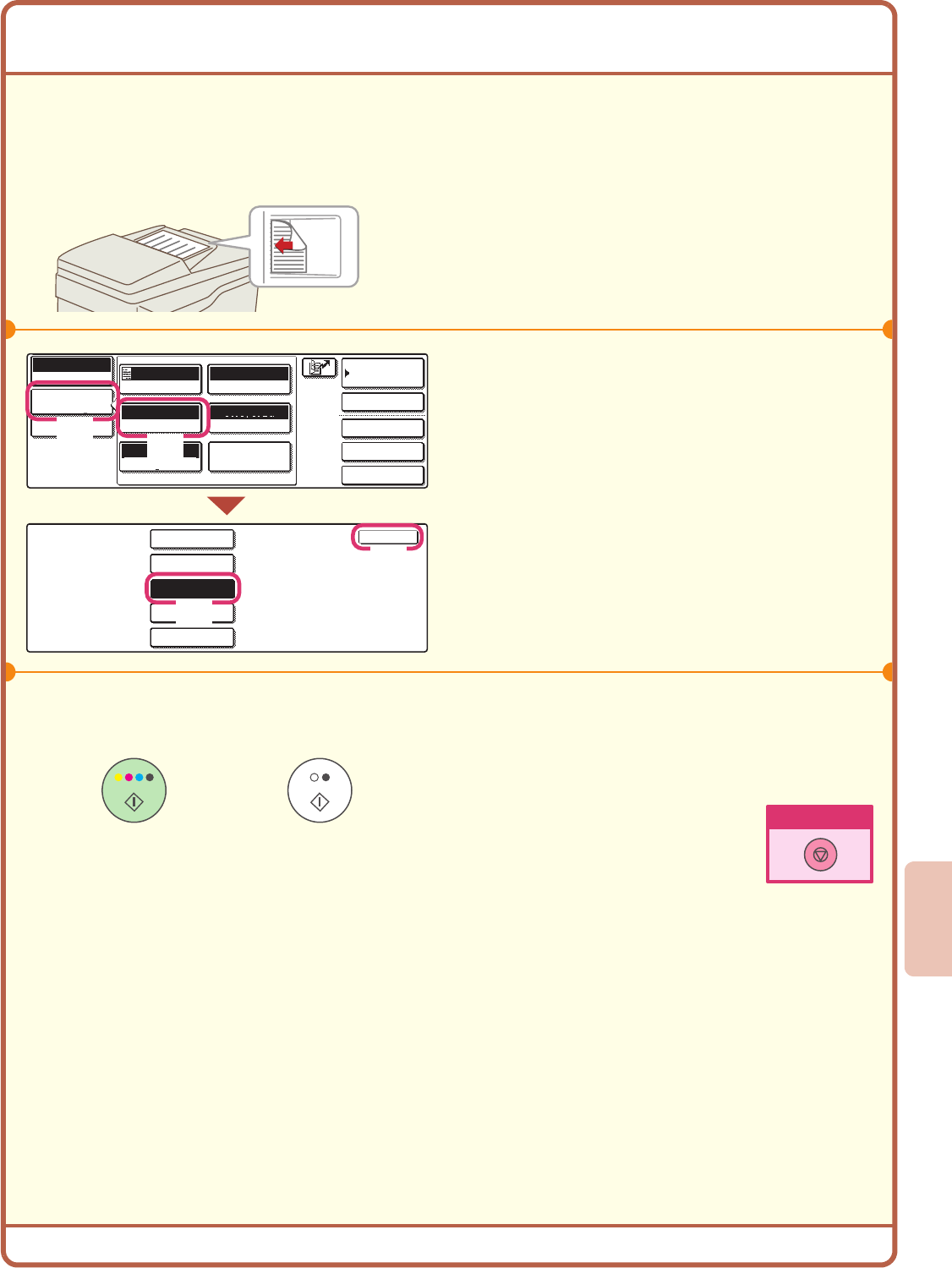
CHANGING THE RESOLUTION
You can select the resolution to match the original type.
This section explains how to set the resolution to "300X300dpi", which creates a clearer image than the default
resolution.
1
Place the original.
When using the document glass, place the original
with the side to be scanned face down.
2
Select the resolution in the touch panel.
(1)
Touch the [Image Settings] key.
(2)
Touch the [Resolution] key.
(3)
Touch the [300X300dpi] key.
(4)
Touch the [OK] key.
3
Select the destination and then press the
[COLOUR START] key or the [BLACK &
WHITE START] key.
The side to be scanned must be face up!
Address Entry
Special Modes
File
Quick File
Scan
Mode Switch
Original
Resolution
Exposure
Colour Mode
File Format
Special Modes
Address Book
200X200dpi
Auto
Mono2/Auto
TIFF/JPEG
Scan
Resolution
Image
Settings
Send Settings
100X100dpi
OK
200X200dpi
400X400dpi
600X600dpi
300X300dpi
Auto
A4
(2)
(1)
(3)
(4)
or
Cancel scanning
PDF-Datei · ·
Fragen zu Sharp MX-2700G
Zu diesem Handbuch gibt es noch keine Fragen. Stellen Sie die erste.
Verwandte Produkte und Handbücher für Drucken & Scannen Sharp MX-2700G
- Drucken & Scannen Sharp MX-2310U Bedienungsanleitung
 (8 Seiten)
- Drucken & Scannen Sharp AR-C265P Betriebsanweisung
(310 Seiten)
- Drucken & Scannen Sharp ER-01PU Bedienungsanleitung
(44 Seiten)
- Drucken & Scannen Sharp MX-M904 Bedienungsanleitung
(12 Seiten)
- Drucken & Scannen Sharp DM-2015 - B/W Laser Printer Bedienungsanleitung
(4 Seiten)
- Drucken & Scannen Sharp AR-M355 Bedienungsanleitung
(2 Seiten)
- Drucken & Scannen Sharp DP-750 Wartungshandbuch
(84 Seiten)
- Drucken & Scannen Sharp MZ-80P4 Spezifikationen
(25 Seiten)
- Drucken & Scannen Sharp MX-C300PL Spezifikationen
(108 Seiten)
- Drucken & Scannen Sharp MX-M200D Bedienungsanleitung
 (100 Seiten)
- Drucken & Scannen Sharp AR-4551 Spezifikationen
(280 Seiten)
- Drucken & Scannen Sharp AR-M351N Spezifikationen
(188 Seiten)
- Drucken & Scannen Sharp AR-M355 Bedienungsanleitung
(12 Seiten)
- Drucken & Scannen Sharp MX-M904 Spezifikationen
(122 Seiten)
- Drucken & Scannen Sharp JX-9600 Bedienungsanleitung
 (14 Seiten)
- Drucken & Scannen Sharp CE-140P Bedienungsanleitung
 (60 Seiten)
- Drucken & Scannen Sharp EL-2607R Spezifikationen

 (2 Seiten)
- Drucken & Scannen Sharp DP-750 Wartungshandbuch
(110 Seiten)
- Drucken & Scannen Sharp AR-M350N/M450N Bedienungsanleitung
(12 Seiten)
- Drucken & Scannen Sharp ER-01PU Bedienerhandbuch
(241 Seiten)