Sharp VL-H29E Spezifikationen Seite 17
- Seite / 96
- Inhaltsverzeichnis
- FEHLERBEHEBUNG
- LESEZEICHEN

- SHARP CORPORATION 1
- Contents 6
- Supplied Accessories 9
- Optional Accessories 9
- Precautions 10
- Dew Formation 11
- 4 Remove the cleaning tape 12
- Operation References 13
- Part Names 13
- Right view 15
- Warning Indicators 16
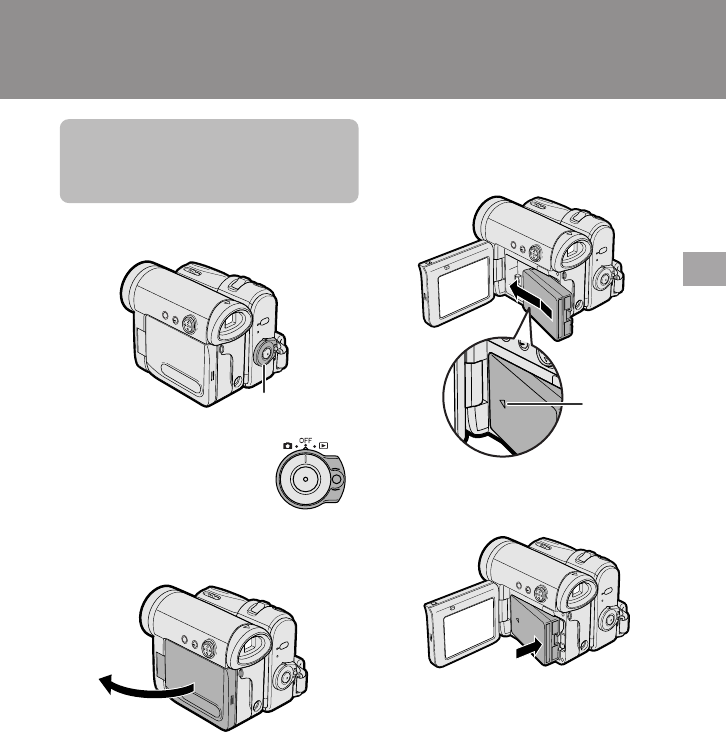
- Preparation 17
- 3 Take the battery pack out 18
- Charging time and maximum 19
- Inserting 21
- Removing 21
- Installing the Battery to 23
- Remote Control (Not sup 23
- SETT ING 24
- 12004.1 24
- 100030RETURN 25
- Using the Lens Cap 26
- Using the Viewfinder 28
- 2 Hold down the Lock 28
- Detaching the Lens 28
- Closing the viewfinder 29
- Adjusting the dioptre 29
- Using the LCD 30
- 3 Hold down the Lock 30
- Tips on Recording 31
- Positions 31
- Basic Operations 32
- To pause recording 33
- To turn the power off 33
- Power Standby Mode 34
- Turning on/off the 34
- Backlight 34
- Auto Focus 35
- Macro Shots 35
- Remaining Recording 35
- Time Display 35
- BATTERY I S 36
- TOO LOW 36
- Playback 38
- (L/MONO) 39
- Useful Features 40
- DGTL ZOOM 41
- A U T OAUTO 43
- 3 0min3 0min 43
- PAUSEPAUSE 43
- BLC / GA I N ON 44
- BLC GAIN/ 45
- AUTO FOCUS 45
- Camera Recording 46
- To cancel the still image 47
- ER SAVE 5 MI N 49
- Self Recording 50
- 2 Set the Power switch to v 50
- 3 Begin recording 50
- 4 Set the Power switch to v 51
- 5 Begin recording 51
- TAPE SPEED 52
- AUD I O MODE 53
- DATE DISP. DATE 55
- EXECUTEROTATE PB 57
- Stretch Playback 58
- Advanced Features 59
- Selecting 61
- 4 Press the DISPLAY/MODE SET 62
- 5 Press the DISPLAY/MODE SET 63
- Recommended Shutter 65
- Tips on Using the Manual 66
- Shutter Speed 66
- SCENE MENU 67
- Audio Dubbing 70
- If you wish to change the 71
- VIDEO AUDIO 73
- To Record from an External 75
- Editing with the DV 76
- Terminal (IEEE1394) 76
- To Record from Video Equip 77
- ONANLG DGTL 78
- Appendix 79
- Setting the 80
- Camcorder to 80
- Factory Presettings 80
- D EMO MODE 81
- Useful Information 82
- Erasure protect tab 83
- Mini DV Cassette 83
- AC Adapter 85
- Replacing the Fluorescent 85
- Cleaning 85
- Using Your Camcorder 86
- Copyright Protection 86
- Troubleshooting 87
- Specifications 91
- On-screen Display Index 92
- Menu screens 93
- Mode screens 93
- Playback mode 93
Verwandte Produkte und Handbücher für Kamerarekorder Sharp VL-H29E
 (53 Seiten)
(12 Seiten)
(97 Seiten)
(53 Seiten)
(12 Seiten)
(97 Seiten)
 (113 Seiten)
(74 Seiten)
(91 Seiten)
(127 Seiten)
(129 Seiten)
(113 Seiten)
(74 Seiten)
(91 Seiten)
(127 Seiten)
(129 Seiten)
 (83 Seiten)
(99 Seiten)
(83 Seiten)
(99 Seiten)
 (111 Seiten)
(92 Seiten)
(116 Seiten)
(58 Seiten)
(139 Seiten)
(111 Seiten)
(92 Seiten)
(116 Seiten)
(58 Seiten)
(139 Seiten)
© 2020, manymanuals.de. Alle Rechte vorbehalten. | 0.030 s |
 Manymanuals.com
 Manymanuals.de
 Manymanuals.fr
 Manymanuals.it
 Manymanuals.pl
 Manymanuals.cz
 Manymanuals.es
 Manymanuals-pt.com
Kommentare zu diesen Handbüchern