Sharp XL-HF201PHS Spezifikationen Seite 7

  • Herunterladen
  • Zu meinen Handbüchern hinzufügen
  • Drucken
  • Seite
    / 22
  • Inhaltsverzeichnis
  • FEHLERBEHEBUNG
  • LESEZEICHEN
  • Bewertet. / 5. Basierend auf Kundenbewertungen
Seitenansicht 6
E-7
Setting the clock (Remote control
only) (continued)
To confirm the time display:
Press the CLOCK/TIMER button. The time display will
appear for about 5 seconds.
Note:
When power supply is restored after unit is plugged in again
or after a power failure, reset the clock (pages 6-7).
To readjust the clock:
Perform “Setting the clock” from step 1. If the “Clock” does not
appear in step 2, step 4 (for selecting the 24-hour or 12-hour
display) will be skipped.
To change the 24-hour or 12-hour display:
Listening to the iPod, iPhone or iPad
Made for:
●
iPod touch (4
th
generation)
●
iPod touch (3
rd
generation)
●
iPod touch (2
nd
generation)
●
iPod touch (1
st
generation)
●
iPod classic
●
iPod nano (6
th
generation)
●
iPod nano (5
th
generation)
●
iPod nano (4
th
generation)
●
iPod nano (3
rd
generation)
●
iPod nano (2
nd
generation)
●
iPhone 4
●
iPhone 3GS
●
iPhone 3G
●
iPhone
●
iPad
Caution:
Please update your iPod, iPhone and iPad unit to the latest
software version before using it. Please visit Apple’s
homepage to download the latest version for your iPod,
iPhone and iPad.
Notes:
●
Charging terminal for iPod, iPhone and iPad:
●
The message
“
This accessory is not made to work with
iPhone” or similar, may appear on the iPhone screen
when:
- battery is low.
- the iPhone is not properly docked (eg. slanting).
If this occurs, remove and re-dock the iPhone.
●
This product is made for iPhone. To prevent random
interference when iPhone is docked, the headphone
output is disabled, and “HP INVALID” will be
displayed.
You may also experience brief audio interference
during incoming calls.
●
The headphone output is switched off during inserting
iPod, iPhone and iPad unit. This is an Apple product
specification.
Note:
USB terminal does not support VIDEO out.
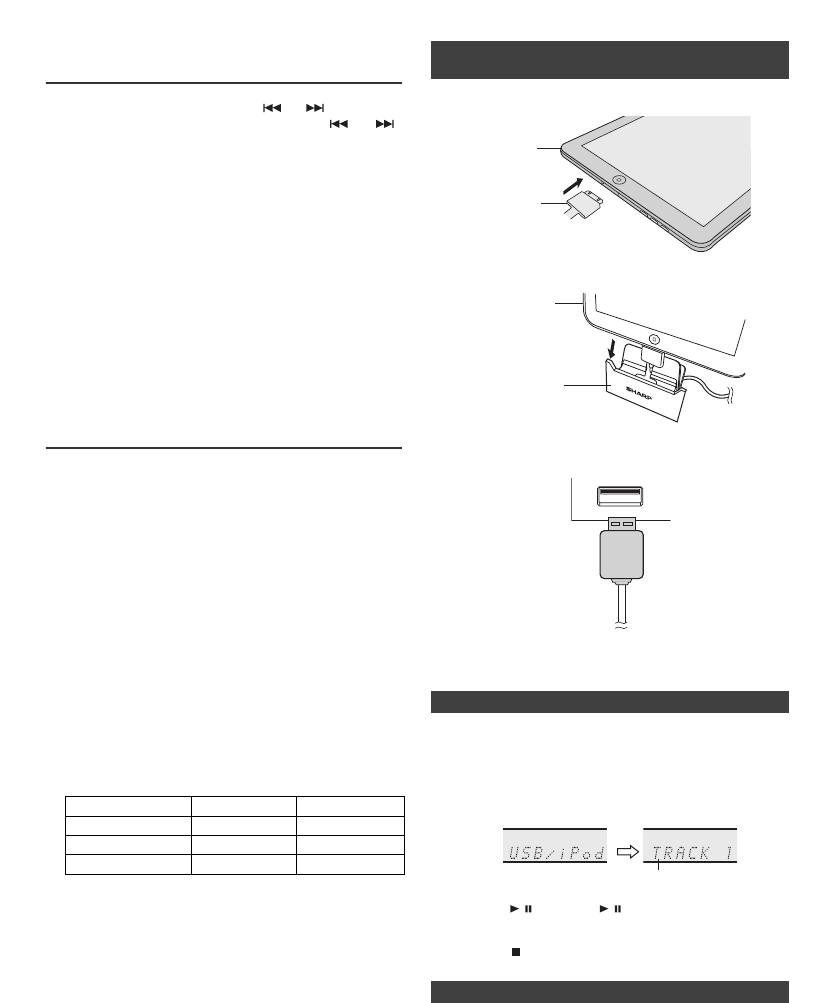
1 Press the ON/STAND-BY button to turn the power on.
2 Press the USB button on the remote control or
FUNCTION button repeatedly on the main unit to select
USB function.
3 Connect iPod, iPhone or iPad to the unit. “USB/iPod” will
appear.
4 Press
the /
(CD/USB
/ ) button to start playback.
Note:
Stop button ( ) is invalid during iPod, iPhone or iPad play-
back.
● Sound will only switch from iPhone to the main unit
after authentication process is completed in
approximately 10 seconds.
● Incoming calls will pause the playback.
● Once the calls are answered, the conversation can only
be heard through the built-in iPhone speaker. Turn on
the iPhone speaker or undock the iPhone to start
conversation.
6 To adjust the minutes, press the or button and
then press the ENTER button. Press the or
button once to advance the time by 1 minute. Hold it
down to advance the time by 5 minutes interval.
1 Clear all the programmed contents. [Refer to “Factory
reset, clearing all memory” on page 21 for details.]
2 Perform “Setting the clock” from step 1 onwards.
Condition DOCK USB
USB function NO YES
Other function YES NO
Stand-by YES NO
■ iPod, iPhone and iPad connection (USB
only)
1
Insert the connector to the iPod, iPhone or iPad.
2 Place the iPad to the stand for iPad.
3 Connect the iPod, iPhone or iPad to the unit via USB
connector.
■ iPod, iPhone or iPad playback (USB)
■ iPhone playback
iPad
Connector
iPad
Stand for iPad
USB
Track n umb e r
Seitenansicht 6
1 2 3 4 5 6 7 8 9 10 11 12 ... 21 22

Kommentare zu diesen Handbüchern

Keine Kommentare

Life Fitness Outils manuels d'utilisation

À partir de L

Cliquez sur un alphabet ci-dessous pour faire défiler la liste complète des modèles commençant par cette lettre

Modèles Type de document
LS-1000
Manuel de l'utilisateur   Life Fitness LS-1000 User Manual, 2 pages
LS-5500
Manuel de l'utilisateur   Life Fitness LS-5500 User Manual, 3 pages
LS-5500C
Manuel de l'utilisateur   Life Fitness LS-5500C User Manual, 3 pages
LS-5500HR
Manuel de l'utilisateur   Life Fitness LS-5500HR User Manual, 3 pages
LS-9100B
Manuel de l'utilisateur   Life Fitness LS-9100B User Manual, 3 pages
LS-9100C
Manuel de l'utilisateur   Life Fitness LS-9100C User Manual, 3 pages
LS-9100DT
Manuel de l'utilisateur   Life Fitness LS-9100DT User Manual, 3 pages
LS-9500HR
Manuel de l'utilisateur   Life Fitness LS-9500HR User Manual, 3 pages
LS8500
Manuel de l'utilisateur   Life Fitness LS8500 User Manual, 9 pages