5
Sharpdesk for Total Document Management
Copy
Copy
Print
Print
Scan*
Scan*
Fax/Internet Fax*
Fax/Internet Fax*
PC-Fax*
PC-Fax*
PC-Internet Fax*
PC-Internet Fax*
Word
Excel
PDF
PowerPoint®
Scanned
image
etc.
Search screen
Compose
Store
View
Search Edit
Print
PC-Fax
E-mail
OCR
ICT*
DesktopSuper G3 fax
Client PCs
Internet
Network folder
E-mail
Internet fax
FTP server
Scan to
Scan
Document
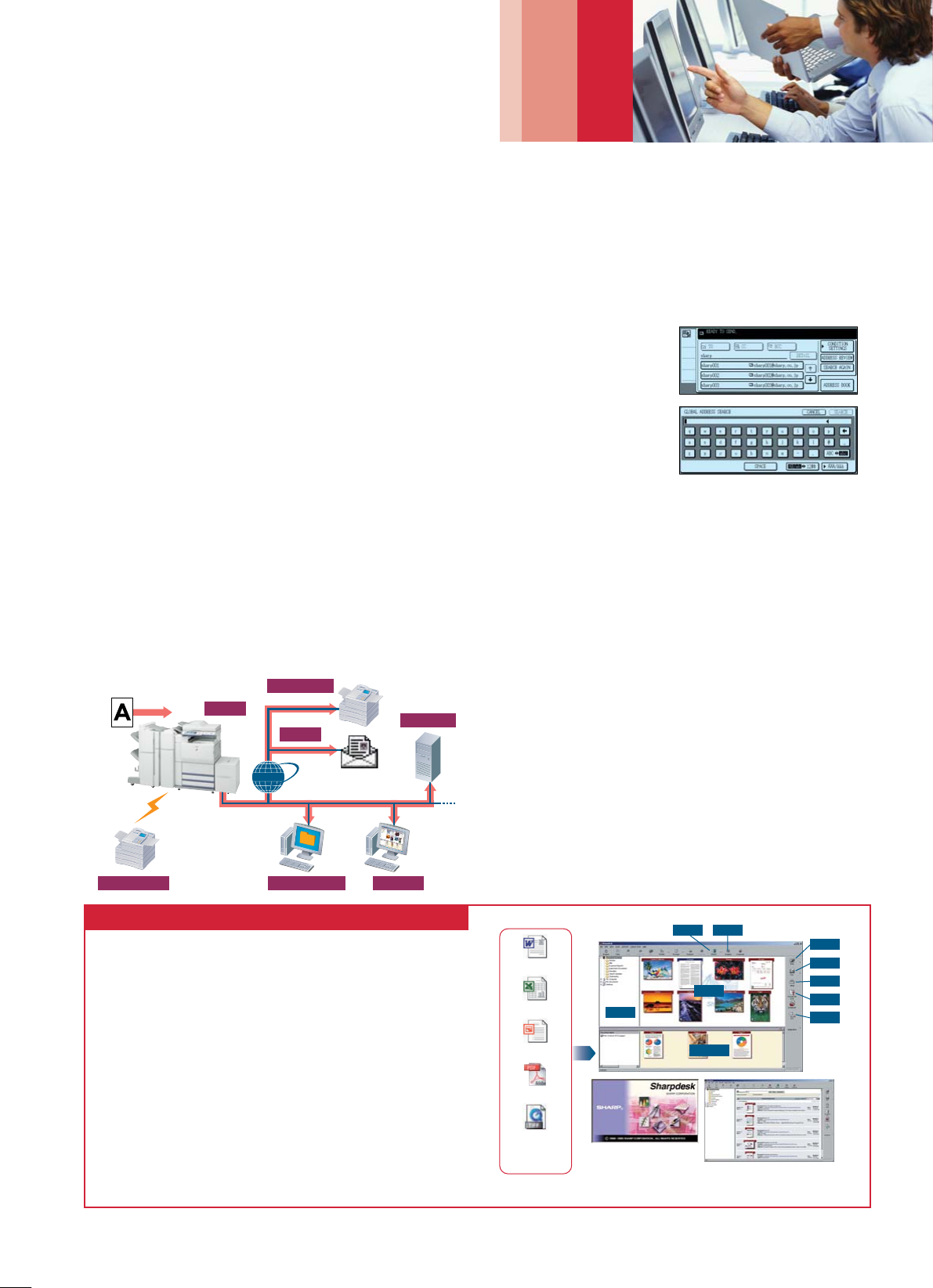
Sharpdesk is an original Sharp application that provides integrated desktop
management of documents in over 200 file formats, including scanned
paper-based documents and those created with popular applications such as
Word. It allows you to organise, edit, search and distribute your documents,
all with simple drag-and-drop operation.
• Intuitive desktop display features thumbnail viewing
• Sharpdesk Imaging provides annotation tools for paper-free proofreading
• Sharpdesk Composer combines different types of files into a single
document
• Optical character recognition converts documents into editable text files
• Output zone distributes files to e-mail, printers and other applications
• File search allows searching by file name, keyword or thumbnail
* Image Compression Tool for converting images into high-compression PDF files.
NETWORK SCANNING
Speedy A3 Network Scanning
The 150-sheet DSPF and optional MX-NSX1 Network Scanner
Expansion Kit turn the MX-M620U/N into an ultra-efficient
network scanner* that can be used with any Windows PC on
the network. Converting any type of paper-based document, up
to A3 (11" x 17") in size, into an editable digital file is as easy as
making a copy. The 150-sheet DSPF lets you quickly scan two-
sided originals at up to 64 pages per minute.
* MX-M620U requires optional MX-NBX1
Multiple Distribution of Scanned Files
With the touch of a few buttons, you can choose different ways
to distribute your scanned documents. Scan to E-mail allows you
to send documents as an attachment to any e-mail address over
the Internet. Scan to FTP Server lets you scan a document
directly to an FTP server for special applications such as company-
wide posting or archiving. Scan to Desktop enables you to send
scanned documents directly to your PC desktop. With Sharpdesk,
Sharp’s powerful but easy-to-use document management
software, editing and managing scanned documents is easier than
ever. Scan to HDD sends scanned images to the MX-M620U/N’s
built-in hard disk to use in the Document Filing function. Scan to
Network Folder (SMB) sends files to a shared folder on a
networked Windows PC. And Scan to Fax enables conventional
faxing or Internet faxing.
LDAP Support
Built-in LDAP (lightweight directory access protocol) support
eliminates the need to enter or register full addresses. Simply enter
the first few letters of the recipient’s name and the MX-M620U/N
displays a list of possible matches on your company’s LDAP server.
This feature saves precious time and lets you avoid errors when
typing e-mail addresses. After searching, selected addresses can be
stored to the MX-M620U/N’s
address book. And the
integrated User
Authentication function (see
page 8) blocks unauthorised
access by requiring the user to
log in before searching for an
address.
Easy Text Entry
Use the LCD control panel’s onscreen keyboard to customise file
names or e-mail messages and subject titles, making it easier for
the recipient to recognise and archive this information.
TWAIN Support
With support for the TWAIN standard, the MX-M620U/N allows
you to use scanned images with any commercially available
TWAIN-compliant application (push out method).
Linearised PDF
With the MX-M620U/N, you can create linearised PDF files, which
allow the first page of a PDF file to be displayed in a user’s Web
browser before the entire file is downloaded. This saves users the
time and frustration of having to wait for large PDF files to be
displayed in their Web browsers.

 (33 Seiten)
 Manymanuals.com
 Manymanuals.de
 Manymanuals.fr
 Manymanuals.it
 Manymanuals.pl
 Manymanuals.cz
 Manymanuals.es
 Manymanuals-pt.com
Kommentare zu diesen Handbüchern