Sharp MX-4100N Spezifikationen Seite 116: REMOVING MISFEEDS
 1
 2
 3
 4
 5
 6
 7
 8
 9
 10
 11
 12
 13
 14
 15
 16
 17
 18
 19
 20
 21
 22
 23
 24
 25
 26
 27
 28
 29
 30
 31
 32
 33
 34
 35
 36
 37
 38
 39
 40
 41
 42
 43
 44
 45
 46
 47
 48
 49
 50
 51
 52
 53
 54
 55
 56
 57
 58
 59
 60
 61
 62
 63
 64
 65
 66
 67
 68
 69
 70
 71
 72
 73
 74
 75
 76
 77
 78
 79
 80
 81
 82
 83
 84
 85
 86
 87
 88
 89
 90
 91
 92
 93
 94
 95
 96
 97
 98
 99
 100
 101
![Sharp MX-4100N Spezifikationen, Seite 102: START] key](/jointfilesconvert/330656/preview-101.png "Seite 102: START] key – Sharp MX-4100N Spezifikationen") 102
 103
 104
 105
 106
 107
 108
 109
 110
 111
 112
 113
 114
 115
 116
 117
 118
 119
 120
114
REMOVING MISFEEDS
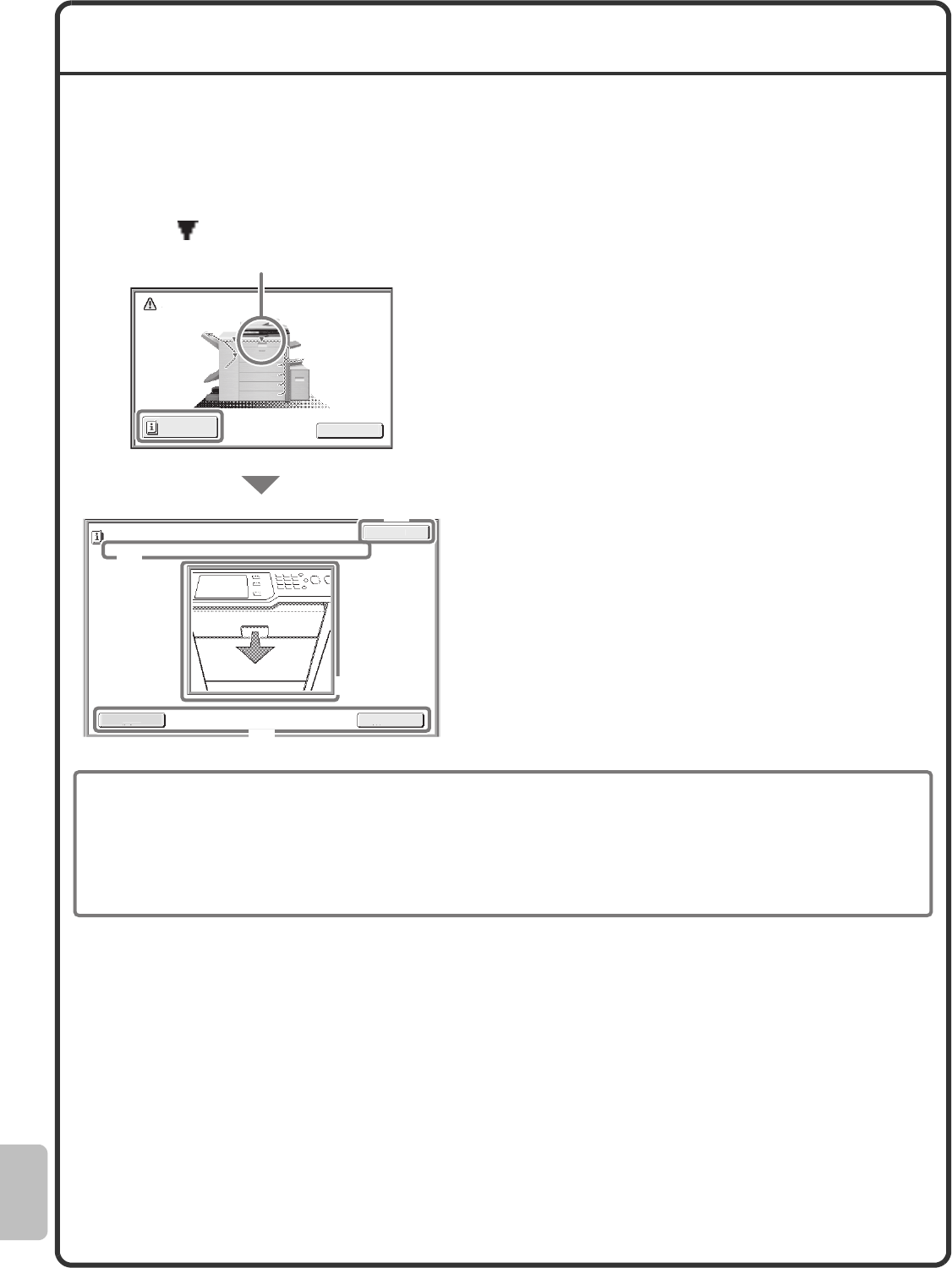
When a paper misfeed occurs, the message "A misfeed has occurred." will appear in the touch panel and printing
and scanning will stop. In this event, touch the [Information] key in the touch panel. When the key is touched,
instructions for removing the misfeed will appear. Follow the instructions. When the misfeed is cleared, the
message will automatically clear.
The blinking
mark in the image at left indicates the approximate position of the misfeed.
Touch the [Information] key to display the following
screen.
(A) Instructions for removing the misfeed appear
here.
(B) Animation showing what to do.
(C) Display the previous screen or the next screen.
(D) This closes the information screen.
The information screen cannot be closed until the
misfeed is removed.
For detailed procedures for removing misfeeds, see "REMOVING MISFEEDS" in "8. TROUBLESHOOTING" in
the Operation Guide.
A misfeed has occurred.
Information
OK
Exit
Open the center cover and remove the misfed originals.
Misfeed Removal
Back
Next
(C)
(B)
(A)
(D)
Misfeed location
• While the message appears, printing and scanning cannot be resumed.
• If the message does not clear even after the misfeed has been removed, the causes below are possible. Check
once again.
- The misfeed was not correctly removed.
- A torn piece of paper remains in the machine.
- A cover or unit that was opened or moved to remove the misfeed was not returned to its original position.
PDF-Datei · ·
Fragen zu Sharp MX-4100N
Zu diesem Handbuch gibt es noch keine Fragen. Stellen Sie die erste.
Verwandte Produkte und Handbücher für Kopierer Sharp MX-4100N
- Kopierer Sharp AR-5316E Bedienungsanleitung
 (80 Seiten)
- Kopierer Sharp SF-7400 Bedienungsanleitung
 (8 Seiten)
- Kopierer Sharp AL-2040 Spezifikationen
(92 Seiten)
- Kopierer Sharp Multi Access Bedienungsanleitung
(8 Seiten)
- Kopierer Sharp MX-850 Bedienungsanleitung
(12 Seiten)
- Kopierer Sharp AX-600X(R) Bedienungsanleitung
(12 Seiten)
- Kopierer Sharp AR-FX7 Bedienerhandbuch
(116 Seiten)
- Kopierer Sharp MX-4500N Bedienungsanleitung
(12 Seiten)
- Kopierer Sharp Multi Access Bedienungsanleitung
(8 Seiten)
- Kopierer Sharp AR-161 Bedienungsanleitung
(4 Seiten)
- Kopierer Sharp AR-C150 Bedienungsanleitung
(31 Seiten)
- Kopierer Sharp AR-M700U Bedienungsanleitung
(28 Seiten)
- Kopierer Sharp DX-C400 - Color - All-in-One Bedienungsanleitung
(8 Seiten)
- Kopierer Sharp MX-1100 Bedienungsanleitung
(12 Seiten)
- Kopierer Sharp SF-7400 Bedienungsanleitung
(10 Seiten)
- Kopierer Sharp MX-C380 Spezifikationen
(78 Seiten)
- Kopierer Sharp MX-M363N Bedienungsanleitung
(12 Seiten)
- Kopierer Sharp MX-C400P Einstellungsanleitung
(257 Seiten)
- Kopierer Sharp MX-M465N Bedienungsanleitung
(8 Seiten)
- Kopierer Sharp AR-D21 Wartungshandbuch
(152 Seiten)