Sharp XV-Z200E Spezifikationen Seite 30
- Seite / 70
- Inhaltsverzeichnis
- FEHLERBEHEBUNG
- LESEZEICHEN


- SHARP CORPORATION 1
- Introduction 2
- PRODUCT DISPOSAL 3
- Declaration of Conformity 3
- WARNING: 3
- Contents 5
- Accessories 6
- IMPORTANT SAFEGUARDS 7
- Part Names and Functions 10
- Projector (Rear View) 12
- Remote Control 13
- Using the Remote Control 14
- Quick Start 15
- Setup and Projection 15
- 4. Select the INPUT mode 16
- 8. Turn the Power off 16
- Setting Up the Projector 17
- Side View 18
- Projecting a Reversed Image 19
- Connections 20
- Connecting to Video Equipment 22
- Connecting to a Computer 26
- ON button 29
- Switching the INPUT 30
- Image Projection 30
- Adjusting the Focus 31
- Using the Adjustment 32
- 2 Remove your hands from the 32
- Keystone Correction 33
- 4 Press 33
- Using the Keystone Correction 34
- Selecting the Picture Mode 35
- Switching the High Bright 35
- Adjusting the Picture 35
- Aspect Ratio 35
- Basic Operation 36
- Menu Items 37
- Useful Features 38
- Using the Menu Screen 39
- Menu Selections 39
- (Adjustments) 39
- 1 Press 39
- 2 Press 39
- 3 Press 40
- To adjust the projected 40
- 4 Press 40
- 5 Press 40
- Menu Selections (Settings) 41
- Adjusting the Image 43
- Gamma Correction Function 44
- Picture Mode Function 45
- Adjusting the Computer 46
- Special Modes Setting 46
- Auto Sync Adjustment 47
- Checking the Input Signal 47
- Checking the Lamp Life 48
- Using the “Options” Menu 48
- Setting On-screen Display 48
- Setting the Video System 49
- Signal Type Setting 49
- Eco Mode 50
- Selecting a Background 50
- Auto Power Off Function 51
- Selecting the Menu Screen 51
- Position 51
- Selecting the Menu Color 52
- Selecting the On-screen 53
- Display Language 53
- Setting the Projection 53
- Maintenance 54
- Maintenance Indicators 55
- 2 Disconnect the power cord 56
- 3 Remove the lamp unit cover 56
- Caution Concerning the Lamp 57
- Replacing the Lamp 57
- Regarding the Lamp 57
- 1 Press on the projector or 58
- 4 Remove the lamp unit 59
- 5 Insert the new lamp unit 59
- 1 Connect the power cord 59
- 2 Reset the lamp timer 59
- Connecting Pin Assignments 60
- PC control 61
- Communication conditions 61
- Basic format 61
- Commands 61
- Computer Compatibility Chart 62
- Troubleshooting 63
- Specifications 64
- Dimensions 65
- Glossary 66
- VALID IN USA ONLY 68
- Consumer Electronics Products 69
Verwandte Produkte und Handbücher für Datenprojektoren Sharp XV-Z200E
 (45 Seiten)
(74 Seiten)
(67 Seiten)
(65 Seiten)


 (103 Seiten) (64 Seiten)
(40 Seiten)
Tripp Lite PDUMV15NET manuali
Manuali dei proprietari e guide per l'utente per Multiprese Tripp Lite PDUMV15NET.
We fornisce 1 manuali pdf Tripp Lite PDUMV15NET per scaricare gratuitamente in base al tipo di documento: Manuale Utente
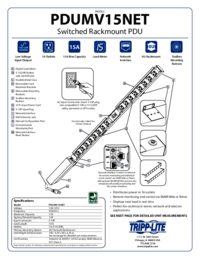
Tripp lite PDUMV15NET Manuale Utente (2 pagine)
Marchio: Tripp-lite | Categoria: Power distribution units (PDUs) | Dimensione: 0.63 MB |
Indice
Più prodotti e manuali per Multiprese Tripp Lite
| Modelli | Tipo di Documento |
|---|---|
| PDUMH20NET2 |
Manuale Utente
Tripp Lite PDUMH20NET2 User's Manual,
4 pagine
|
| PDUMH20HVNET |
Manuale Utente
Tripp Lite PDUMH20HVNET User's Manual,
11 pagine
|
| PDUMH15ATNET |
Manuale Utente
  Tripp Lite PDUMH15ATNET User's Manual,
36 pagine |
| PDU Power Strips |
Manuale Utente
Tripp Lite PDU Power Strips User's Manual,
3 pagine
|
| OMNI1500XLNAFTA |
Manuale Utente
Tripp Lite OMNI1500XLNAFTA User's Manual,
5 pagine
|
| PDUNV |
Manuale Utente
Tripp Lite PDUNV User's Manual,
2 pagine
|
| 200904140 |
Manuale Utente
Tripp Lite 200904140 User's Manual [en] ,
9 pagine
|
| PDUMH15AT |
Manuale Utente
Tripp Lite PDUMH15AT User's Manual,
28 pagine
|
| PS-415-HG-OEM |
Manuale Utente
Tripp Lite PS-415-HG-OEM User's Manual,
2 pagine
|
| TRIPP.LITE PDUMV40 |
Manuale Utente
Tripp Lite TRIPP.LITE PDUMV40 User's Manual,
12 pagine
|
© 2020, manymanuals.de. Alle Rechte vorbehalten. | 0.016 s |
 Manymanuals.com
 Manymanuals.de
 Manymanuals.fr
 Manymanuals.it
 Manymanuals.pl
 Manymanuals.cz
 Manymanuals.es
 Manymanuals-pt.com
Kommentare zu diesen Handbüchern