Sharp FO-10 Spezifikationen Seite 26
- Seite / 162
- Inhaltsverzeichnis
- LESEZEICHEN

- FO-11/FO-51/FO-71 1
- Introduction 2
- Important safety information 4
- Table of Contents 5
- A Look at the Operation Panel 7
- Unpacking Checklist 9
- Connections 10
- 3 Remove the packing paper 11
- 1 Press once and once 12
- 2 Press 4 times 12
- 3 Select the dial mode: 12
- 4 Press to exit 12
- Extension phone (optional) 13
- Loading the Thermal Paper 14
- 2 Press twice 17
- 3 Press once 17
- 7 Press 18
- DATE & TIME SET 18
- Setting the Date and Time 19
- Setting the Reception Mode 21
- Volume Adjustment 22
- Transmittable Documents 24
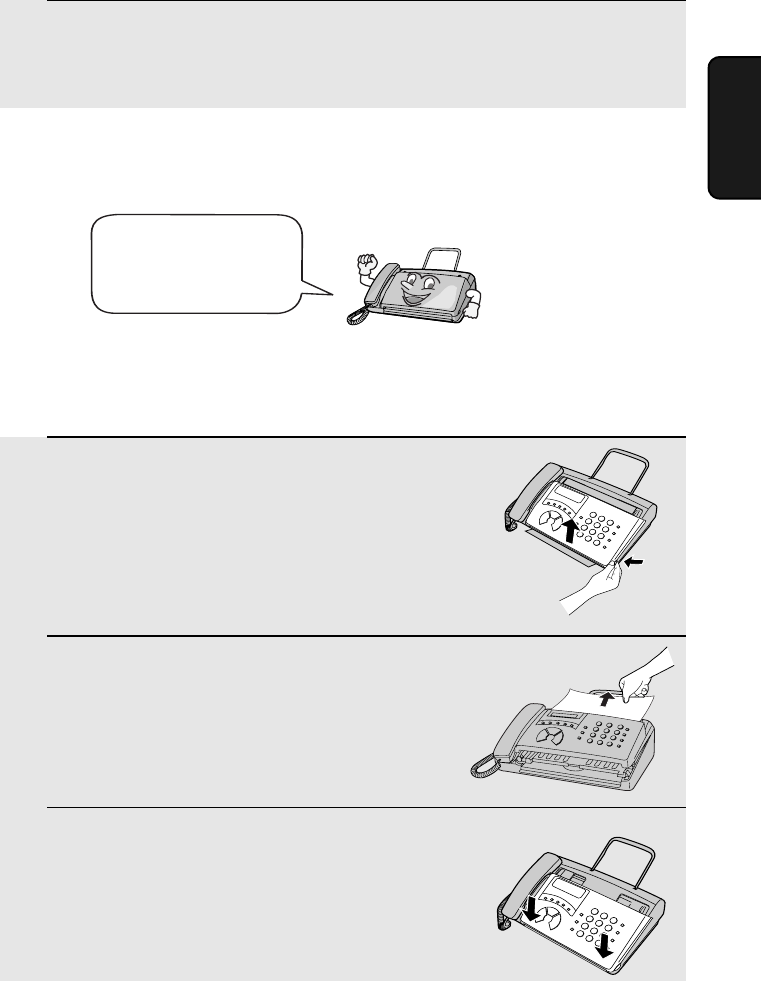
- Loading the Document 25
- 2 Remove the document 26
- 3 Close the operation panel 26
- Resolution settings 27
- Contrast settings 27
- 2. Sending 30
- 8 Press 32
- Clearing auto-dial numbers 33
- Using the REDIAL key 38
- Automatic redialling 38
- 2 Press once 41
- Using TEL Mode 43
- Optional Reception Settings 44
- 5. Making Telephone Calls 47
- Chain Dialling 48
- Changing the outgoing message 50
- Optional A.M. Mode Settings 52
- Quiet Detect Start Time 53
- 2 Press 5 times 54
- 7. Special Functions 55
- Priority Call 58
- Blocking voice calls 59
- Service) 60
- 2 Press 63
- 3 Press to print the list 64
- Transaction Report 65
- 2 Press 3 times 66
- 9. Maintenance 67
- 7 Close the operation pane 68
- Caution! 68
- Problems and Solutions 69
- Answering machine connection 72
- General problems 72
- Messages and Signals 74
- Audible signals 75
- Clearing Paper Jams 76
- 3 Remove the document 76
- 5 Reload the paper 78
- 3 Remove the paper roll 78
- Quick Reference Guide 79
- LMNOPQR1ST 82
- UVWXNYZQR 82
- 1[\]^_` 82
- COPY/HELP 87
- Kþ:;6 97
- û.3 99
- ¬®ð>¬Ð 100
- !û.3 100
- RESOLUTION/ 101
- RECEPTION MODE 101
- ¬®ð>¬3 102
- 4=> 104
- READY TO SEND 109
- 4 110
- FAX/TEL # MODE 111
- ENTRY MODE 111
- :; f ²³6¹w 111
- 透過自動撥號傳送傳真 112
- §24 114
- I½4 115
- -·»³¼µ).® 118
- -²·µ ¼ 119
- )de . 119
- -¼¶)1. 120
- ϯ¿pÀ:;.¹w 121
- -²·µ)de. 122
- ϯ(¾ª²³.¹w 123
- Żx 125
- :> 126
- -1{ 129
- JÁ<ÄÅ 130
- 1J 131
- O-¼¶)1.ë 132
- ¦pD{DÁ<.¹w 133
- ¦pD{D Á<.¹w 134
- JOHN DOE 525-8693 136
- ²¬gß¡ 137
- ²¬ gß¡ 138
- ¢2£gß¡ 140
- ÀÁ{ 141
- ¦[ ߧ:>:; 142
- ¦[ߧ:>:; 143
- FUNCTION 144
- LISTING MODE 144
- -£¤¥¦ 149
- SHARP CORPORATION 162
Verwandte Produkte und Handbücher für Faxgeräte Sharp FO-10

 (36 Seiten)
(69 Seiten)
(36 Seiten)
(69 Seiten)
 (162 Seiten)
(152 Seiten)
(76 Seiten)
(6 Seiten)
(162 Seiten)
(152 Seiten)
(76 Seiten)
(6 Seiten)

 (100 Seiten)
(88 Seiten)
(108 Seiten)
(104 Seiten)
(80 Seiten)
(100 Seiten)
(88 Seiten)
(108 Seiten)
(104 Seiten)
(80 Seiten)
 (130 Seiten)
(120 Seiten)
(130 Seiten)
(120 Seiten)
 (198 Seiten)
(107 Seiten)
(12 Seiten)
(116 Seiten)
(198 Seiten)
(107 Seiten)
(12 Seiten)
(116 Seiten)
© 2020, manymanuals.de. Alle Rechte vorbehalten. | 0.077 s |
 Manymanuals.com
 Manymanuals.de
 Manymanuals.fr
 Manymanuals.it
 Manymanuals.pl
 Manymanuals.cz
 Manymanuals.es
 Manymanuals-pt.com
Kommentare zu diesen Handbüchern