Sharp PC-AR10 Spezifikationen Seite 78
- Seite / 107
- Inhaltsverzeichnis
- FEHLERBEHEBUNG
- LESEZEICHEN

- Notice for Users in Australia 1
- Notice for Users in the UK 2
- Notice for Users in Europe 3
- CAUTION: 5
- Safety Precautions 6
- Battery Pack Precautions 7
- Modem Precautions 8
- About This Manual 9
- Manual Conventions 11
- Table of Contents 12
- Connecting Peripherals 13
- Communication Functions 13
- Changing or Adding Options 13
- Security Features 13
- Setup Utility 13
- Appendices 14
- Overview of Computer 15
- Right Side View 18
- Left Side View 18
- Rear View 19
- Bottom View 19
- Fast Start 20
- Setting Up Windows Me 23
- Turning Off Your Computer 24
- Basic Operations 25
- Power and Battery Indicators 26
- Resetting the System 27
- Reset switch 27
- (recessed) 27
- Using the Keyboard 28
- Windows Keys 29
- Using the Quick Start Buttons 31
- Using the Glide Pad 32
- Disabling the Glide Pad 33
- Reading the Status Indicators 34
- Changing the Brightness 35
- Turning off the Display 35
- Microphone 37
- Using the Drives 38
- CD-RW drive 39
- Floppy Disk Drive 39
- Drive lock latch 41
- Raised ribs to push 41
- Using the CD-RW Drive 43
- Release lock latch 45
- Pull drive out of 45
- Battery and Power Management 46
- Battery Charging 47
- Battery Low Warnings 49
- Battery Conditioning 51
- Battery lock button 52
- Lift battery pack out of 52
- Battery pack 52
- Battery release lever 52
- Programmable Power Management 53
- Power Meter 56
- Advanced Options 56
- Using PC Cards 60
- Configuring a PC Card 61
- Removing a PC Card 62
- Connecting the monitor 63
- Switching the Display 63
- Dual Independent Displays 65
- Connecting USB Devices 67
- Connecting a Printer 68
- Connecting a Serial Device 69
- PS/2 port 70
- IEEE 1394 port 71
- Configuring the Modem 73
- LAN unit 74
- LAN jack 75
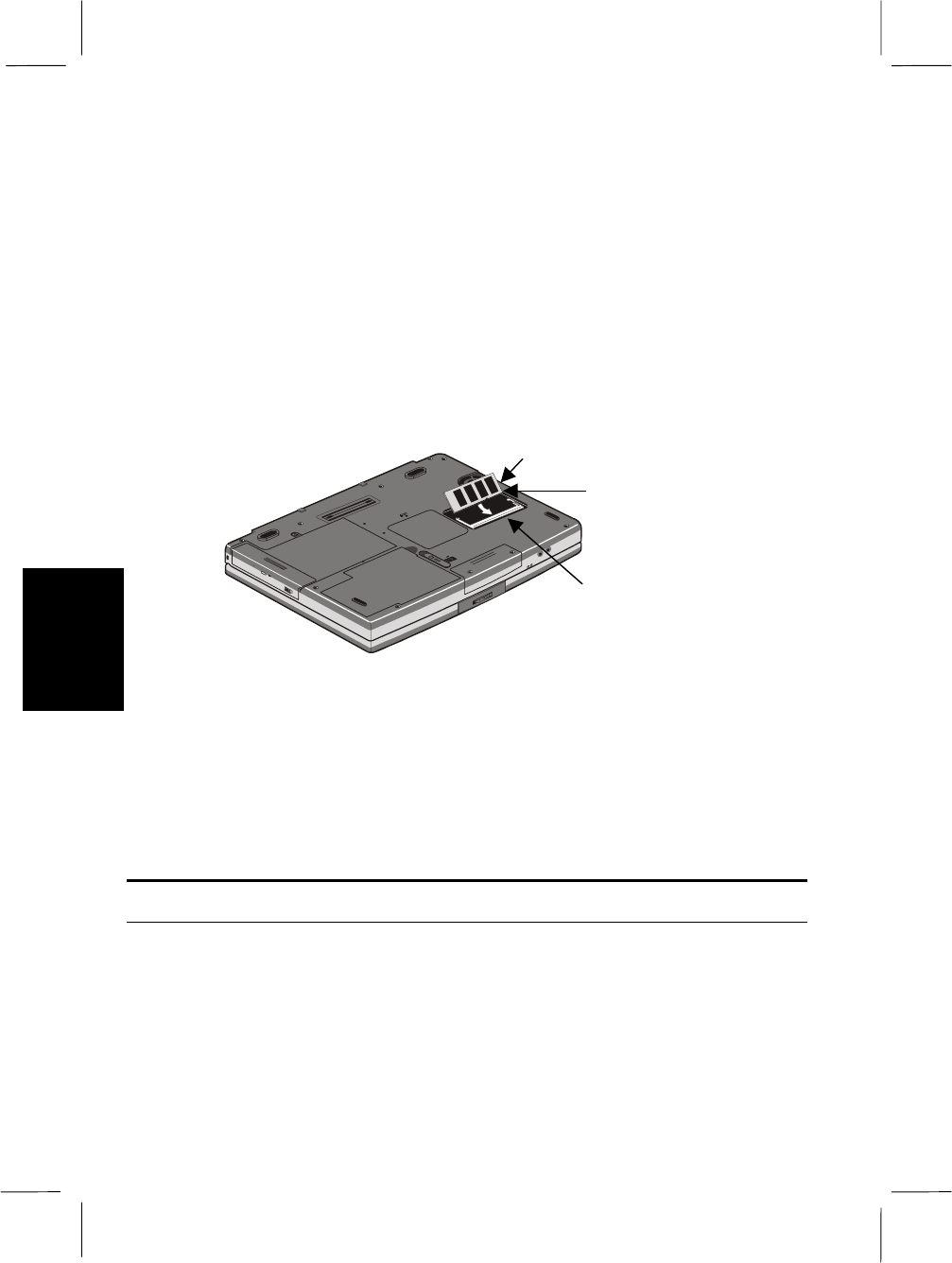
- Removing a Memory Module 78
- About the Port Replicator 79
- Port Replicator Ports 80
- Docking and Undocking 80
- Using a Security Cable 85
- Using the Setup Utility 87
- Main Page 88
- Advanced Page 89
- Security Page 90
- Power Page 91
- Boot Page 92
- Exit Page 92
- Save Changes 93
- Appendix 1: Troubleshooting 94
- Troubleshooting 100
- Cleaning the Computer 101
- Traveling with the Computer 101
- Appendix 3: Specifications 103
- Specifications 104
- Index-1 105
- Index-3 107
Verwandte Produkte und Handbücher für Notebooks Sharp PC-AR10
 (89 Seiten)
(93 Seiten)
(97 Seiten)
 (53 Seiten)
(160 Seiten)
(48 Seiten)
(120 Seiten)
(123 Seiten)
(72 Seiten)
(46 Seiten)
(90 Seiten)
(296 Seiten)
(97 Seiten)
(76 Seiten)
(413 Seiten)
(59 Seiten)
LG TB260 Handbücher
Bedienungsanleitungen und Benutzerhandbücher für Nein LG TB260.
Wir stellen 1 PDF-Handbücher LG TB260 zum kostenlosen herunterladen nach Dokumenttypen zur Verfügung Bedienungsanleitung
Inhaltsverzeichnis
Weitere Produkte und Handbücher für Nein LG
| Modelle | Dokumententyp |
|---|---|
| LMEN126HVT |
Bedienungsanleitung
 LG LMAN097HVT.EMBAEUS,LMAN127HVT.EMBAEUS,LMEN126HVT,LMN097HVT.EWHBEUS,LMN127HVT.EWHBEUS,LMN187HVT.EWHBEUS manuel du propriétaire [el] ,
19 Seiten |
| 55UV661H |
Bedienungsanleitung
 LG 55UV661H Руководство пользователя [en] ,
40 Seiten |
| LMC25785SW |
Bedienungsanleitung
 LG LMC25785SW manuel du propriétaire [en] ,
38 Seiten |
| PDRYCB100.ENCXLEU |
Bedienungsanleitung
LG PDRYCB100.ENCXLEU manuel du propriétaire,
15 Seiten
|
| GR-J403CB |
Bedienungsanleitung
LG GR-J403BTD Owner’s Manual,
17 Seiten
|
| MC-7649DW |
Bedienungsanleitung
LG MC-7649DW Owner’s Manual [fr] ,
40 Seiten
|
| N30P |
Bedienungsanleitung
LG N30P Owner’s Manual [en] ,
36 Seiten
|
| 42PM3MVA |
Bedienungsanleitung
LG 42PM3MVA Owner’s Manual,
1 Seiten
|
| LS-C186VML1 |
Bedienungsanleitung
LG LS-C186VML1 manuel du propriétaire [en] ,
31 Seiten
|
| GR-S472ZLC |
Bedienungsanleitung
LG GR-S472ZLC,SNS472ZLC دليل المالك,
13 Seiten
|
| 42LB5800 |
Bedienungsanleitung
 LG 42LB5800,55LB5800,50LB5800,47LB5800,32LB5800,60LB5800 快速設定指南,
2 Seiten |
| LS-C126PMC0 |
Bedienungsanleitung
LG LS-C126PMC0 manuel du propriétaire [en] ,
20 Seiten
|
| MS-133DD |
Bedienungsanleitung
LG MS-133DD manual del propietario,
25 Seiten
|
| LHS-A2000W |
Bedienungsanleitung
 LG LHS-A2000W دليل المالك [pl] ,
12 Seiten |
| MF-FM33S2K |
Bedienungsanleitung
LG MF-FM33S2K Owner’s Manual [fr] ,
58 Seiten
|
| LSNC306DGM3 |
Bedienungsanleitung
LG LSNC306DGM3 Owner’s Manual,
21 Seiten
|
| 52LB9RF | Bedienungsanleitung LG 52LB9RF מדריך למשתמש, 103 Seiten |
| 29FG2RL |
Bedienungsanleitung
LG 29FG2RL دليل المالك [et] ,
8 Seiten
|
| VTUP843NB |
Bedienungsanleitung
LG VTUP843NB Owner’s Manual,
24 Seiten
|
| LF-5904SFS | Bedienungsanleitung LG LF-5904BFS,SD-3257WFS,LF-5904SFS,LF-5904WFS دفترچه ی راهنما, 60 Seiten |
© 2020, manymanuals.de. Alle Rechte vorbehalten. | 0.016 s |
 Manymanuals.com
 Manymanuals.de
 Manymanuals.fr
 Manymanuals.it
 Manymanuals.pl
 Manymanuals.cz
 Manymanuals.es
 Manymanuals-pt.com
Kommentare zu diesen Handbüchern