Sharp AL-2060 Spezifikationen Seite 15
- Seite / 112
- Inhaltsverzeichnis
- FEHLERBEHEBUNG
- LESEZEICHEN

- CONTENTS 3
- 6 PRINTER/SCANNER FUNCTIONS 4
- 7 USER SETTINGS 4
- 9 APPENDIX 4
- CAUTIONS 5
- SOFTWARE LICENSE 6
- ENVIRONMENTAL INFORMATION 7
- INTRODUCTION 8
- MAIN FEATURES 9
- LCD panel displays messages 10
- Laser printer function 10
- Color scanner function 10
- PREPARATIONS 11
- Operation panel 12
- ACCESSORIES 14
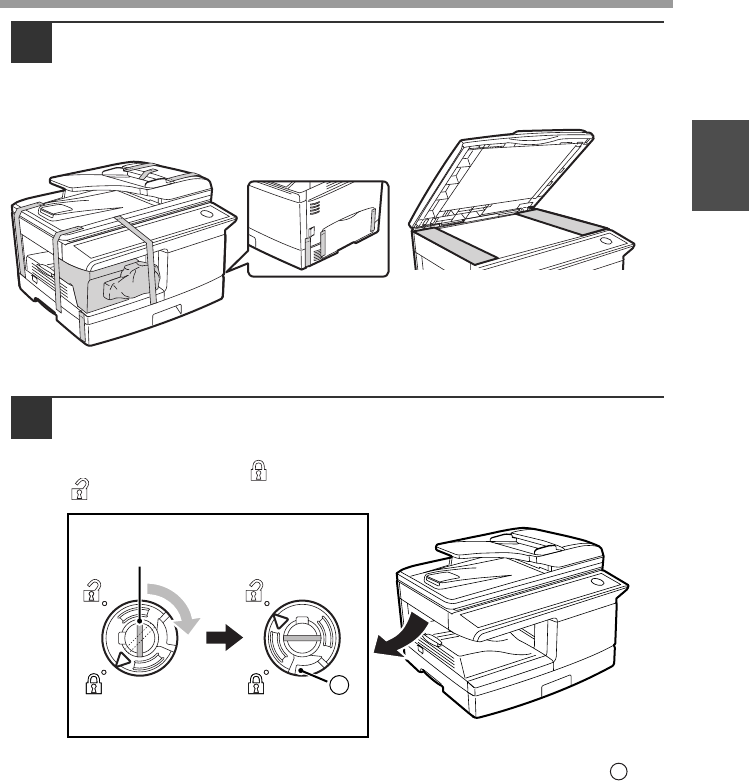
- Lock Unlock 15
- Grasp here and turn in 15
- 4 or 5 times 16
- Lock release button 16
- POWER ON AND OFF 18
- Power off 19
- Power save modes 19
- LOADING PAPER 20
- LOADING THE PAPER TRAY 21
- Pressure plate lock 22
- Envelopes 23
- Print face 24
- PAPER SIZE 25
- MAKING COPIES 26
- Using the RSPF 27
- SELECTING THE TRAY 29
- ()] key to select 30
- ()] key is pressed: 30
- REDUCTION/ENLARGEMENT/ZOOM 31
- CONVENIENT COPY 32
- FUNCTIONS 32
- Using the document glass 33
- SORT COPY 35
- SHEET OF PAPER (2 IN 1 copy) 37
- ORIG. SIZE ENTER 38
- CREATING MARGINS WHEN COPYING 40
- MARGIN SHIFT 41
- ON OFF 41
- LONG EDGE 41
- INSTALLING THE SOFTWARE 42
- BEFORE INSTALLATION 43
- Connecting a USB cable 48
- Go to step 11 51
- After step 1-7 on page 46 51
- SETTING UP BUTTON MANAGER 55
- Windows 98/Me/2000 57
- PRINTER/SCANNER 59
- USING THE PRINTER MODE 60
- BASIC PROCEDURE FOR PRINTING 60
- USING THE SCANNER MODE 61
- SCANNING FROM YOUR COMPUTER 62
- HOW TO USE THE ONLINE MANUAL 63
- USER SETTINGS 64
- Print mode 68
- SP. FUNC 69
- Base settings 70
- TROUBLESHOOTING AND 71
- MAINTENANCE 71
- Indication 72
- Cause and remedy Page 72
- Lamp indicator Display 72
- TROUBLESHOOTING THE MACHINE 73
- Play (Windows 2000/XP/Vista) 79
- Removing the software 79
- MISFEED REMOVAL 80
- B: Misfeed in the fusing area 81
- Roller rotating 82
- D: Misfeed in the RSPF 83
- DRUM CARTRIDGE REPLACEMENT 86
- Drum cartridge handle 87
- CARTRIDGE LIFE 88
- CLEANING THE MACHINE 89
- TRANSFER CHARGER 91
- ABOUT SUPPLIES 92
- APPENDIX 93
- Printer Function 95
- Scanner Function 96
- ()] key ............. 10, 28 97
- ........ 34 98
- INDEX BY PURPOSE 100
- 3.HAZARDS IDENTIFICATION 102
- 4.FIRST-AID MEASURES 102
- 5.FIRE-FIGHTING MEASURES 102
- 7.HANDLING AND STORAGE 102
- 11.TOXICOLOGICAL INFORMATION 103
- 10.STABILITY AND REACTIVITY 103
- 12.ECOLOGICAL INFORMATION 104
- 13.DISPOSAL CONSIDERATIONS 104
- 14.TRANSPORT INFORMATION 104
- 15.REGULATORY INFORMATION 104
- 16.OTHER INFORMATION 104
- ➢➣➢➣➢➣➢➣➢➣➢➣➢➣ 109
- Laserstrahl 111
- Route de Bollwiller - SOULTZ 112
- 68503 GUEBWILLER CEDEX FRANCE 112
Verwandte Produkte und Handbücher für Multifunktionsgeräte Sharp AL-2060
 (116 Seiten)
 (108 Seiten) (139 Seiten)
 (48 Seiten) (161 Seiten)
(120 Seiten)
(48 Seiten) (161 Seiten)
(120 Seiten)
© 2020, manymanuals.de. Alle Rechte vorbehalten. | 0.020 s |
 Manymanuals.com
 Manymanuals.de
 Manymanuals.fr
 Manymanuals.it
 Manymanuals.pl
 Manymanuals.cz
 Manymanuals.es
 Manymanuals-pt.com
Kommentare zu diesen Handbüchern