7 8
Note: The AR-FX8 may not be available in some regions.
Conventional Memory Transmission
Scan All
Send
Saves Time
Scan
Quick On-Line Transmission (AR-M620U/N)
Call
Send
Dial
Folder window View/work area Output zone
Composer
15 sec.
G3
14.4 Kbps
Super G3
33.6 Kbps
Transmission time
Preparation time Finishing time
3 sec.
1 sec.
PC-iFax
PC-Fax
“Send Fax”
command from PC
Fax is sent to recipient
fax machine
Internet
Composer
Search screen
Imaging Annotation function
6 sec./page
4 sec.
8 sec.
Phone line
Internet
Sharpdesk™ 3.0 screen
Print Fax E-mail Convert by OCR
Scan
Internet
Document
File server
Client PCs
Scan to desktop
Send to
designated PC
Scan to HDD
Store data for
Document Filing
File server
Note: All times are approximate.
Store and share
as digital data
Scan to FTP server
Send as e-mail
attachment
Scan to e-mail
HDD
Retrieve as
necessary
FAXING NETWORK SCANNING
Versatile Fax with Choice of Transmission
Powerful Network Scanning and
Integrated Document Management
A3 Network Scanning at Astonishing Speed
The 150-sheet DSPF and optional AR-NS3 Network Scanner Expansion
Kit turn the AR-M620U/N into an ultra-efficient network scanner. With
the touch of a few buttons, you can choose one of four ways to
distribute your scanned documents. Scan to HDD sends scanned
images to the AR-M620U/N’s built-in hard disk to use in the Document
Filing function (see pages 5 & 6). Scan to E-mail allows you to send
documents as an attachment to any e-mail address over the Internet.
You can easily enter an e-mail subject title or file name from the
touch-screen LCD. Scan to FTP Server lets you scan a document
directly to an FTP server for special applications such as company-wide
posting or archiving. Scan to Desktop enables you to send scanned
documents directly to your desktop computer. And with Sharpdesk™
(see below), Sharp’s powerful but easy-to-use document management
software, editing and managing scanned documents is easier than ever.
High-Speed Operation
The AR-FX8 Fax Expansion Kit turns the AR-M620U/N into a Super G3
fax machine featuring a fast modem speed of 33.6 Kbps. Using JBIG
data compression, the AR-M620U/N can send an A4 (8
1
/2" x 11") size
page in under 3 seconds*. Working together with the machine’s speedy
150-sheet DSPF, this function greatly enhances the efficiency of your
faxing jobs.
*Based on Sharp standard chart (A4 size with 6% coverage) at standard resolution.
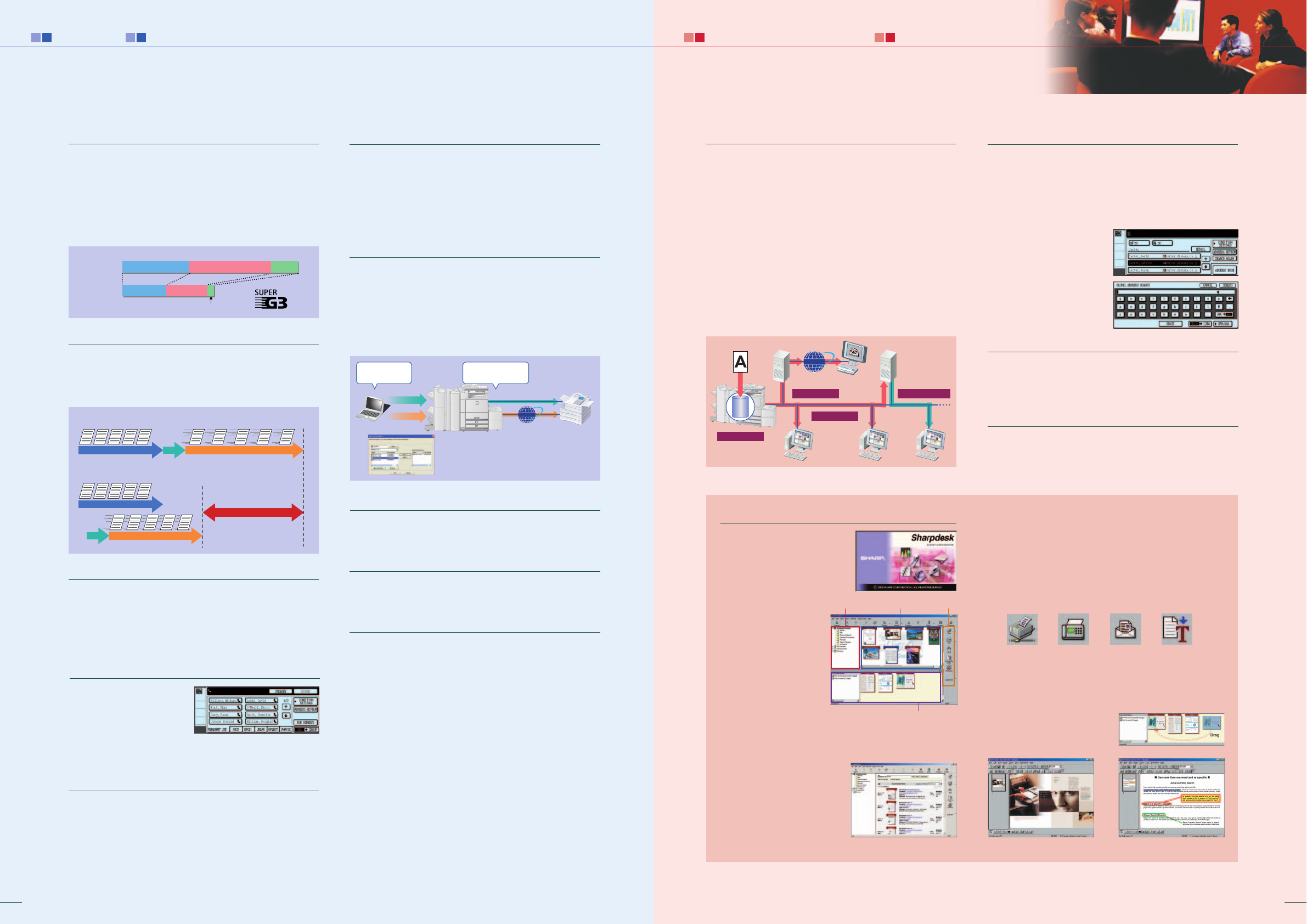
Quick On-Line Transmission
The AR-M620U/N starts dialling and transmitting a multi-page
document as soon as the first page is scanned into memory. This allows
you to send documents in much less time than with conventional
memory transmission.
Duplex Transmission and Reception
With the DSPF, the AR-M620U/N scans both pages of two-sided
documents and sorts them in memory. The pages are then transmitted
in the proper order. Thanks to the standard duplex module, the AR-
M620U/N can also print incoming faxes onto both sides of paper, thus
saving you paper costs.
999-Number Auto Dialling
Register up to 999 frequently
used numbers into the
customisable directory of one-
touch auto-dial keys, listed in
alphabetical order for easy
searches of specific numbers.
Multi Access Function
You get two different functions simultaneously; for example, you can
scan documents into memory for transmission while you receive an
incoming fax.
Send and Receive Faxes Over the Internet
You can send faxes to other ITU-T T-37-compliant Internet fax
machines via the Internet without worrying about costs. Plus, you
don’t need to wait around for transmission since the documents are
scanned into and then sent from memory. It’s also much faster than
public phone lines.
Note: Optional AR-P19 (for AR-M620U) and AR-NS3 are required.
PC-Fax/PC-iFax
A PC-Fax/PC-iFax function allows you to directly send a document
created on your PC to a recipient’s fax machine via a phone line or the
Internet. Since all faxing procedures are done on your PC without
printing to paper, this function saves time and costs, increases faxing
productivity, and retains original document quality.
Note: Optional AR-FX8 is required for PC-Fax and AR-NS3 for PC-iFax. Also, AR-
P19 is required for both PC-Fax and PC-iFax on the AR-M620U.
Flash Memory Backup
In case of power failure, documents stored in memory are retained
until power is restored, preventing data from being lost.
Ultra Fine Mode
You can set the AR-M620U/N to this ultra-high resolution to give the
recipient crisp, clear reproduction of detailed images and fine text.
OTHER KEY FEATURES
• F-Code communication enables confidential communication, relay request
transmission, and memory polling with fax machines from other brands that
conform to the ITU-T F-Code (sub-address and pass code) standard
• Automatic Transmission Reduction automatically reduces the size of the
document being sent to fit the paper size of the recipient machine
• Memory Transmission/Reception stores documents in memory, allowing the
originals to be returned to the user quickly and saving incoming faxes in
memory if the AR-M620U/N runs out of paper or toner
• Timer Transmission enables unattended after-hours operation when reduced
phone rates are in effect
• Polling allows the user to retrieve a document left in the feeder of a remote
fax machine
• Long originals (up to 800 mm long) can be sent using the DSPF
• Broadcast Faxing to up to 5,000 destinations
• Programme keys (up to 8 keys) are available to set up frequently used
transmissions for instant recall
• Rotation Reception/Transmission rotates incoming or outgoing faxes to match
the direction of the printing paper size
• Divided Reception prints out long-length faxes onto separate sheets of paper
• Convenient image editing functions: Edge/Centre Erase, 2-in-1, Card Shot
LDAP Compatibility for Network Scanning
Built-in LDAP (lightweight directory access protocol) support
eliminates the need to enter or register an entire e-mail address.
Simply enter the first few letters of the recipient’s name and the AR-
M620U/N displays a list of possible matches from names and e-mail
addresses on your company’s LDAP server. This feature saves precious
time and lets you avoid errors when typing e-mail addresses. After
searching, selected addresses can
be stored to the AR-M620U/N’s
address book. And the integrated
User Authentication function
(see page 9) blocks unauthorised
access by requiring the user to
log in before searching for an
address.
Speedy Duplex Scanning
With the 150-sheet DSPF, you can scan both sides of a page at once.
This speed and simplicity lets you quickly scan two-sided originals at
up to 64 pages per minute.
TWAIN Support
With support for the TWAIN standard, the AR-M620U/N allows you to
import scanned images to any commercially available TWAIN-
compliant application.
Sharpdesk™ for Total Document Management
Sharpdesk™ is an original, intuitive
application that provides integrated
desktop management of documents
regardless of the format. Once you
scan documents and images, or
drag-and-drop existing files
on your PC into Sharpdesk™,
you can view their
thumbnail images and
organise, edit, search, and
distribute your documents
in over 200 file formats for
maximum productivity.
Intelligent File Storage
When using Scan to Desktop to send scanned files to your PC,
Sharpdesk™ is activated automatically to save files in their
designated folders.
Powerful Search
Sharpdesk™ retrieves not only
regular text files, but also image
files that have been converted by
OCR into editable text files.
Thumbnail Display for Easy Browsing
Sharpdesk™ lets you browse thumbnail icons for over 200 file
types, including TIFF, JPEG, and BMP.
Drag-and-Drop Output
Print documents directly from your desktop, send them as e-mail
attachments, or convert them into text files using the built-in OCR
engine — all with simple drag-and-drop operation.
Sharpdesk Composer and Sharpdesk Imaging
Sharpdesk Composer lets you combine different types of files into a
single document through simple drag-and-drop operation. And
Sharpdesk Imaging provides a range of useful annotation tools
including labels, stamps, and
marks for paper-free
proofreading.

 (20 Seiten)
 (82 Seiten)
 (161 Seiten)
 Manymanuals.com
 Manymanuals.de
 Manymanuals.fr
 Manymanuals.it
 Manymanuals.pl
 Manymanuals.cz
 Manymanuals.es
 Manymanuals-pt.com
Kommentare zu diesen Handbüchern