Sharp UX-CD600 Bedienungsanleitung Seite 121
- Seite / 156
- Inhaltsverzeichnis
- FEHLERBEHEBUNG
- LESEZEICHEN

- UX-CD600 1
- ENERGY STA R 2
- Introduction 3
- Important safety information 6
- Table of Contents 8
- A Look at the Operation Panel 10
- Machine display 12
- Cordless handset 13
- 1. Installation 16
- Setting Up 17
- Connecting the power cord 18
- Connecting the phone lines 19
- Raising the base antenna 22
- 1. Installation 23
- Machine display: 25
- Connecting a headset 27
- Accessory cordless handsets 27
- Loading the Imaging Film 28
- Loading Printing Paper 30
- Print contrast setting 31
- Setting the paper size 31
- Display: 32
- Setting the Date and Time 34
- Daylight Saving Time 35
- Setting the Reception Mode 36
- Line Settings 37
- The display briefly shows 38
- Volume Adjustment - Machine 41
- Machine ringer 42
- Cordless handset ringer 43
- Making a Phone Call 44
- Receiving a Phone Call 45
- Using Auto Attendant Mode 46
- 2. Cordless 47
- Selecting Auto Attendant mode 48
- Setting the ring duration 49
- FUNCTION 50
- Editing an auto-dial number 52
- Dialing an auto-dial number 52
- Clearing an auto-dial number 53
- PRESS START KEY 54
- SELECT SEARCH 54
- : COMMON 54
- : PRIVATE 54
- Using the Intercom Feature 55
- (cordless handset locator) 57
- TRANSFER:▲▼ 58
- (conference call) 59
- Locking the cordless handset 60
- Making a phone call 61
- Putting a call on hold 61
- Using an auto-dial number 62
- 3. Answering 63
- Recording an Outgoing Message 64
- Number of rings in TAD mode 67
- Erasing received messages 69
- Recording memos 69
- Setting ICM time 72
- Fax reception on TAD failure 72
- OGM only mode 73
- CPC Detection 74
- Transfer Function 75
- Remote Operations 78
- Toll Saver 79
- Retrieving your messages 79
- Other remote operations 81
- Changing the reception mode 81
- Recording a memo 83
- 4. Sending Faxes 84
- Loading the Document 85
- Resolution settings 86
- Contrast settings 87
- WHICH LINE? 88
- PRESS 1 OR 2 88
- 4. Sending 89
- Automatic redialing 95
- Error Correction Mode 96
- Sending a Fax From Memory 97
- Memory transmission 98
- If the memory becomes full 99
- 5. Receiving Faxes 100
- Changing the number of rings 101
- Receiving Faxes Manually 102
- Optional Reception Settings 104
- Reception Ratio 105
- START/MEMORY 106
- 6. Making Copies 107
- Copy Cut-off 108
- 7. Special Functions 109
- Entering your area code 110
- How Caller ID operates 111
- Display messages 112
- How Call Waiting ID operates 112
- Viewing the Caller ID list 113
- Cordless handset display: 114
- 7. Special 115
- Functions 115
- COPY/HELP/POLL 116
- 8. Printing Lists 117
- Telephone Number List 118
- Setup List 118
- Message List 118
- Caller-ID List 118
- Transaction Report 119
- Printing Lists 120
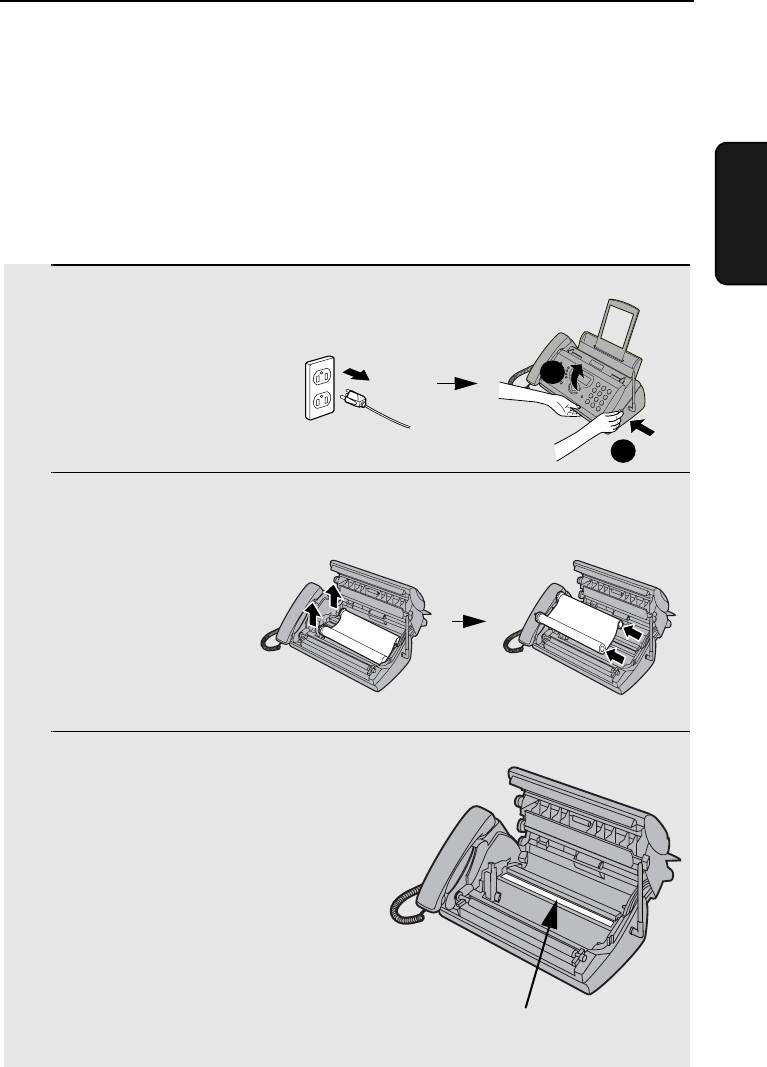
- 9. Maintenance 121
- Scanning glass and rollers 122
- The housing 123
- Maintenance 124
- Battery disposal 125
- Wiping the charger contacts 125
- 10. Troubleshooting 126
- 10. Trouble 127
- Problems and Solutions 128
- General problems 129
- Cordless handset problems 130
- Messages and Signals 133
- Audible signals 138
- Display backlight 138
- Clearing Paper Jams 139
- Ordering Parts 141
- FCC Regulatory Information 142
- S H A R P 143
- Quick Reference Guide 145
- Using the Cordless Phone 146
- Guía de referencia rápida 147
- Uso del teléfono inalámbrico 148
- REMOTE OPERATION CARD 151
- (Box#) 152
- (Tel. #) 152
- END USER LIMITED WARRANTY 154
- IMPORTANT SERVICE INFORMATION 155
- SHARP ELECTRONICS CORPORATION 156
Verwandte Produkte und Handbücher für Drucker Sharp UX-CD600
 (140 Seiten)
(32 Seiten)
(20 Seiten)
(380 Seiten)
(181 Seiten)
(799 Seiten)
(655 Seiten)
(88 Seiten)
(118 Seiten)
(121 Seiten)
(46 Seiten)
(47 Seiten)
(28 Seiten)
(88 Seiten)
(2 Seiten)
(849 Seiten)
(32 Seiten)
(84 Seiten)
(52 Seiten)
(140 Seiten)
(32 Seiten)
(20 Seiten)
(380 Seiten)
(181 Seiten)
(799 Seiten)
(655 Seiten)
(88 Seiten)
(118 Seiten)
(121 Seiten)
(46 Seiten)
(47 Seiten)
(28 Seiten)
(88 Seiten)
(2 Seiten)
(849 Seiten)
(32 Seiten)
(84 Seiten)
(52 Seiten)
© 2020, manymanuals.de. Alle Rechte vorbehalten. | 0.019 s |
 Manymanuals.com
 Manymanuals.de
 Manymanuals.fr
 Manymanuals.it
 Manymanuals.pl
 Manymanuals.cz
 Manymanuals.es
 Manymanuals-pt.com
Kommentare zu diesen Handbüchern