Sharp AR-337 Bedienungsanleitung Seite 143
- Seite / 152
- Inhaltsverzeichnis
- FEHLERBEHEBUNG
- LESEZEICHEN

- AR-287/AR-337 1
- FOR YOUR RECORDS 2
- CONTENTS 3
- INTRODUCTION 4
- USING THIS MANUAL 4
- CHAPTER 1 5
- INSTALLATION REQUIREMENTS 6
- CAUTIONS 7
- Cautions on laser 8
- POWER ON AND OFF 10
- INFORMATION FUNCTION 11
- USING THE TOUCH PANEL 12
- Function setting icons 13
- CHAPTER 2 15
- AUDITING ACCOUNTS 16
- USING THE RADF 17
- Centring scale 22
- Original size detector 22
- 2-SIDED COPY 24
- Automatic selection 25
- Manual selection 26
- REDUCTION/ENLARGEMENT/ZOOM 26
- CLEAR ALL 28
- SPECIAL PAPERS (manual feed) 29
- EXPOSURE ADJUSTMENTS 30
- SORT/GROUP 31
- Storing a job program 32
- Deleting a stored job program 33
- Recalling a job program 33
- JOB MEMORY 33
- INTERRUPT 34
- CHAPTER 3 35
- COPY RATIO 36
- X—50% Y—70% 37
- Expanded margin 38
- Original 38
- MARGIN SHIFT 39
- READY TO CO 40
- SPECIAL FUNCTIONS Erase 41
- DUAL PAGE COPYING 42
- MULTI SHOT 44
- AUDIT CLEAR 48
- THE INSERT 50
- PAMPHLET COPY 51
- URE PAPER SELECT 53
- AUTO 11 17 53
- IMAGE EDITING FUNCTIONS 54
- T ON FRONT COVER? 55
- CENTERING 56
- REPEAT COPY 58
- BINDING CHANGE 63
- TEXT STAMP 66
- 1ST PAGE 67
- TANDEM COPY 78
- TRANSPARENCY 79
- DUAL PAGE 79
- SETTING REVIEW 80
- CHAPTER 4 81
- CHAPTER4 83
- Front guide 84
- Left guide 84
- ADDING TONER 85
- USED TONER DISPOSAL 87
- STORAGE OF SUPPLIES 88
- CHAPTER 5 89
- MISFEED REMOVAL 90
- Misfeed in the RADF 91
- Misfeed in the bypass tray 92
- Misfeed in the transport area 94
- Misfeed in the duplex module 97
- MAINTENANCE REQUIRED 99
- TROUBLESHOOTING 100
- Self-diagnostic function 101
- CHAPTER 6 103
- PART NAMES AND FUNCTIONS 104
- Interior 105
- Operation Panel 106
- Touch Panel (Basic screen) 107
- USER MAINTENANCE 108
- GENERAL INFORMATION 109
- SPECIFICATIONS 110
- CHAPTER 7 113
- SYSTEM CONFIGURATION 114
- FINISHER (AR-FN1N) 115
- Offset stack 116
- OFFSET mode 116
- NON-OFFSET mode 116
- Sort and group 117
- SORT mode 117
- GROUP mode 117
- STAPLE SORT mode 117
- EXPOSURE 118
- Staple cartridge replacement 122
- Staple jam removal 124
- Misfeed removal 126
- SF-S15 20-bin sorter 126
- FINISHER (AR-FN2) 131
- Stapling position 136
- LARGE CAPACITY TRAY (AR-LC1N) 142
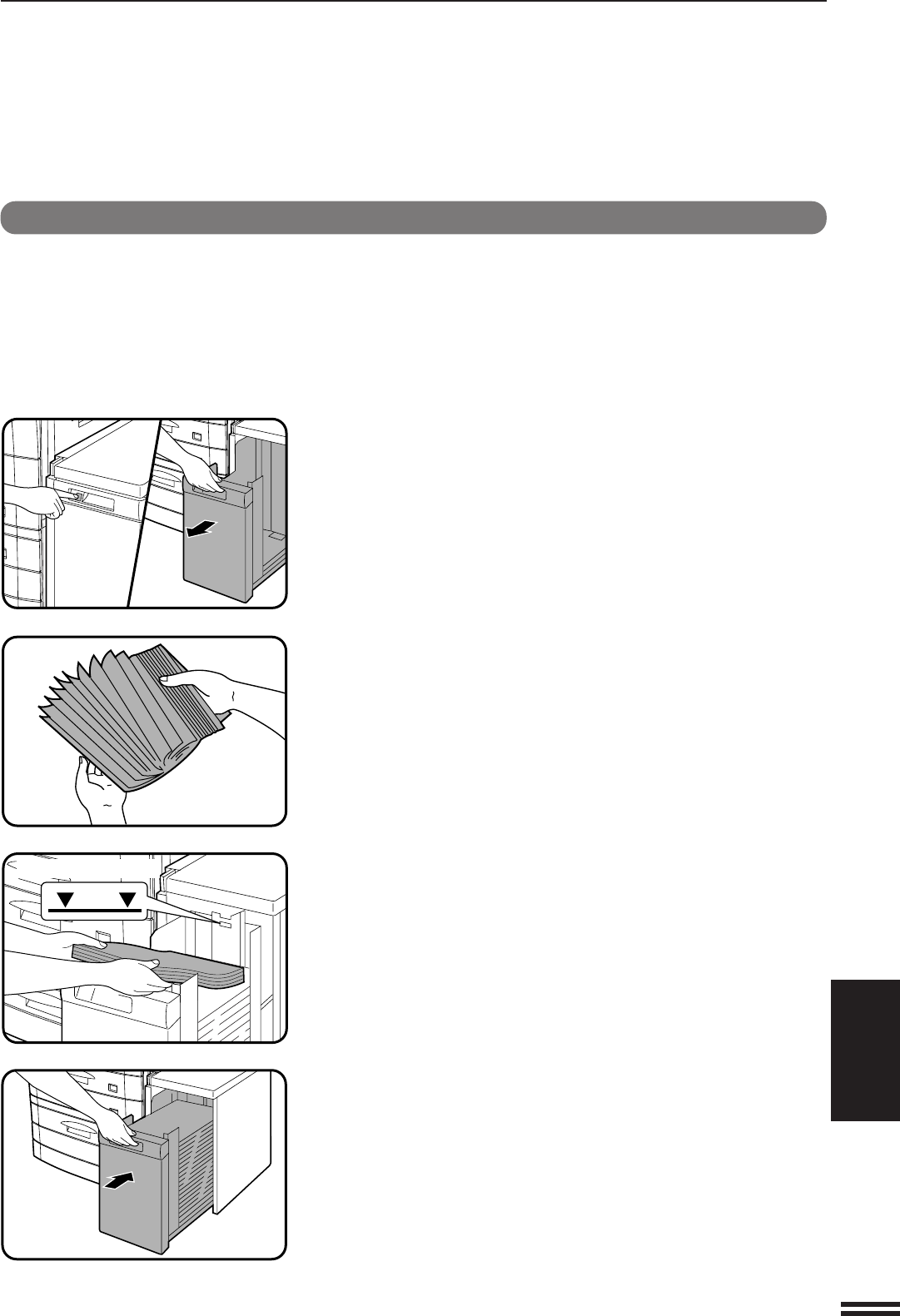
- Loading copy paper 143
- STAND/500-SHEET PAPER DRAWER 146
- DUAL TRAY OUTPUT UNIT 149
- Specifications 150
- WARNING: 151
- AR-287/AR-337/AR-407 152
- SHARP CORPORATION 152
Verwandte Produkte und Handbücher für Drucker Sharp AR-337
 (128 Seiten)
(224 Seiten)
(92 Seiten)
(81 Seiten)
(372 Seiten)
(188 Seiten)
(128 Seiten)
(224 Seiten)
(92 Seiten)
(81 Seiten)
(372 Seiten)
(188 Seiten)

 (172 Seiten)
(140 Seiten)
(72 Seiten)
(710 Seiten)
(156 Seiten)
(140 Seiten)
(32 Seiten)
(20 Seiten)
(380 Seiten)
(181 Seiten)
(799 Seiten)
(655 Seiten)
(88 Seiten)
(118 Seiten)
(172 Seiten)
(140 Seiten)
(72 Seiten)
(710 Seiten)
(156 Seiten)
(140 Seiten)
(32 Seiten)
(20 Seiten)
(380 Seiten)
(181 Seiten)
(799 Seiten)
(655 Seiten)
(88 Seiten)
(118 Seiten)
© 2020, manymanuals.de. Alle Rechte vorbehalten. | 0.061 s |
 Manymanuals.com
 Manymanuals.de
 Manymanuals.fr
 Manymanuals.it
 Manymanuals.pl
 Manymanuals.cz
 Manymanuals.es
 Manymanuals-pt.com
Kommentare zu diesen Handbüchern