Sharp ZQ-750M Spezifikationen Seite 56

  • Herunterladen
  • Zu meinen Handbüchern hinzufügen
  • Drucken
  • Seite
    / 83
  • Inhaltsverzeichnis
  • FEHLERBEHEBUNG
  • LESEZEICHEN
  • Bewertet. / 5. Basierend auf Kundenbewertungen
Seitenansicht 55
55
Personalizing Your Organizer
10
CHAPTER CHAPTER
CHAPTER CHAPTER
CHAPTER 10
Personalizing
Your Organizer
Now that you have an understanding of all of the OrganizersNow that you have an understanding of all of the Organizers
Now that you have an understanding of all of the Organizers
functions and its operation, lets take a look at the variousfunctions and its operation, lets take a look at the various
functions and its operation, lets take a look at the various
ways you can customize the Organizer to suit your personalways you can customize the Organizer to suit your personal
ways you can customize the Organizer to suit your personal
preferences: entries can be made secure through passwordpreferences: entries can be made secure through password
preferences: entries can be made secure through password
protection and by marking them as secret; and a large fontprotection and by marking them as secret; and a large font
protection and by marking them as secret; and a large font
view can be selected for the Organizers display.view can be selected for the Organizers display.
view can be selected for the Organizers display.
The Organizer offers a level of security for its entries andThe Organizer offers a level of security for its entries and
The Organizer offers a level of security for its entries and
operations. It is to define particular entries within variousoperations. It is to define particular entries within various
operations. It is to define particular entries within various
applications as secret, and then enable the Lapplications as secret, and then enable the L
applications as secret, and then enable the L
OCKOCK
OCKOCK
OCK
ORGANIZER option in the Second Main Menu.ORGANIZER option in the Second Main Menu.
ORGANIZER option in the Second Main Menu.
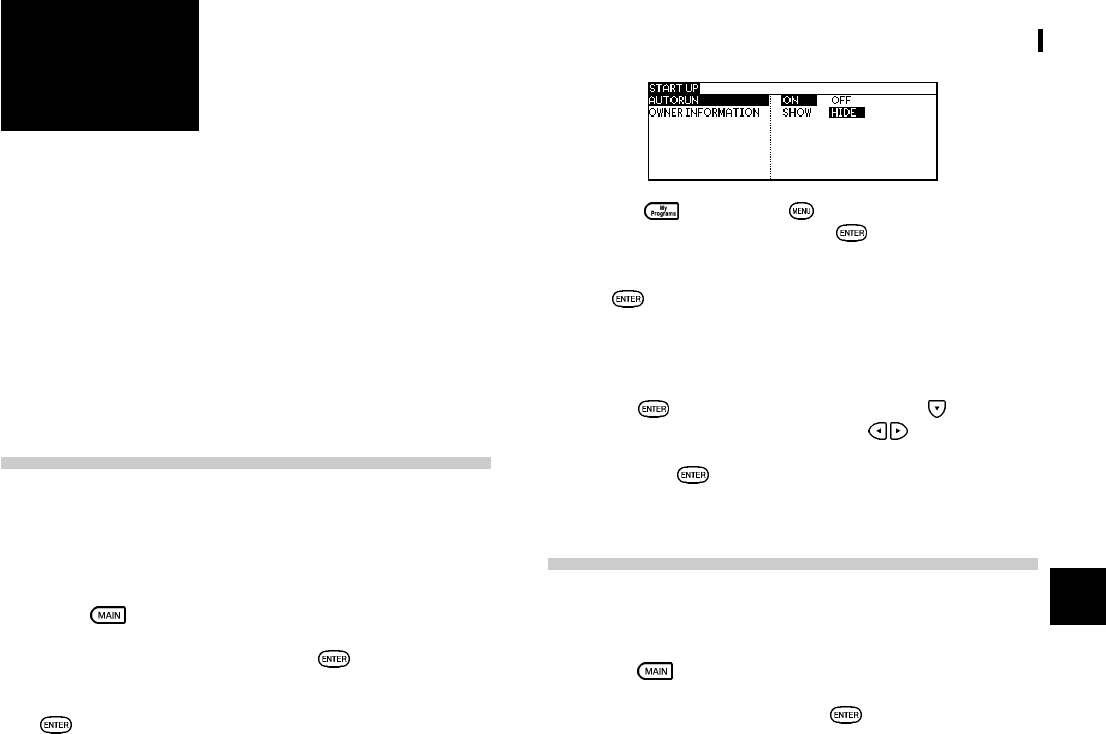
The Start-Up Display
You can choose to have a program run whenever the Organizer
is turned on, using the AUTORUN feature. You can also choose
to show or hide owner information when you power on the
Organizer.
1. Press twice to enter the Second Main Menu.
2. Select Start-up Display then press .
3. In the AUTORUN field, you can choose ON and press
to activate the autorun first.
4. Press then press . Select AUTORUN in MY
PROGRAMS MENU and press
.
5. Select the program for autorun by pressing the number
or
. A Checkmark is then added to the selected
program which will run automatically each time the
Organizer is turned on.
6. Select Start-up Display in the Second Main Menu then
press
. In the START UP menu, press to move to
OWNER INFORMATION and press
to select SHOW
or HIDE the information once the Organizer is turned on
then press to confirm.
Setting the Owners Information
The Owners Information comprises your name, address and
telephone number.
1. Press
twice to enter the Second Main Menu.
2. Select Owner Info, then press .
The cursor starts in the NAME field.
Seitenansicht 55
1 2 ... 51 52 53 54 55 56 57 58 59 60 61 ... 82 83

Kommentare zu diesen Handbüchern

Keine Kommentare

Philips HD4659/53 manuales

Manuales del propietario y guías del usuario para Hervidores eléctricos Philips HD4659/53.
Ofrecemos 1 manuales en pdf Philips HD4659/53 para descargar gratis por tipos de documentos: Manual de usuario


Más productos y manuales para Hervidores eléctricos Philips

Modelos Tipo de documento
HD9305/20 Manual de usuario       Philips Wasserkocher HD9305/00 Bedienungsanleitung, 6 paginas
HD4681/00 Manual de usuario    Philips Kettle HD4684/50 User manual, 4 paginas
HD9306/03 Manual de usuario       Philips Daily Collection Kettle HD9306/03 Important Information Manual, 2 paginas
HD4676/40 Manual de usuario       Philips Czajnik HD4677/20 Instrukcja obsługi, 11 paginas
HD9380/20 Manual de usuario       Philips Avance Collection Jarro HD9384/20 Manual do proprietário, 2 paginas
HD9357/11 Manual de usuario       Philips Viva Collection Βραστήρας HD9357/11 Εγχειρίδιο χρήσης, 2 paginas
HD4681/53 Manual de usuario    Philips Hurtigkoker HD4681/80 Brukerveiledning, 2 paginas
HD4664/20 Manual de usuario        Philips Bouilloire HD4664/20 Mode d’emploi, 13 paginas
HD4676/40 Manual de usuario      Philips Varná konvice HD4677/20 Uživatelská příručka, 9 paginas
HD4646/00 Manual de usuario      Philips Daily Collection Kuhalo za vodu HD4646/00 Upute za uporabu, 8 paginas
HD9326/21 Manual de usuario     Philips Βραστήρας HD9326/21 Εγχειρίδιο χρήσης, 4 paginas
RWSS9500/00 Manual de usuario   Philips Modul pro bezdrátové zadní audiozařízení RWSS5510/00 Uživatelská příručka, 9 paginas
HD9316/03 Manual de usuario      Philips Viva Collection Kettle HD9316/03 User manual, 2 paginas
HD4677/40 Manual de usuario    Philips Viva Collection Hurtigkoker HD4677/40 Brukerveiledning [ru] , 10 paginas
HD4659/04 Manual de usuario       Philips Чайник HD4659/04 User manual, 15 paginas
HD4678/55 Manual de usuario       Philips Tējkanna HD4678/55 Lietotāja rokasgrāmata, 15 paginas
HD9386/20 Manual de usuario      Philips Avance Collection Чайник HD9386/20 Инструкция по эксплуатации, 2 paginas
HD9327/10 Manual de usuario    Philips Viva Collection Чайник HD9327/10 Инструкция по эксплуатации, 2 paginas
HD4649/00 Manual de usuario        Philips Waterkoker HD4649/00 Gebruiksaanwijzing, 10 paginas
HD4622/20 Manual de usuario     Philips 무선 전기주전자 HD4622/20 사용 설명서, 11 paginas