Sharp VL-Z800S Spezifikationen Seite 95
- Seite / 128
- Inhaltsverzeichnis
- FEHLERBEHEBUNG
- LESEZEICHEN

- VL-Z800S-S 1
- OPERATION MANUAL 3
- Contents 4
- Advanced Features 5
- Supplied Accessories 7
- Optional Accessories 7
- Precautions 8
- Dew Formation 9
- 4 Remove the cleaning tape 10
- Operation References 11
- Right view 13
- Warning Indicators 14
- MEMORY CARD 15
- READ ERROR 15
- Preparation 16
- 3 Take the battery pack out 17
- Inserting 21
- Removing 21
- About the write-protect 21
- Installing the Battery to 23
- Remote Control 23
- LANGUAGE 24
- 100030RETURN 25
- Using the Lens Cap 26
- Using the Viewfinder 28
- 2 Hold down the Lock 28
- Detaching the Lens 28
- Closing the viewfinder 29
- Adjusting the dioptre 29
- Using the LCD 30
- 3 Hold down the Lock 30
- Tips on Recording 31
- Positions 31
- Basic Operations 32
- Camera mode 33
- Camera Recording 34
- Power Standby Mode 35
- Turning on/off the 35
- Backlight 35
- Auto Focus 36
- Macro Shots 36
- Remaining Recording 36
- Time Display 36
- Information Display 37
- Remaining Battery 37
- Power Display 37
- About the S-video socket 41
- Useful Features 42
- DGTL ZOOM 43
- BLC / GA I N ON 45
- FINE PIC. LEVEL 1 47
- LED LIGHT ON 48
- BLC GA IN/ 49
- AUTO FOCUS 49
- To pause recording 51
- To cancel the still image 51
- ER SAVE 5 MI N 53
- Self Recording 54
- 3 Set the Power switch to v 54
- 4 Begin recording 54
- Self recording with reversed 55
- TAPE SPEED 56
- AUD I O MODE 57
- Using the Zoom 58
- Microphone (Optional 58
- Accessory) 58
- TELEZOOM MIC 59
- Tape Playback 61
- Functions with the 61
- 1 During Tape Playback, press 61
- 2 Press the h (or j) 61
- FFREWSTOPPLAY 62
- DATE DISP. DATE 62
- 5002.6.2 62
- PIC. EFFECT 63
- EXECUTEROTATE PB 64
- Stretch Playback 66
- (Continued on the next page) 69
- 4 Press the DISPLAY/MODE SET 70
- 5 Press the DISPLAY/MODE SET 71
- Tips on Using the Manual 74
- Shutter Speed 74
- T A P EPAUSE 75
- TIME CODE 77
- 12-bit audio recording 78
- 16-bit audio recording 78
- Audio Dubbing 79
- If you wish to change the 79
- Cutting Unwanted Se 81
- (L/MONO) 82
- To Record from an External 83
- Editing with the DV 84
- Terminal (IEEE1394) 84
- To Record from Video Equip 85
- REC MODE 87
- IMAGE S IZE 88
- SE L F T IMER 90
- 2 Press the DISPLAY/MODE SET 91
- EXECUTEFORMAT 92
- RESETFILE NO 93
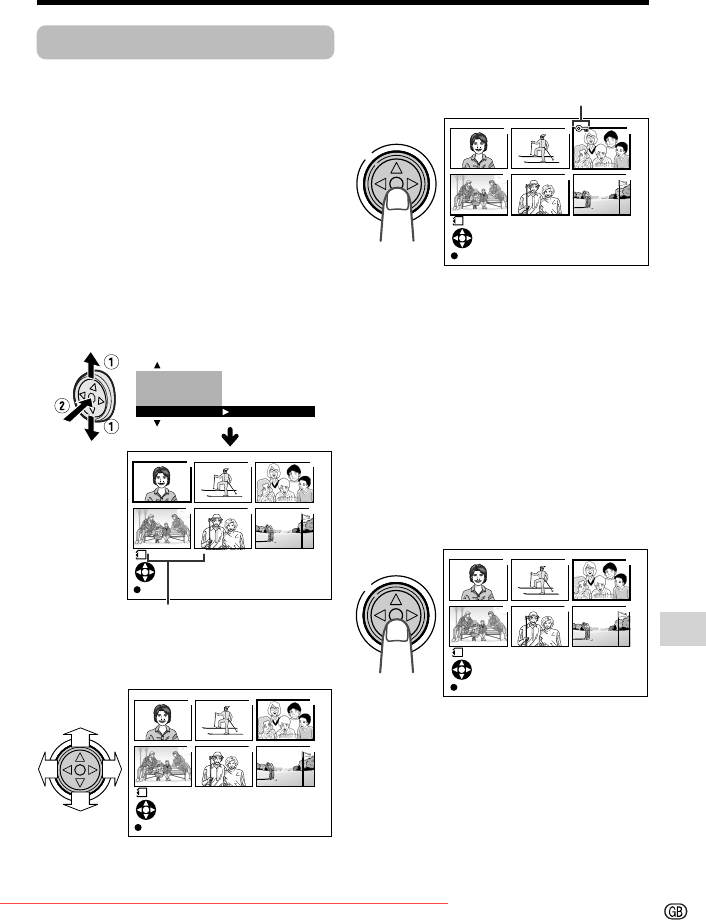
- To cancel the protection 95
- Assigning Print Order to All 99
- Digital Still Camera Features 100
- Playback 100
- System Requirements 101
- Transferring the data on 105
- Card to Computer 105
- Disconnecting the USB 105
- DVC00001.JPG 106
- DVC00002.JPG 106
- 100SHARP 106
- EXECUTESL IDE SHO 107
- BACKL I GHT 108
- Setting the 109
- Camcorder to 109
- Factory Presettings 109
- D EMO MOD E 110
- Useful Information 111
- Appendix 112
- SD\ Memory Card and 113
- MultiMediaCard\ 113
- Removable Storage Care 113
- AC Adapter 115
- Replacing the Fluorescent 115
- Cleaning 115
- Troubleshooting 117
- Specifications 121
- On-screen Display Index 122
- Tape Playback mode 123
- Menu screens 123
- Mode screens 123
- Card Playback mode 125
- VL-Z800S-CE1; 04/1/15/18:00 127
Verwandte Produkte und Handbücher für Kamerarekorder Sharp VL-Z800S
 (96 Seiten)
 (92 Seiten)
 (88 Seiten)
 (120 Seiten)
 (133 Seiten) (128 Seiten)
 (80 Seiten)
(124 Seiten)
(80 Seiten)
(124 Seiten)
 (132 Seiten)
(96 Seiten)
(178 Seiten)
(128 Seiten)
(73 Seiten)
(118 Seiten)
(132 Seiten)
(96 Seiten)
(178 Seiten)
(128 Seiten)
(73 Seiten)
(118 Seiten)
© 2020, manymanuals.de. Alle Rechte vorbehalten. | 0.043 s |
 Manymanuals.com
 Manymanuals.de
 Manymanuals.fr
 Manymanuals.it
 Manymanuals.pl
 Manymanuals.cz
 Manymanuals.es
 Manymanuals-pt.com
Kommentare zu diesen Handbüchern