Sharp AR-160 Einstellungsanleitung Seite 13

  • Herunterladen
  • Zu meinen Handbüchern hinzufügen
  • Drucken
  • Seite
    / 20
  • Inhaltsverzeichnis
  • FEHLERBEHEBUNG
  • LESEZEICHEN
  • Bewertet. / 5. Basierend auf Kundenbewertungen
Seitenansicht 12
11
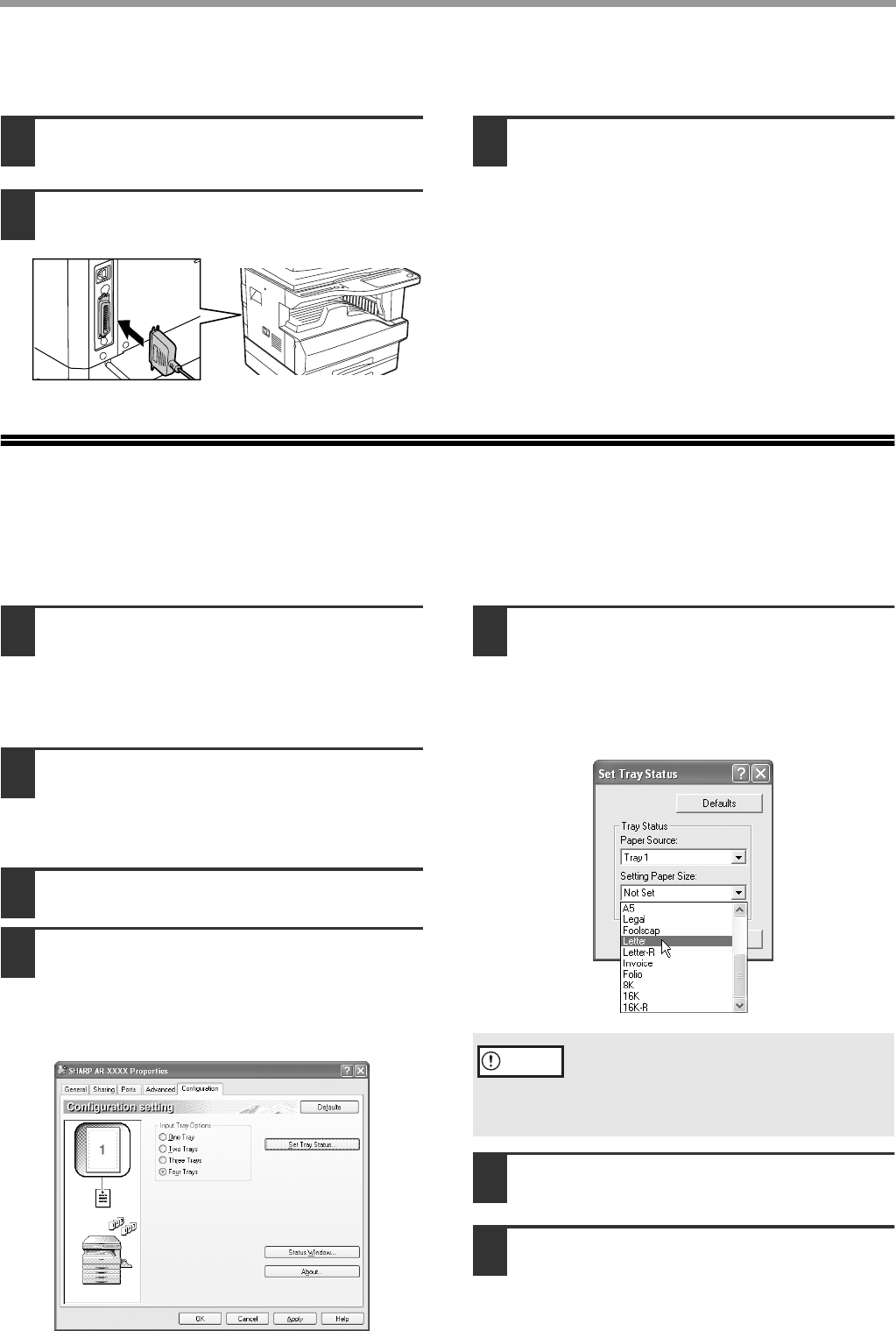
CONNECTING TO A COMPUTER
CONNECTING A PARALLEL CABLE
1
Ensure that your computer and the
machine are turned off.
2
Plug the cable into the parallel port on
the machine, and fasten with the clasps.
3
Plug the other end of the cable into
your computer's parallel port.
CONFIGURING THE PRINTER DRIVER
After installing the MFP driver (printer driver), you must configure the printer driver settings appropriately for the
number of paper trays on the machine and the size of paper loaded in each.
1
Click the "start" button, click "Control
Panel", click "Printers and Other Hardware",
and then click "Printers and Faxes".
In operating systems other than Windows XP, click the
"Start" button, select "Settings", and then click "Printers".
2
Click the "SHARP AR-XXXX" printer
driver icon and select "Properties"
from the "File" menu.
If you are using Windows NT 4.0/2000/XP, go to step 4.
3
In Windows 95/98/Me, click the "Setup" tab.
4
Click the "Configuration" tab and set
the printer configuration based on the
options that have been installed.
Set the printer configuration properly. If not,
printing may not take place correctly.
5
Click the "Set Tray Status" button and
select the size of paper that is loaded
in each tray.
Select a tray in the "Paper source" menu, and
select the size of paper loaded in that tray from the
"Setting Paper Size" menu. Repeat for each tray.
6
Click the "OK" button in the "Set Tray
Status" window.
7
Click the "OK" button in the printer
properties window.
If the dual function board is not installed, be sure
to configure the above "Set Tray Status"
settings, and then when printing specify a tray
other than "Auto Select" in "Paper Source" in the
"Paper" tab of the printer driver setup screen.
Caution
!install_ar160205.book 11 ページ 2003年5月26日 月曜日 午後12時9分
Seitenansicht 12
1 2 ... 8 9 10 11 12 13 14 15 16 17 18 19 20

Kommentare zu diesen Handbüchern

Keine Kommentare

Hunter-fan 40135 manuels

Manuels d'utilisation et guides de l'utilisateur pour Panneau de contrôle Hunter-fan 40135.
Nous fournissons des manuels en pdf 1 Hunter-fan 40135 à télécharger gratuitement par type de document : Manuel de l'utilisateur


Plus de produits et de manuels pour Panneau de contrôle Hunter-fan

Modèles Type de document
47350A Manuel de l'utilisateur   Hunter Fan 47350A User Manual, 23 pages
44260 Manuel de l'utilisateur    Hunter Fan 44260 User Manual, 104 pages
44377W Manuel de l'utilisateur   Hunter Fan 44377W User Manual, 64 pages
PH20-30A Manuel de l'utilisateur   Hunter Fan PH20-30A User Manual, 26 pages
40170 Manuel de l'utilisateur   Hunter Fan 40170 User Manual, 33 pages
44550 Manuel de l'utilisateur   Hunter Fan 44550 User Manual, 38 pages
44459 Manuel de l'utilisateur   Hunter Fan 44459 User Manual, 40 pages
43665 Manuel de l'utilisateur   Hunter Fan 43665 User Manual, 49 pages
44360 Manuel de l'utilisateur   Hunter Fan 44360 User Manual, 58 pages
44660 Manuel de l'utilisateur   Hunter Fan 44660 User Manual, 2 pages
SET & SAVE 44155C Manuel de l'utilisateur   Hunter Fan SET & SAVE 44155C User Manual, 52 pages
144860 Manuel de l'utilisateur   Hunter Fan 144860 User Manual, 76 pages
47110A Manuel de l'utilisateur   Hunter Fan 47110A User Manual, 2 pages
43157 Manuel de l'utilisateur   Hunter Fan 43157 User Manual, 2 pages
47250A Manuel de l'utilisateur   Hunter Fan 47250A User Manual, 7 pages
42999 44050S Manuel de l'utilisateur   Hunter Fan 42999 44050S User Manual, 23 pages
47200A Manuel de l'utilisateur   Hunter Fan 47200A User Manual, 7 pages
44428 Manuel de l'utilisateur   Hunter Fan 44428 User Manual, 22 pages
42177 Manuel de l'utilisateur   Hunter Fan 42177 User Manual, 25 pages
42711-01 Manuel de l'utilisateur   Hunter Fan 42711-01 User Manual, 55 pages