Sharp MX-4101N Spezifikationen Seite 44: ENVIRONMENT
 1
 2
 3
 4
 5
 6
 7
 8
 9
 10
 11
 12
 13
 14
 15
 16
 17
 18
 19
 20
 21
 22
 23
 24
 25
 26
 27
 28
 29
 30
 31
 32
 33
 34
 35
 36
 37
 38
 39
 40
 41
 42
 43
 44
 45
 46
 47
 48
 49
 50
 51
 52
 53
 54
 55
 56
 57
 58
 59
 60
 61
 62
 63
 64
 65
 66
 67
 68
 69
 70
 71
 72
 73
 74
 75
 76
31
This chapter explains how to install the PPD file to enable printing from a Macintosh and how to configure the printer
driver settings.
☞ MAC OS X: this page
(v10.2.8, v10.3.9, v10.4.11, v10.5 - 10.5.1)
☞ MAC OS 9.0 - 9.2.2: page 36
MAC OS X
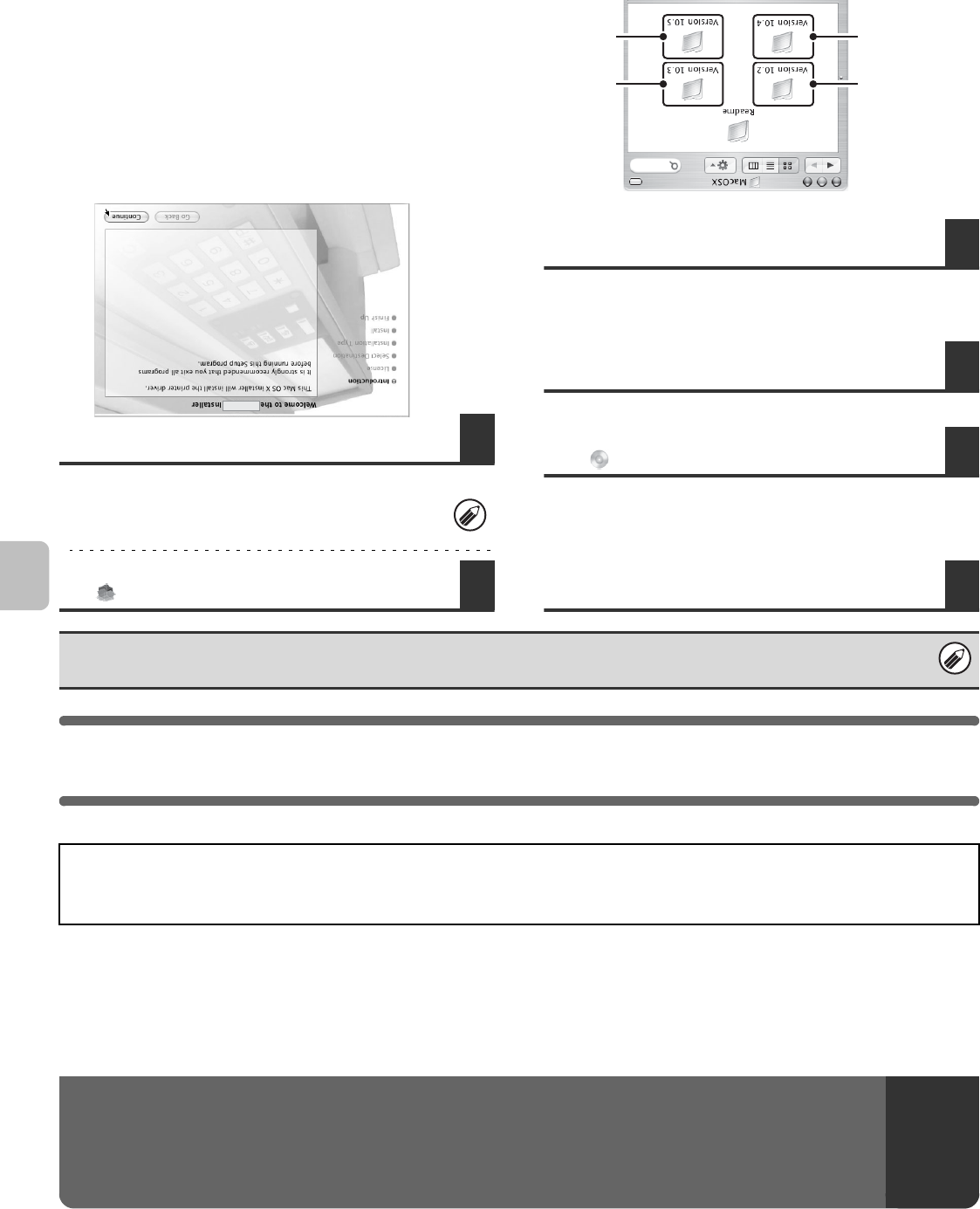
1
Insert the "Software CD-ROM" into your
computer's CD-ROM drive.
Insert the "Software CD-ROM" that shows "Disc 2" on the
front of the CD-ROM.
2
Double-click the [CD-ROM] icon ( ) on
the desktop.
3
Double-click the [MacOSX] folder.
Before installing the software, be sure to read "ReadMe
First". "ReadMe First" is in the [English] folder in the
[Readme] folder.
4
Double-click the folder corresponding
to the versions of the operating system.
5
Double-click the [MX-PBX1] icon ( ).
6
Click the [Continue] button.
3
SETUP IN A MACINTOSH
ENVIRONMENT
• The PS3 expansion kit is required to use the machine as a printer in a Macintosh environment. In addition, the
machine must be connected to a network. A USB connection cannot be used.
• The scanner driver and PC-Fax driver cannot be used in a Macintosh environment.
The explanations of screens and procedures are primarily for Mac OS X v10.4. The screens may vary in other versions of the
operating system.
v10.3.9
v10.5 -
10.5.1
v10.4.11
v10.2.8
If the "Authenticate" window appears in Mac OS X
v10.2.8, enter the password and click the [OK] button.
PDF-Datei · ·
Fragen zu Sharp MX-4101N
Zu diesem Handbuch gibt es noch keine Fragen. Stellen Sie die erste.
Verwandte Produkte und Handbücher für Multifunktionsgeräte Sharp MX-4101N
- Multifunktionsgeräte Sharp JW-20FLT Bedienungsanleitung
 (197 Seiten)
- Multifunktionsgeräte Sharp MX-C381 Spezifikationen
(148 Seiten)
- Multifunktionsgeräte Sharp MX-M260 Bedienungsanleitung
 (160 Seiten)
- Multifunktionsgeräte Sharp MX-4101N Spezifikationen
(12 Seiten)
- Multifunktionsgeräte Sharp MX-M564N Bedienungsanleitung
(8 Seiten)
- Multifunktionsgeräte Sharp MX-M564N Bedienungsanleitung
(8 Seiten)
- Multifunktionsgeräte Sharp CPD-3830 Bedienungsanleitung
(1 Seiten)
- Multifunktionsgeräte Sharp MX-2010U Bedienungsanleitung
(12 Seiten)
- Multifunktionsgeräte Sharp MX-B381 Bedienungsanleitung
(12 Seiten)
- Multifunktionsgeräte Sharp MX-7500N Bedienungsanleitung
(30 Seiten)
- Multifunktionsgeräte Sharp AL-2021 Spezifikationen
(91 Seiten)
- Multifunktionsgeräte Sharp MX-B402 Bedienungsanleitung
(50 Seiten)
- Multifunktionsgeräte Sharp FO-155 Spezifikationen

 (165 Seiten)
- Multifunktionsgeräte Sharp MX-4140N Installationshandbuch
(19 Seiten)
- Multifunktionsgeräte Sharp JW-50FL Bedienungsanleitung
(201 Seiten)
- Multifunktionsgeräte Sharp MX-4140N Bedienungsanleitung
(12 Seiten)
- Multifunktionsgeräte Sharp CPD-3830 Bedienungsanleitung
(12 Seiten)
- Multifunktionsgeräte Sharp CD600 - B/W - Fax Bedienungsanleitung
(23 Seiten)
- Multifunktionsgeräte Sharp AR-810 Bedienerhandbuch
(178 Seiten)
- Multifunktionsgeräte Sharp AL-1566 Spezifikationen
(116 Seiten)