Sharp MX-4101N Spezifikationen Seite 63: "Disc 1" CD-ROM
 1
 2
 3
 4
 5
 6
 7
 8
 9
 10
 11
 12
 13
 14
 15
 16
 17
 18
 19
 20
 21
 22
 23
 24
 25
 26
 27
 28
 29
 30
 31
 32
 33
 34
 35
 36
 37
 38
 39
 40
 41
 42
 43
 44
 45
 46
 47
 48
 49
 50
 51
 52
 53
 54
 55
 56
 57
 58
 59
 60
 61
 62
 63
 64
 65
 66
 67
 68
 69
 70
 71
 72
 73
 74
 75
 76
12
INSTALLING THE PRINTER DRIVER / PC-FAX DRIVER
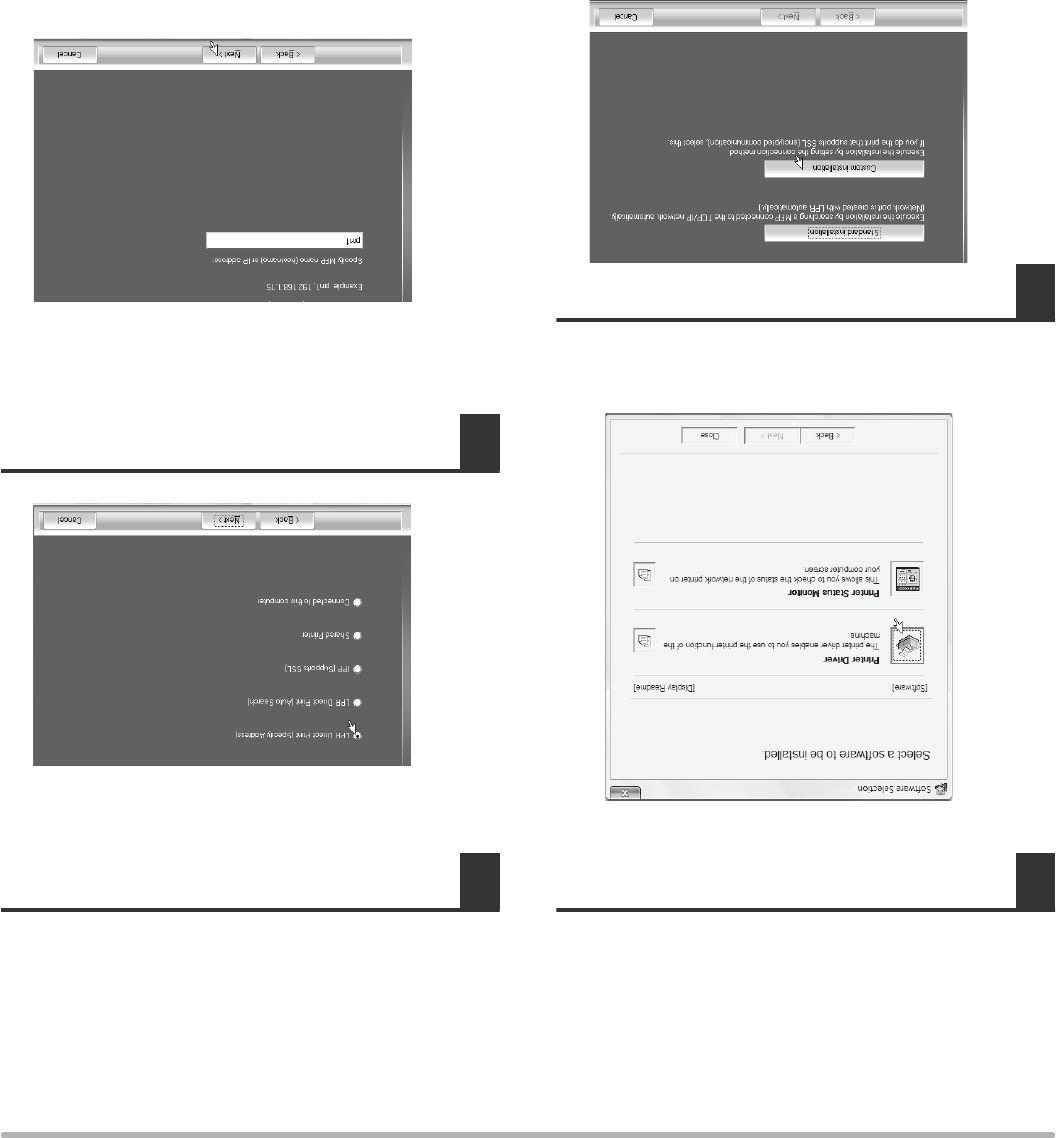
X Installation by specifying the machine's address
When the machine cannot be found because it is not powered on or otherwise, installation is possible by entering the
name (host name) or IP address of the machine.
When the software selection screen appears in step 6 of "OPENING THE SOFTWARE SELECTION SCREEN (FOR
ALL SOFTWARE)" (page 8), perform the steps below.
1
Click the [Printer Driver] button.
To install the PC-Fax driver, click the [PC-Fax Driver]
button on the "Disc 2" CD-ROM.
* The above screen appears when using the
"Disc 1" CD-ROM.
2
Click the [Custom installation] button.
3
When you are asked how the printer is
connected, select [LPR Direct Print
(Specify Address)] and click the [Next]
button.
4
Enter the name (host name) or IP
address of the machine and click the
[Next] button.
☞ Checking the IP address of the machine
(page 7)
PDF-Datei · ·
Fragen zu Sharp MX-4101N
Zu diesem Handbuch gibt es noch keine Fragen. Stellen Sie die erste.
Verwandte Produkte und Handbücher für Multifunktionsgeräte Sharp MX-4101N
- Multifunktionsgeräte Sharp JW-20FLT Bedienungsanleitung
 (197 Seiten)
- Multifunktionsgeräte Sharp MX-C381 Spezifikationen
(148 Seiten)
- Multifunktionsgeräte Sharp MX-M260 Bedienungsanleitung
 (160 Seiten)
- Multifunktionsgeräte Sharp MX-4101N Spezifikationen
(12 Seiten)
- Multifunktionsgeräte Sharp MX-M564N Bedienungsanleitung
(8 Seiten)
- Multifunktionsgeräte Sharp MX-M564N Bedienungsanleitung
(8 Seiten)
- Multifunktionsgeräte Sharp CPD-3830 Bedienungsanleitung
(1 Seiten)
- Multifunktionsgeräte Sharp MX-2010U Bedienungsanleitung
(12 Seiten)
- Multifunktionsgeräte Sharp MX-B381 Bedienungsanleitung
(12 Seiten)
- Multifunktionsgeräte Sharp MX-7500N Bedienungsanleitung
(30 Seiten)
- Multifunktionsgeräte Sharp AL-2021 Spezifikationen
(91 Seiten)
- Multifunktionsgeräte Sharp MX-B402 Bedienungsanleitung
(50 Seiten)
- Multifunktionsgeräte Sharp FO-155 Spezifikationen

 (165 Seiten)
- Multifunktionsgeräte Sharp MX-4140N Installationshandbuch
(19 Seiten)
- Multifunktionsgeräte Sharp JW-50FL Bedienungsanleitung
(201 Seiten)
- Multifunktionsgeräte Sharp MX-4140N Bedienungsanleitung
(12 Seiten)
- Multifunktionsgeräte Sharp CPD-3830 Bedienungsanleitung
(12 Seiten)
- Multifunktionsgeräte Sharp CD600 - B/W - Fax Bedienungsanleitung
(23 Seiten)
- Multifunktionsgeräte Sharp AR-810 Bedienerhandbuch
(178 Seiten)
- Multifunktionsgeräte Sharp AL-1566 Spezifikationen
(116 Seiten)