Sharp MX-B201D Spezifikationen Seite 73: (Windows XP)
 1
 2
 3
 4
 5
 6
 7
 8
 9
 10
 11
 12
 13
 14
 15
 16
 17
 18
 19
 20
 21
 22
 23
 24
 25
 26
 27
 28
 29
 30
 31
 32
 33
 34
 35
 36
 37
 38
 39
 40
 41
 42
 43
 44
 45
 46
 47
 48
 49
 50
 51
 52
 53
 54
 55
 56
 57
 58
 59
 60
 61
 62
 63
 64
 65
 66
 67
 68
 69
 70
 71
 72
 73
 74
 75
 76
 77
 78
 79
 80
 81
 82
 83
 84
 85
 86
 87
 88
 89
 90
 91
 92
 93
 94
 95
 96
 97
 98
 99
 100
 101
 102
 103
 104
 105
 106
 107
 108
 109
 110
 111
 112
 113
 114
 115
 116
 117
SCANNER FUNCTIONS
72
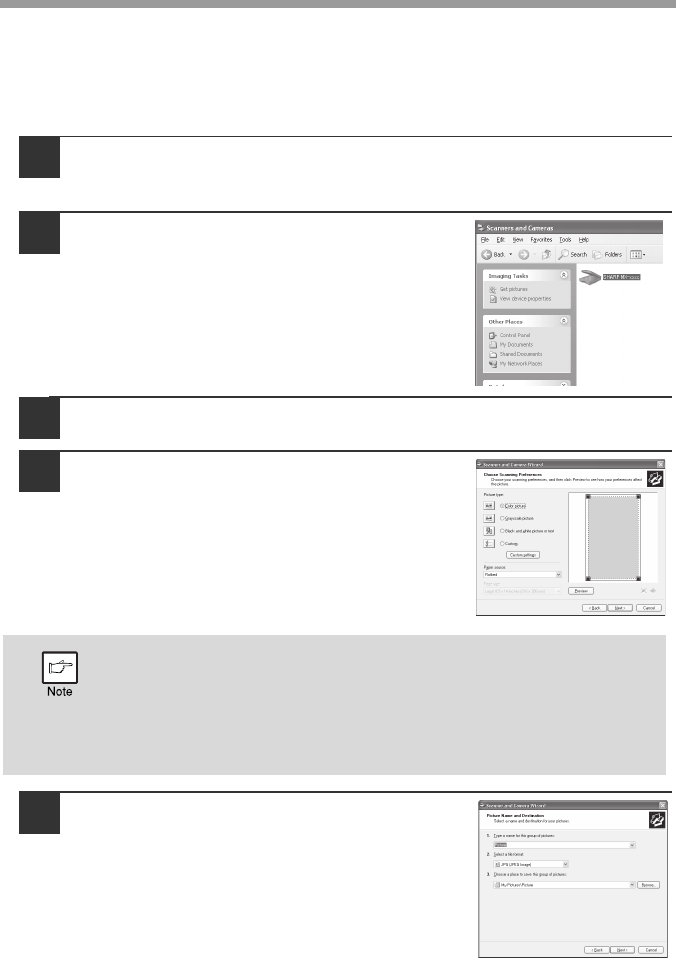
Scanning from the "Scanner and Camera Wizard"
(Windows XP)
The procedure for scanning with the "Scanner and Camera Wizard" in Windows XP
is explained here. The "Scanner and Camera Wizard" lets you scan an image
without using a WIA-compliant application.
1
Place the original that you wish to scan on the document glass/
RSPF.
For the procedure for placing the original, see "NORMAL COPYING" (p.17).
2
Click the "start" button, click "Control
Panel", click "Printers and Other
Hardware", and then click "Scanners
and Cameras".
Click the "SHARP MX-xxxx" icon and
then click "Get pictures" in "Imaging
Tasks".
The "Scanner and Camera Wizard" will appear.
3
Click the "Next" button.
4
Select the "Picture type" and "Paper
source", and click the "Next" button.
• If you placed the original on the document
glass, select "Flatbed" for the "Paper source".
• If you placed the original in the RSPF, select
"Document Feeder" for the "Paper source"
and specify the original size in "Page size".
• You can click the "Preview" button to display
the preview image.
5
Specify a group name, format and folder
for saving the image, and then click the
"Next" button.
JPG, BMP, TIF or PNG can be selected for the
format. To begin scanning, click the "Next"
button.
• If you select "Document Feeder" for the "Paper source" and click
the "Preview" button, the top original in the RSPF is previewed.
The previewed original is sent to the original exit area, so you will
need to return it to the RSPF before starting the scanning job.
• To adjust the resolution, picture type, brightness and contrast
settings, click the "Custom settings" button.
PDF-Datei · ·
Fragen zu Sharp MX-B201D
Zu diesem Handbuch gibt es noch keine Fragen. Stellen Sie die erste.
Verwandte Produkte und Handbücher für Drucken & Scannen Sharp MX-B201D
- Drucken & Scannen Sharp MX-M350U Einstellungsanleitung
 (91 Seiten)
- Drucken & Scannen Sharp AR-208S Bedienungsanleitung
 (104 Seiten)
- Drucken & Scannen Sharp M450U Einstellungsanleitung
(93 Seiten)
- Drucken & Scannen Sharp MX-6200N Bedienungsanleitung
 (12 Seiten)
- Drucken & Scannen Sharp AR-FX5 Bedienungsanleitung
(6 Seiten)
- Drucken & Scannen Sharp MX-B201D Bedienungsanleitung
(4 Seiten)
- Drucken & Scannen Sharp AR-M351U Bedienungsanleitung
(12 Seiten)
- Drucken & Scannen Sharp AR-M455 Operation Spezifikationen
(183 Seiten)
- Drucken & Scannen Sharp MX-C300PL Bedienungsanleitung

 (108 Seiten)
- Drucken & Scannen Sharp AJ-5030 Bedienungsanleitung
(148 Seiten)
- Drucken & Scannen Sharp DX-B450P Installationshandbuch
(28 Seiten)
- Drucken & Scannen Sharp MX-M350 Spezifikationen
(110 Seiten)
- Drucken & Scannen Sharp SF-2014 Bedienungsanleitung
(6 Seiten)
- Drucken & Scannen Sharp AR-M450 Bedienungsanleitung
(8 Seiten)
- Drucken & Scannen Sharp AR-M455 Operation Bedienungsanleitung
(18 Seiten)
- Drucken & Scannen Sharp Z-845 Betriebsanweisung
(44 Seiten)
- Drucken & Scannen Sharp AR-RB1 Bedienungsanleitung
(4 Seiten)
- Drucken & Scannen Sharp AL-2020 Bedienungsanleitung
(42 Seiten)
- Drucken & Scannen Sharp MX-2700G Bedienungsanleitung
(12 Seiten)
- Drucken & Scannen Sharp AR-M351U Bedienungsanleitung
(7 Seiten)