Sharp PG-D210U Spezifikationen
Stöbern Sie online oder laden Sie Spezifikationen für Projektoren Sharp PG-D210U herunter. Sharp PG-D210U Specifications Benutzerhandbuch
 1
 2
 3
 4
 5
 6
 7
 8
 9
 10
 11
 12
 13
 14
 15
 16
 17
 18
 19
 20
 21
 22
 23
 24
 25
 26
 27
 28
 29
 30
 31
 32
 33
 34
 35
 36
 37
 38
 39
 40

PG-D210U
LCD PROJECTOR
PROJECTEUR LCD
PROYECTOR LCD
OPERATION MANUAL
MODE D’EMPLOI
MANUAL DE OPERACION
PDF-Datei · ·
Inhaltsverzeichnis
PG-D210U LCD PROJECTOR PROJECTEUR LCD PROYECTOR LCD OPERATION MANUAL MODE D’EMPLOI MANUAL DE OPERACION ENGLISH E FRANÇAIS F ESPAÑOL ES Contents E •…
Dear SHARP Customer Welcome to the SHARP Family. We are pleased that you are now the owner of a SHARP Color LCD Projector built for outstanding…
Important Safeguards Electrical energy can perform many useful functions. This unit has been engineered and manufactured to ensure your personal…
Lightning—For added protection for this product during a lightning storm, or when it is left unattended and unused for long periods of time, unplug it…
Notes on Operation About the Temperature Monitor Function: • If the projector starts to overheat due to set-up problems or a dirty air filter, “TEMP.”…
Location of Controls FRONT VIEW Cautions: • The exhaust vent, the lamp cage cover and adjacent areas may be extremely hot during projector operation.…
Position of MOUSE/ADJUSTMENT switch BLACK SCREEN (RED) ON (RED) ADJ. MENU (RED) ENTER (RED) ADJ. / , / (NOT LIT) — Operating the Wireless Mouse Remote…
Inserting the batteries Remove the battery cover as shown and insert four AA size batteries making sure their polarities match the ( ) and ( ) marks…
Wireless Mouse Functions Connection Example The wireless mouse functions and laser pointer on the remote control can help you create a more…
Setting Up the Projector Using the Focus and Zoom • Zoom, Focus and Reversed/Inverted Image mode functions broaden your options for projector…
Height of Projector Adjust to match the setup configuration. Projector Distance and Picture Size Relationship • The zoom lens allows adjustment of the…
Using the Image Invert/Reverse Function This projector is equipped with an image invert/reverse function. The projected image can be inverted or…
Example of a ceiling-mount setup Before mounting the projector, be sure to contact your nearest Authorized Sharp Industrial LCD Products Dealer to…
Adjuster release Adjusting the Height of the Picture Use the adjuster release to adjust the angle of the projector and height of the picture. Minor…
Connecting the Projector (VIDEO 1, VIDEO 2) To playback audio and video with the projector connected to a VCR, Laser Disc Player or external audio…
Connecting the Projector (RGB 1, 2: Computer) COMPUTER AUDIO PC CONTROL COMPUTER RGB VIDEO S-VIDEO 12 L OFF ON R LR AUDIO IN 2 IN 1 AUDIO OUTPUT IN 1…
Connecting to the Computer RGB Input (RGB 1, 2)/Output Terminals You can connect your projector to a computer for easy projection of full-color…
Connecting an external monitor Connect your computer monitor to the projector’s COM- PUTER RGB OUTPUT terminal to view images simulta- neously on the…
Input Signals (Recommended Timing) For IBM and compatibles For Apple Macintosh Series Input signals: The video output signal timing of different types…
RGB Adjustment Controls When displaying computer patterns which repeat every other dot (tiling, vertical stripes, etc.), interference may occur…
Computer Mode Memory Adjustments • The projector has been preset with different modes for use with XGA and other compatible computers. However, 7…
Basic Operation of the Projector 1 1. Connect the AC cord Connect the supplied AC cord to the AC inlet on the back of the projector. OFF ON 110-120V/…
Select one of eight ON-SCREEN DISPLAY languages You can return to the previous screen by se- lecting the uppermost item (turquoise) with the…
Select input Press the INPUT SELECT button on the projector to switch the picture input. When you press the but- ton, the current input mode is…
Adjusting the Picture • This projector’s picture is factory preset to standard settings. However, you can adjust it to suit your own preferences with…
• The projector’s audio is factory preset to the standard setting. However, you can adjust it to suit your own preference with the ADJUSTMENT buttons…
Functions on the Projector Setting Up the System Using this function, you can check the input signal and lamp usage time, and select the remote mouse.…
Using the Black Screen Function This projector is equipped with a Black Screen Function. This function can be used to black out the presentation…
Using the Blue Screen Function This projector is equipped with a Blue Screen function that will turn the screen blue when the video input termi- nal…
Air Filter Maintenance • The air filter should be cleaned every 100 hours of use. Clean the filter more often when the projector is used in a dusty or…
Alle 40 Seiten anzeigen
Lamp/Maintenance Indicators Lamp The lamp operating life differs, depending on the usage environment. It is recommended that the lamp be replaced…
Lamp Replacement The lamp in the projector has a finite service life. The lamp operating life differs, depending on the usage environment. It is…
Caution: • Because some parts may not be sufficiently cooled, be sure to remove the lamp cage by the handle while taking care not to touch the…
Connection Pin Assignments Analog RGB 1 and 2 Signal Input and Analog RGB Output Terminal: 15-pin mini D-sub female connector Computer Input Analog 1.…
RS-232C Terminal Specifications 1. PC control A personal computer can be used to control the projector by connecting the supplied computer control…
→ ← Unit CONTROL ITEM COMMAND PARAMETER CONTROL CONTENTS 1C2C3C4C1P2P3P4P VOLUME ADJUSTMENT _ _ * VOLUME (0 – 60) _ _ _ MUTE OFF _ _ _ MUTE ON AUDIO…
Wired Remote Control Terminal Specifications 1. Specifications of wired remote control input • 3.5ø minijack • External: 5 V (1 A) • Internal: GND 2.…
Specifications Product Type Model Video system Display method LCD panel Lens Projection lamp Contrast ratio Video input signal S-video input signal…
3 (261) 0.2 (5) 4.0 (101)(Max.) 1.9 (49) 10.5 (267) 1.9 (47) 0.8 (21) 13.0 (329) 1.1 (29) 2.8 (71)0.7 (18) 8.0 (204) 5.4 (137) Dimensions Side View…
SHARP CORPORATION OSAKA, JAPAN Printed in Japan Imprimé au Japon Impreso en Japón TINS-6785CEZZ T2184-A 9P06-JWG
Weitere Dokumente für Projektoren Sharp PG-D210U
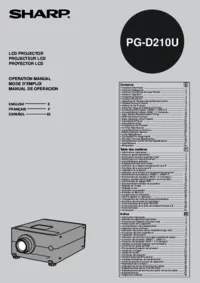 Sharp PG-D210U Bedienungsanleitung
(40 Seiten)
 Sharp PG-D210U Bedienungsanleitung
(40 Seiten)
Fragen zu Sharp PG-D210U
Zu diesem Handbuch gibt es noch keine Fragen. Stellen Sie die erste.
Verwandte Produkte und Handbücher für Projektoren Sharp PG-D210U
- Projektoren Sharp XV-Z1A Wartungshandbuch
 (65 Seiten)
- Projektoren Sharp AN-SV100T Bedienungsanleitung
(2 Seiten)
- Projektoren Sharp AN-LV140X Bedienungsanleitung
 (26 Seiten)
- Projektoren Sharp PG-M20XU Wartungshandbuch
(97 Seiten)
- Projektoren Sharp AN-P12EX Spezifikationen
(59 Seiten)
- Projektoren Sharp XG-C40XUSL Bedienungsanleitung
 (33 Seiten)
- Projektoren Sharp XG-C60X Bedienungsanleitung
(19 Seiten)
- Projektoren Sharp XG-XV1E Wartungshandbuch
(44 Seiten)
- Projektoren Sharp XV-Z200E Wartungshandbuch
(140 Seiten)
- Projektoren Sharp XV-Z12000 - Vision - DLP Projector Wartungshandbuch
(107 Seiten)
- Projektoren Sharp XV-Z30000 Operation Bedienungsanleitung
(17 Seiten)
- Projektoren Sharp XG-P20XD Wartungshandbuch
(137 Seiten)
- Projektoren Sharp AN-NV6T Bedienungsanleitung
(2 Seiten)
- Projektoren Sharp XV-Z20000 Bedienungsanleitung
(2 Seiten)
- Projektoren Sharp XG-55X-L Bedienungsanleitung
 (71 Seiten)
- Projektoren Sharp XV-Z10000U - Vision - DLP Projector Wartungshandbuch
(178 Seiten)
- Projektoren Sharp XG-NV7XU Wartungshandbuch
(110 Seiten)
- Projektoren Sharp PG-D2500X Einstellungsanleitung
(77 Seiten)
- Projektoren Sharp PG-D210U Bedienungsanleitung
(40 Seiten)
- Projektoren Sharp Notevision PG-F212X Bedienungsanleitung
(4 Seiten)