Sharp PG-MB60X Spezifikationen Seite 47
- Seite / 84
- Inhaltsverzeichnis
- FEHLERBEHEBUNG
- LESEZEICHEN

- PG-MB60X 1
- Model No.: PG-MB60X 2
- Serial No.: 2
- Introduction 5
- WARNING: 6
- PRODUCT DISPOSAL 6
- Pages 68 and 69 7
- Contents 8
- Reference 9
- IMPORTANT SAFEGUARDS 10
- 8 inches (20 cm) of space 11
- SETUP GUIDE 13
- Accessories 14
- Part Names and Functions 15
- Projector (Rear View) 17
- Remote Control 18
- 2 Insert the batteries 19
- Using the Remote Control 19
- Setup and Projection 20
- 4. Adjust the angle 21
- 7. Turn the Power off 21
- 6. Select the INPUT mode 21
- How to Use the 22
- Storage Case 22
- Setting up the Projector 23
- Projecting a Reversed Image 24
- Connections 25
- Cable adaptor 26
- (commercially available) 26
- Connecting to a Computer 27
- Connecting to Video Equipment 29
- Amplifier 32
- Connecting the Power Cord 33
- Turning the Projector on 33
- Turning the Power off 33
- Using the Adjustment 34
- Correcting Trapezoidal 35
- Distortion 35
- Adjusting the Focus 36
- Switching the INPUT 37
- Displaying the Black 38
- Screen and Turning off 38
- Displaying an Enlarged 38
- Portion of an Image 38
- Freezing a Moving 39
- Selecting the Picture 39
- Resize Mode 40
- Basic Operation 41
- Menu Items 42
- Useful Features 43
- Menu Selections (Adjustments) 44
- To adjust the pro 45
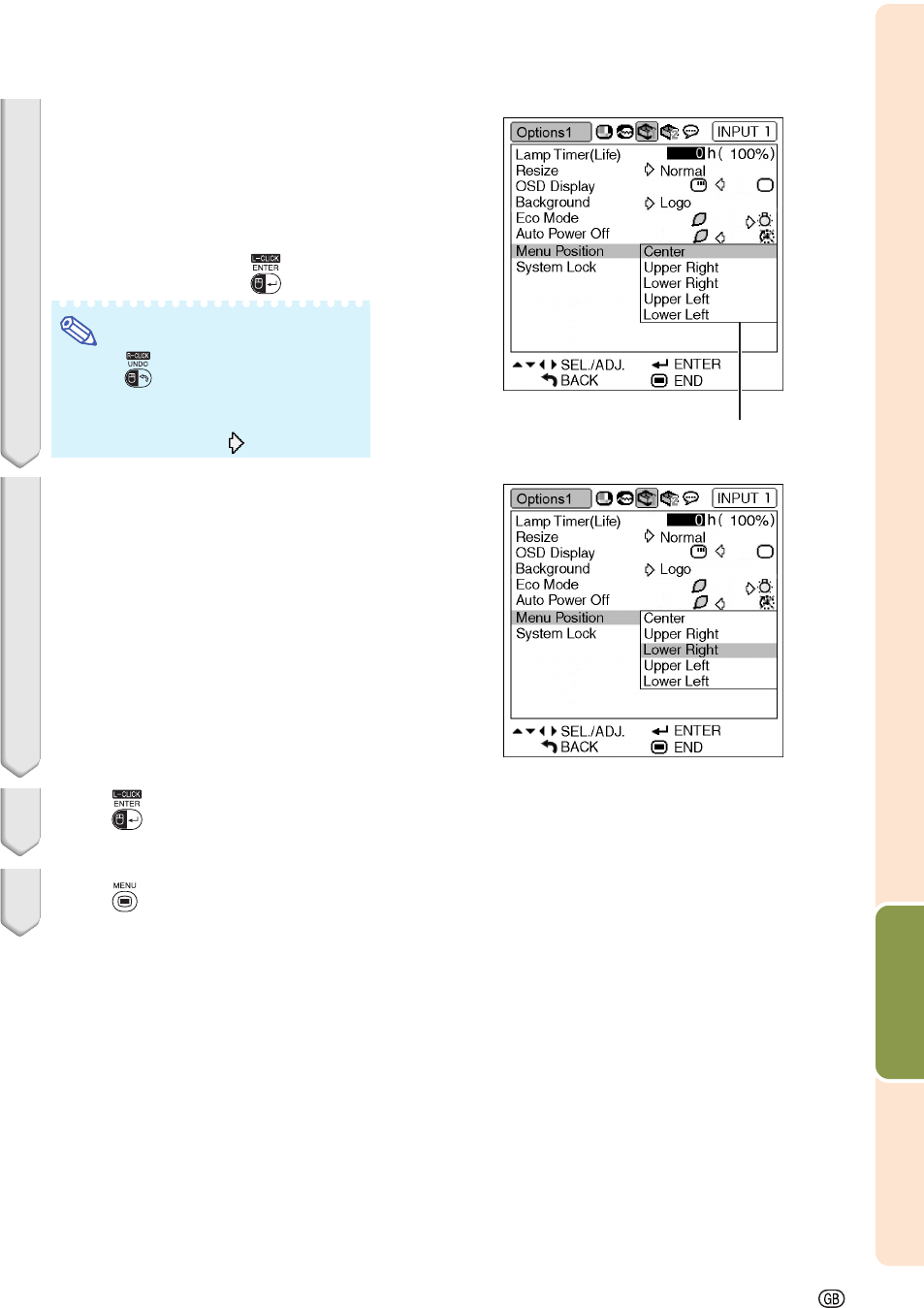
- Menu Selections (Settings) 46
- 3 Press 47
- 4 Press 47
- 5 Press 47
- 6 Press 47
- Selecting the Picture Mode 48
- Adjusting the Image 48
- Emphasizing the Contrast 49
- Signal Type Setting 50
- Adjusting the Computer 51
- Auto Sync Adjustment 52
- Checking the Lamp Life 53
- Setting the Resize Mode 53
- Setting the Video System 54
- Setting On-screen Display 54
- Eco Mode 55
- Auto Power Off Function 56
- Selecting the Menu Screen 56
- Position 56
- System Lock Function 57
- Keylock Function 58
- Setting a Password 59
- Auto Keystone Setting 60
- Speaker Setting 60
- Setting the Audio Output 61
- Reversing/Inverting Pro 61
- Selecting the Transmis 62
- Monitor Output Settings 62
- Returning to the Default 63
- Settings 63
- Selecting the On-screen 64
- Display Language 64
- Maintenance 65
- Maintenance Indicators 66
- Appendix 67
- Caution Concerning the Lamp 68
- Replacing the Lamp 68
- Removing and Installing 69
- Resetting the Lamp Timer 70
- Computer Compatibility Chart 71
- Troubleshooting 72
- For SHARP Assistance 74
- Specifications 75
- Glossary 76
- SHARP CORPORATION 78
- Side View 80
- Lens center 80
- Connecting Pin Assignments 81
- Computer control 82
- Communication conditions 82
- Basic format 82
- Commands 82
- Control Contents 83
- Dimensions 84
Verwandte Produkte und Handbücher für Projektoren Sharp PG-MB60X

 (49 Seiten)
(73 Seiten)
(49 Seiten)
(73 Seiten)
 (12 Seiten)
(32 Seiten)
(12 Seiten)
(32 Seiten)
 (54 Seiten)
(62 Seiten)
(12 Seiten)
(54 Seiten)
(62 Seiten)
(12 Seiten)
© 2020, manymanuals.de. Alle Rechte vorbehalten. | 0.020 s |
 Manymanuals.com
 Manymanuals.de
 Manymanuals.fr
 Manymanuals.it
 Manymanuals.pl
 Manymanuals.cz
 Manymanuals.es
 Manymanuals-pt.com
Kommentare zu diesen Handbüchern