Sharp MX-7040N Spezifikationen Seite 7
- Seite / 32
- Inhaltsverzeichnis
- LESEZEICHEN

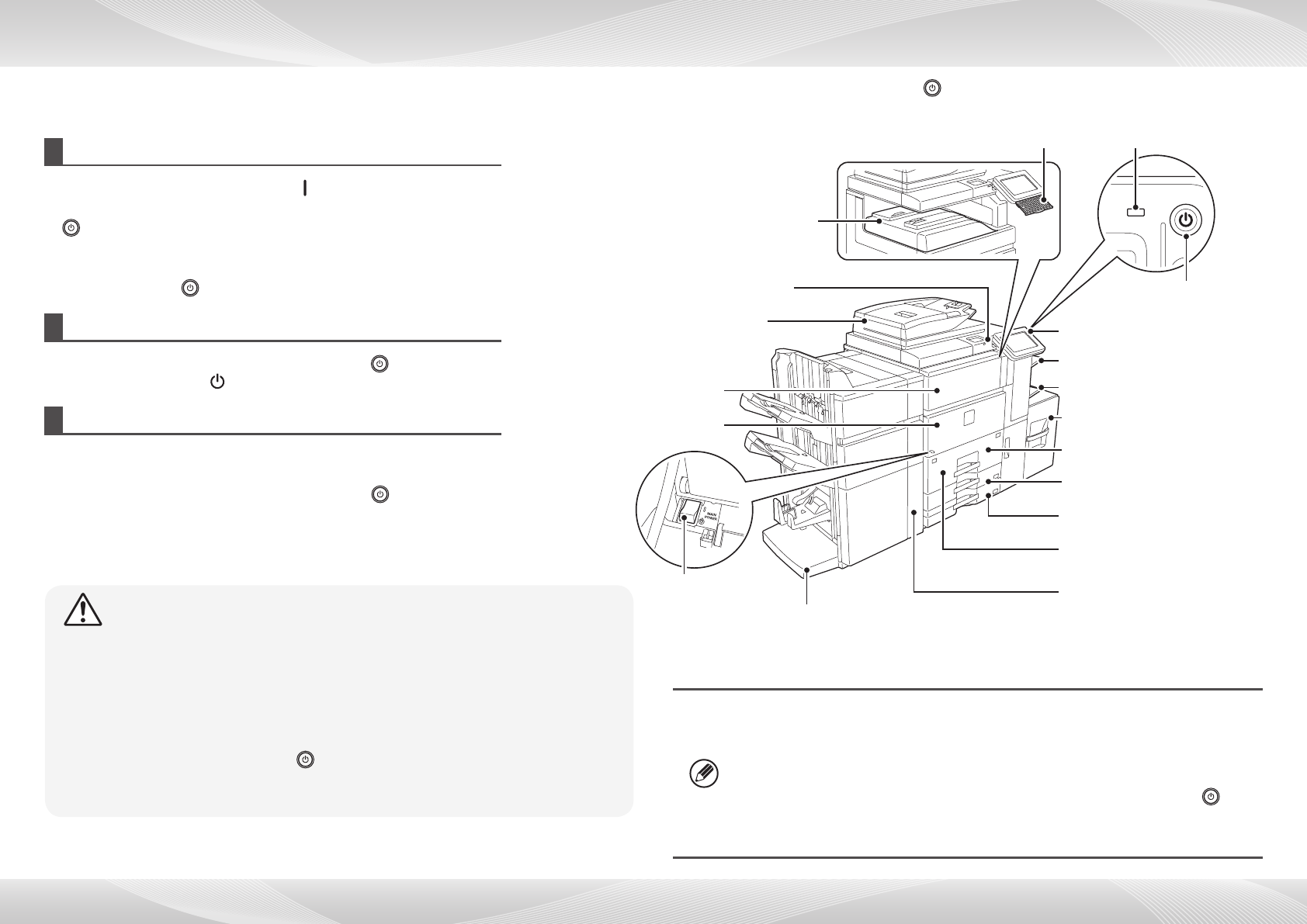
- QUICK START GUIDE 1
- BEFORE FIRST USE 2
- INFORMATION ON DISPOSAL 3
- Software Setup Guide (CD-PDF) 4
- User's Manual (PC) 4
- Operation Guide (Built-in) 4
- CAUTIONS 5
- Caution: 7
- HOME SCREEN 8
- Basic printing 9
- Copy settings 10
- Basic operations 10
- Exposure 11
- Original 11
- Scan settings 14
- File Format 15
- DOCUMENT FILING 16
- Job settings menu 17
- COPY OUTPUT 18
- Saddle Stitch 19
- Trimmer Setting 19
- Punch function 19
- Folding function 19
- MANUAL FINISHING 20
- SPECIFICATIONS 22
- Large Capacity Tray 23
- Large Capacity Trays 23
- Saddle stitch nisher 25
- Network Scanner Specications 27
- Inserter 27
- Folding Unit 27
- Trimming Module 27
- SUPPLIES 28
- Optional Units 29
- Punch Module 30
- Curl Correction Unit 30
- Setting mode password 31
- Noise emission 31
- SHARP CORPORATION 32
Verwandte Produkte und Handbücher für Server Sharp MX-7040N
 (7 Seiten)
(12 Seiten)
(68 Seiten)
(45 Seiten)
DeWalt DW101 Handbücher
Bedienungsanleitungen und Benutzerhandbücher für Elektrowerkzeuge DeWalt DW101.
Wir stellen 1 PDF-Handbücher DeWalt DW101 zum kostenlosen herunterladen nach Dokumenttypen zur Verfügung Bedienerhandbuch
Inhaltsverzeichnis
Weitere Produkte und Handbücher für Elektrowerkzeuge DeWalt
| Modelle | Dokumententyp |
|---|---|
| DW744 |
Bedienerhandbuch
  DeWalt DW744 Instruction Manual,
35 Seiten |
| DW331 |
Bedienerhandbuch
DeWalt DW331 Instruction Manual,
6 Seiten
|
| DW705 |
Bedienungsanleitung
DeWalt DW705 User's Manual,
52 Seiten
|
| D26411 |
Bedienerhandbuch
 DeWalt D26411 Instruction Manual,
32 Seiten |
| DWM120 |
Bedienungsanleitung
DeWalt DWM120 User's Manual,
7 Seiten
|
| DW321 |
Bedienerhandbuch
DeWalt DW321 Instruction Manual,
5 Seiten
|
| DW130V |
Bedienungsanleitung
DeWalt DW130V User's Manual,
5 Seiten
|
| D21002 |
Bedienerhandbuch
DeWalt D21002 Instruction Manual,
7 Seiten
|
| DWD024 |
Bedienerhandbuch
DeWalt DWD024 Instruction Manual,
32 Seiten
|
| DWP611 |
Bedienungsanleitung
DeWalt DWP611 User's Manual,
7 Seiten
|
| 616974-00 |
Bedienerhandbuch
DeWalt 616974-00 Instruction Manual,
4 Seiten
|
| DW308M |
Bedienungsanleitung
DeWalt DW308M User's Manual,
4 Seiten
|
| DW511 |
Bedienerhandbuch
DeWalt DW511 Instruction Manual,
5 Seiten
|
| D24000 |
Bedienerhandbuch
DeWalt D24000 Instruction Manual,
42 Seiten
|
| 36-714 |
Bedienerhandbuch
DeWalt 36-714 Instruction Manual,
80 Seiten
|
| a22946 |
Bedienerhandbuch
DeWalt a22946 Instruction Manual,
6 Seiten
|
| D28710 |
Bedienerhandbuch
DeWalt D28710 Instruction manual,
44 Seiten
|
| DCH213 |
Bedienerhandbuch
DeWalt DCH213 Instruction manual,
53 Seiten
|
| DW680 |
Bedienerhandbuch
DeWalt DW680 Instruction manual,
7 Seiten
|
| DWE315 |
Wartungshandbuch
DeWalt DWE315 Technical data,
15 Seiten
|
© 2020, manymanuals.de. Alle Rechte vorbehalten. | 0.025 s |
 Manymanuals.com
 Manymanuals.de
 Manymanuals.fr
 Manymanuals.it
 Manymanuals.pl
 Manymanuals.cz
 Manymanuals.es
 Manymanuals-pt.com
Kommentare zu diesen Handbüchern