Sharp AR-FX12 Spezifikationen Seite 39
- Seite / 104
- Inhaltsverzeichnis
- LESEZEICHEN

- Q Notice for Users in Europe 2
- INTRODUCTION 3
- CONTENTS 4
- A FACSIMILE 6
- IMPORTANT SAFETY INFORMATION 7
- CHAPTER 1 9
- POINTS TO CHECK AND PROGRAM 10
- AFTER INSTALLATION 10
- CONNECTING AN EXTENSION PHONE 10
- A LOOK AT THE OPERATION PANEL 11
- Condition settings screen 12
- Descending order 13
- Storing order 13
- (initially selected) 13
- Ascending order 13
- ORIGINALS 14
- LOADING A DOCUMENT 15
- STANDARD SIZE 16
- SIZE INPUT 16
- USING A STORED ORIGINAL SIZE 17
- SELECTING THE RESOLUTION 18
- SELECTING THE EXPOSURE 19
- RESENDPEAKER 20
- ADDRESS BOOK 20
- ADDRESS REVIEW 20
- CHAPTER 2 21
- SENDING A FAX 22
- MODE SWITCH 23
- CANCEL SEARCH 25
- E-MAIL/FTP 26
- INTERNET FAX 26
- FAXING A TWO-SIDED ORIGINAL 27
- Quick On-line 28
- Image rotation 28
- CANCELLING A FAX TRANSMISSION 29
- RECEIVING FAXES 30
- CHAPTER 3 31
- (BROADCAST TRANSMISSION) 32
- USING BROADCAST TRANSMISSION 33
- USING EDGE ERASE 34
- Selecting Dual Page Scan 35
- AUTOMATIC TRANSMISSION AT A 36
- DUAL PAGE 37
- USING CARD SHOT 38
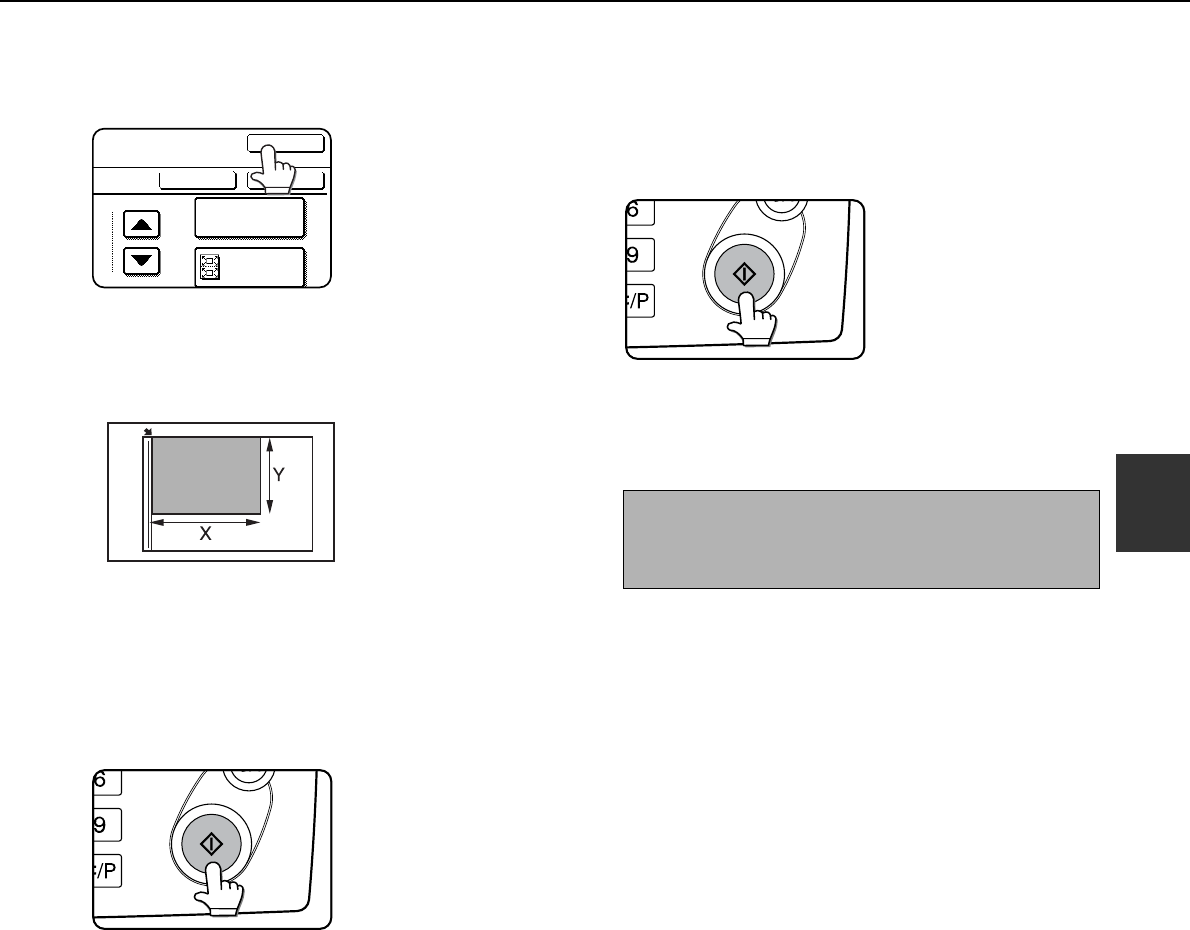
- SIZE RESET 39
- CANCEL OK 39
- SEND PAGE 39
- OWN NUMBER SENDING 41
- SPECIAL MODES 42
- TRANSACTION REPORT 42
- PRINT ORIGINAL IMAGE 42
- TRANSMISSION AND RECEPTION 43
- USING THE POLLING FUNCTION 43
- USING POLLING MEMORY 45
- PUBLIC BOX 46
- USING A PROGRAM 47
- USING THE TRANSFER FUNCTION 48
- Using the PC-FAX function 49
- CHAPTER 4 51
- TRANSMISSION BETWEEN MACHINES 52
- SUPPORTING F-CODES 52
- ADDRESS AND PASSCODE 53
- F-CODE POLLING MEMORY 54
- PROCEDURE FOR F-CODE POLLING 55
- Your machine 56
- The other machine 56
- CONFIDENTIAL MEMORY BOX 57
- CHAPTER 5 61
- USING AN EXTENSION PHONE 62
- CHAPTER 6 65
- PROGRAMMING 66
- AUTO DIAL KEYS AND PROGRAMS 66
- STORING ONE-TOUCH DIAL KEYS 67
- DELETE THE ADDRESS? 69
- SHARP CORPORATION 69
- STORING A GROUP KEY 70
- SHARP GROUP 71
- STORING A PROGRAM 72
- EDITING AND DELETING PROGRAMS 72
- STORING A GROUP INDEX 73
- PROGRAMMING, EDITING, AND 74
- DELETING F-CODE MEMORY BOXES 74
- (POLLING TIMES) 75
- MEMORY BOXES (PRINT PIN) 76
- BOXES (RECIPIENT) 77
- LIST PRINT 78
- FAX DATA 78
- RECEIVE/FORWARD 78
- CHAPTER 7 79
- VIEWING THE COMMUNICATION 81
- ACTIVITY REPORT 81
- WHEN AN ALARM SOUNDS AND A 81
- WARNING MESSAGE IS DISPLAYED 81
- PROBLEMS AND SOLUTIONS 82
- CHAPTER 8 85
- KEY OPERATOR PROGRAMS 86
- I-FAX SETTINGS 87
- E SEND SETTINGS 87
- OPERATION SETTINGS 87
- FAX SETTINGS 87
- Call timer at memory sending 92
- Quick on line sending 92
- Recall in case of line busy 92
- Anti junk fax setting 94
- Fax polling security 94
- Polling security setting 94
- Passcode number setting 94
- PRINTING OUT SETTINGS 95
- CHAPTER 9 97
- SPECIFICATIONS 98
- PRINTED IN FRANCE 104
Verwandte Produkte und Handbücher für Kopierer Sharp AR-FX12
 (6 Seiten)
(183 Seiten)
(28 Seiten)
(108 Seiten)
(16 Seiten)
(6 Seiten)
(183 Seiten)
(28 Seiten)
(108 Seiten)
(16 Seiten)
 (102 Seiten)
(116 Seiten)
(128 Seiten)
(140 Seiten)
(35 Seiten)
(12 Seiten)
(8 Seiten)
(116 Seiten)
(102 Seiten)
(116 Seiten)
(128 Seiten)
(140 Seiten)
(35 Seiten)
(12 Seiten)
(8 Seiten)
(116 Seiten)
 (44 Seiten)
(12 Seiten)
(32 Seiten)
(125 Seiten)
(111 Seiten)
(44 Seiten)
(12 Seiten)
(32 Seiten)
(125 Seiten)
(111 Seiten)
© 2020, manymanuals.de. Alle Rechte vorbehalten. | 0.032 s |
 Manymanuals.com
 Manymanuals.de
 Manymanuals.fr
 Manymanuals.it
 Manymanuals.pl
 Manymanuals.cz
 Manymanuals.es
 Manymanuals-pt.com
Kommentare zu diesen Handbüchern