Sharp AR-NB3 Einstellungsanleitung Seite 26

  • Herunterladen
  • Zu meinen Handbüchern hinzufügen
  • Drucken
  • Seite
    / 48
  • Inhaltsverzeichnis
  • LESEZEICHEN
  • Bewertet. / 5. Basierend auf Kundenbewertungen
Seitenansicht 25
24
INSTALLING THE SOFTWARE
INSTALLING THE PRINTER DRIVER (STANDARD
INSTALLATION)
1
Insert the network expansion kit
"Software CD-ROM (1)" into your
computer's CD-ROM drive.
2
Click the [start] button, click [My
Computer] ( ), and then double-click
the [CD-ROM] icon ( ).
In Windows 95/98/Me/NT 4.0/2000, double-click
[My Computer] and then double-click the
[CD-ROM] icon.
3
Double-click the [Setup] icon ( ).
4
The "SOFTWARE LICENSE" window
will appear. Make sure that you
understand the contents of the license
agreement and then click the [Yes]
button.
5
Read the message in the "Welcome"
window and then click the [Next]
button.
6
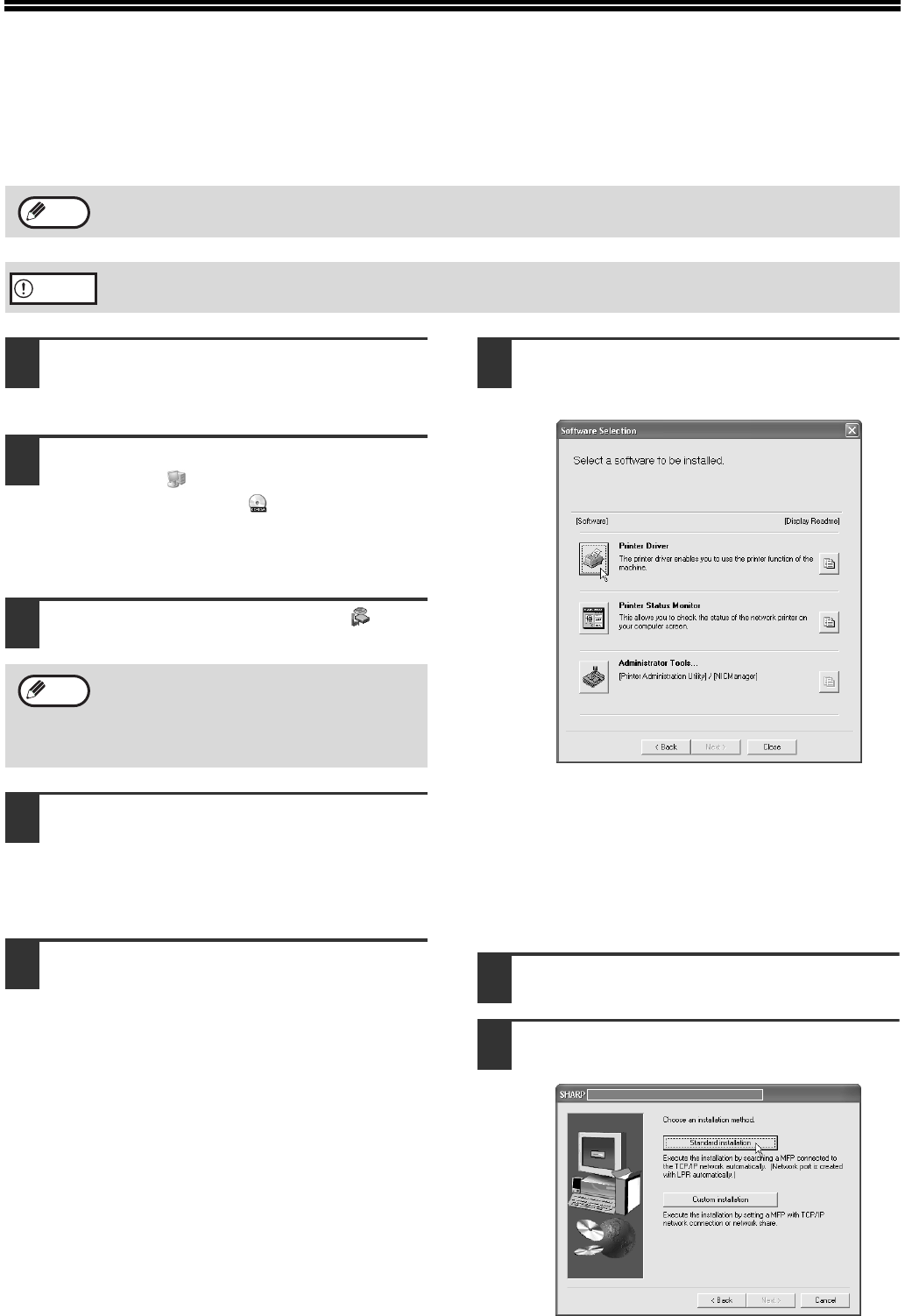
Click the [Printer Driver] button.
To view information on the software, click the
[Display Readme] button.
If you wish to install the printer status monitor,
click the [Printer Status Monitor] button in this
window and follow the on-screen instructions.
If you wish to install the printer administration
utility, click the [Administrator Tools] button in
this window and then click the [Printer
Administration Utility] button and follow the
on-screen instructions.
7
Click the [Next] button.
8
Click the [Standard installation]
button.
If you wish to install the display font or specify the machine's IP address by direct entry when installing the printer
driver, select [Custom installation]. (Page 26)
To use the machine as a network printer in Windows NT 4.0, "TCP/IP Protocol" must be installed on your
computer. If this is not installed, see Windows NT 4.0 Help to install them.
Note
Caution
If the language selection screen appears
after you double click the [Setup] icon,
select the language that you wish to use and
click the [Next] button. (Normally the correct
language is selected automatically.)
Note
Chapter02.fm 24 ページ 2004年11月26日 金曜日 午後3時18分
Seitenansicht 25
1 2 ... 21 22 23 24 25 26 27 28 29 30 31 ... 47 48

Kommentare zu diesen Handbüchern

Keine Kommentare

Philips HD4676/50 manuales

Manuales del propietario y guías del usuario para Hervidores eléctricos Philips HD4676/50.
Ofrecemos 1 manuales en pdf Philips HD4676/50 para descargar gratis por tipos de documentos: Ficha de datos


Más productos y manuales para Hervidores eléctricos Philips

Modelos Tipo de documento
HD4666/60 Ficha de datos   Philips Kettle HD4666/60, 2 paginas
HD4646/25 Ficha de datos   Philips Daily Collection Kettle HD4646/25, 2 paginas
RI4622/21 Ficha de datos   Philips Walita Kettle RI4622/21, 2 paginas
HD4659/04 Ficha de datos   Philips HD4659/04 electrical kettle, 2 paginas
HD9316/03 Ficha de datos    Philips Viva Collection Kettle HD9316/03, 3 paginas
HD4656/40 Ficha de datos   Philips Kettle HD4656/40, 2 paginas
HD4677/21 Ficha de datos   Philips HD4677/21 electrical kettle, 2 paginas
HD9300/90 Ficha de datos   Philips Daily Collection Kettle HD9300/90, 2 paginas
HD9304/13 Ficha de datos   Philips Daily Collection Kettle HD9304/13, 2 paginas
CRP227/01 Ficha de datos   Philips Lid for teamaker CRP227, 2 paginas
HD4690/05 Ficha de datos   Philips Aluminium Collection Kettle HD4690/05, 2 paginas
HD4681/53 Ficha de datos   Philips Kettle HD4681/53, 2 paginas
CRP226/01 Ficha de datos   Philips Filter for kettle CRP226, 2 paginas
CRP228/01 Ficha de datos   Philips Filter for kettle CRP228, 2 paginas
CRP229/01 Ficha de datos   Philips Filter basket holder CRP229, 2 paginas
HD9320/20 Ficha de datos   Philips HD9320/20 electrical kettle, 2 paginas
HD4646/75 Ficha de datos   Philips Daily Collection Kettle HD4646/75, 2 paginas
HD4667/20 Ficha de datos   Philips Kettle HD4667/20, 2 paginas
CRP230/01 Ficha de datos   Philips Filter for kettle CRP230, 2 paginas
HD4649/00 Ficha de datos   Philips HD4649 1.7 liter Kettle, 2 paginas