Sharp AR-NB3 Einstellungsanleitung Seite 20

  • Herunterladen
  • Zu meinen Handbüchern hinzufügen
  • Drucken
  • Seite
    / 48
  • Inhaltsverzeichnis
  • LESEZEICHEN
  • Bewertet. / 5. Basierend auf Kundenbewertungen
Seitenansicht 19
18
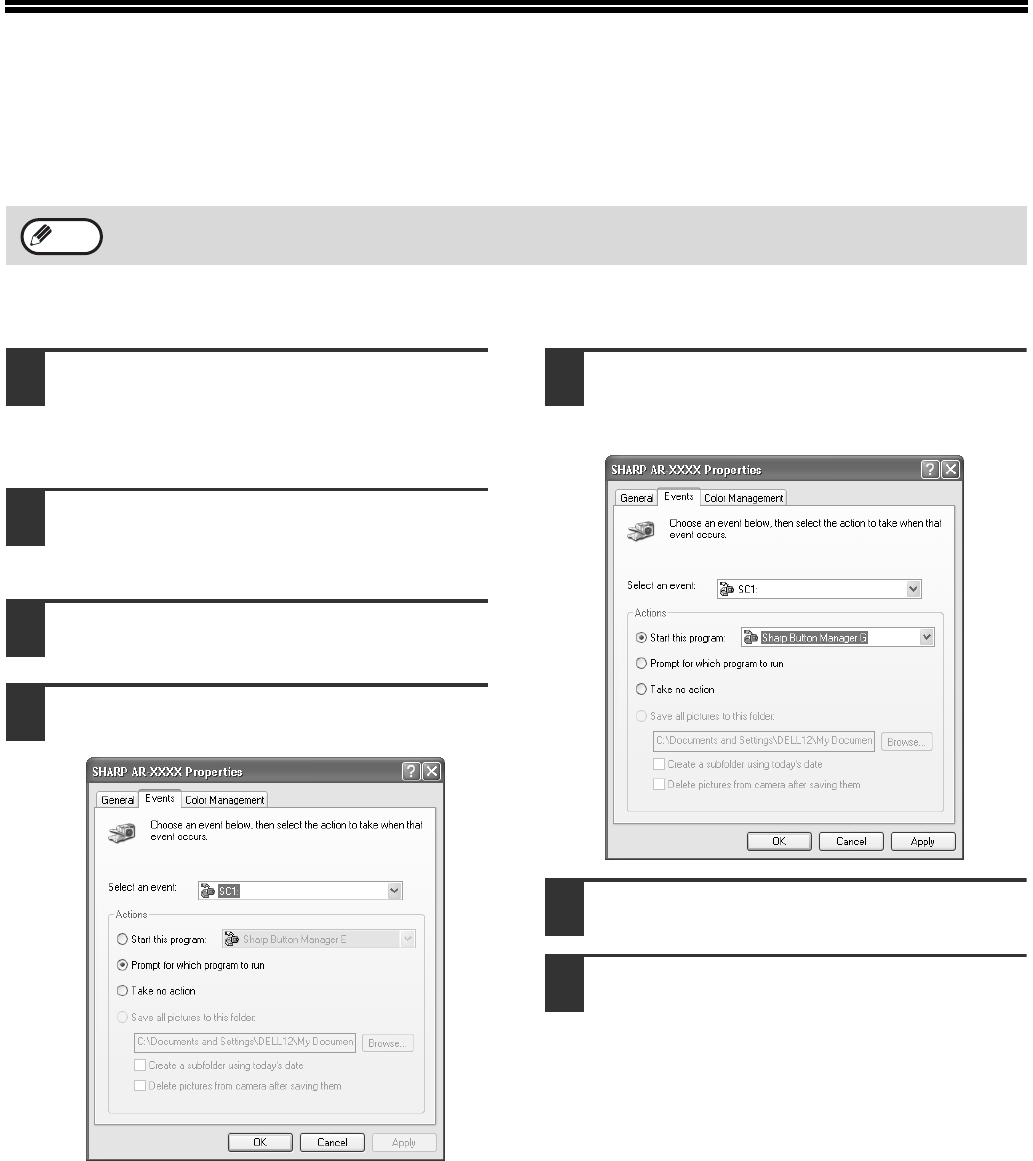
SETTING UP BUTTON MANAGER
Button Manager is a software program that works with the scanner driver to enable scanning from the operation
panel of the machine.
To scan using the operation panel of the machine, Button Manager must be linked with the destination that appears
in the display. Follow the steps below to link Button Manager to machine scanner events.
WINDOWS XP
1
Click the [start] button, click [Control
Panel], click [Printers and Other
Hardware], and then click [Scanners
and Cameras].
2
Click the [SHARP AR-XXXX] icon and
select [Properties] from the [File]
menu.
3
In the "Properties" screen, click the
[Events] tab.
4
Select [SC1:] from the "Select an
event" pull-down menu.
5
Select [Start this program] and then
select [Sharp Button Manager G] from
the pull-down menu.
6
Click the [Apply] button.
7
Repeat Steps 4 through 6 to link
Button Manager to [SC2:] through
[SC6:].
• Select [SC2:] from the "Select an event"
pull-down menu. Select [Start this program],
select [Sharp Button Manager G] from the
pull-down menu, and then click the [Apply]
button. Do the same for each ScanMenu
through [SC6:].
• When the settings have been completed, click
the [OK] button to close the screen.
Button Manager is now linked to the machine scan
destinations SC1 to SC6.
• The scan settings for each of scan destinations SC1
through SC6 can be changed in the setting window
of Button Manager.
•
For the default settings for destinations SC1 to SC6 and
the procedures for configuring Button Manager
settings, see "Scanning from the Operation Panel of the
Machine" and "Button Manager Settings" in "Operation
Manual (for printer and scanner)" in the "Software
CD-ROM (1)" that accompanies the machine.
If computers are connected to both of the USB ports on the machine, separate Button Manager settings are
required for USB-1 and USB-2. (when the dual function board is installed.)
Note
Pegasus-E_Setup_Eng.book 18 ページ 2004年8月19日 木曜日 午後3時46分
Seitenansicht 19
1 2 ... 15 16 17 18 19 20 21 22 23 24 25 ... 47 48

Kommentare zu diesen Handbüchern

Keine Kommentare

Hunter-fan 40120 manuels

Manuels d'utilisation et guides de l'utilisateur pour Panneau de contrôle Hunter-fan 40120.
Nous fournissons des manuels en pdf 1 Hunter-fan 40120 à télécharger gratuitement par type de document : Manuel de l'utilisateur


Plus de produits et de manuels pour Panneau de contrôle Hunter-fan

Modèles Type de document
47550 Manuel de l'utilisateur   Hunter Fan 47550 User Manual, 38 pages
43168 Manuel de l'utilisateur   Hunter Fan 43168 User Manual, 21 pages
44372 Manuel de l'utilisateur   Hunter Fan 44372 User Manual, 45 pages
44665 Manuel de l'utilisateur   Hunter Fan 44665 User Manual, 2 pages
44033-01 44277 Manuel de l'utilisateur   Hunter Fan 44033-01 44277 User Manual, 37 pages
44760 Manuel de l'utilisateur   Hunter Fan 44760 User Manual, 28 pages
44905 Manuel de l'utilisateur   Hunter Fan 44905 User Manual, 54 pages
44127 Manuel de l'utilisateur   Hunter Fan 44127 User Manual, 37 pages
43255 Manuel de l'utilisateur   Hunter Fan 43255 User Manual, 7 pages
44110 Manuel de l'utilisateur   Hunter Fan 44110 User Manual, 52 pages
43154 Manuel de l'utilisateur   Hunter Fan 43154 User Manual [en] , 7 pages
43153 Manuel de l'utilisateur   Hunter Fan 43153 User Manual, 2 pages
44050 Manuel de l'utilisateur   Hunter Fan 44050 User Manual, 24 pages
43355 Manuel de l'utilisateur   Hunter Fan 43355 User Manual, 43 pages
47300A Manuel de l'utilisateur   Hunter Fan 47300A User Manual, 44 pages
40135 Manuel de l'utilisateur   Hunter Fan 40135 User Manual, 30 pages
47350A Manuel de l'utilisateur   Hunter Fan 47350A User Manual, 23 pages
44260 Manuel de l'utilisateur    Hunter Fan 44260 User Manual, 104 pages
44377W Manuel de l'utilisateur   Hunter Fan 44377W User Manual, 64 pages
PH20-30A Manuel de l'utilisateur   Hunter Fan PH20-30A User Manual, 26 pages