Sharp MX-4101N Einstellungsanleitung Seite 17: Printing using the IPP function and the SSL function
 1
 2
 3
 4
 5
 6
 7
 8
 9
 10
 11
 12
 13
 14
 15
 16
 17
 18
 19
 20
 21
 22
 23
 24
 25
 26
 27
 28
 29
 30
 31
 32
 33
 34
 35
 36
 37
 38
 39
 40
 41
 42
 43
 44
 45
15
INSTALLING THE PRINTER DRIVER / PC-FAX DRIVER
�
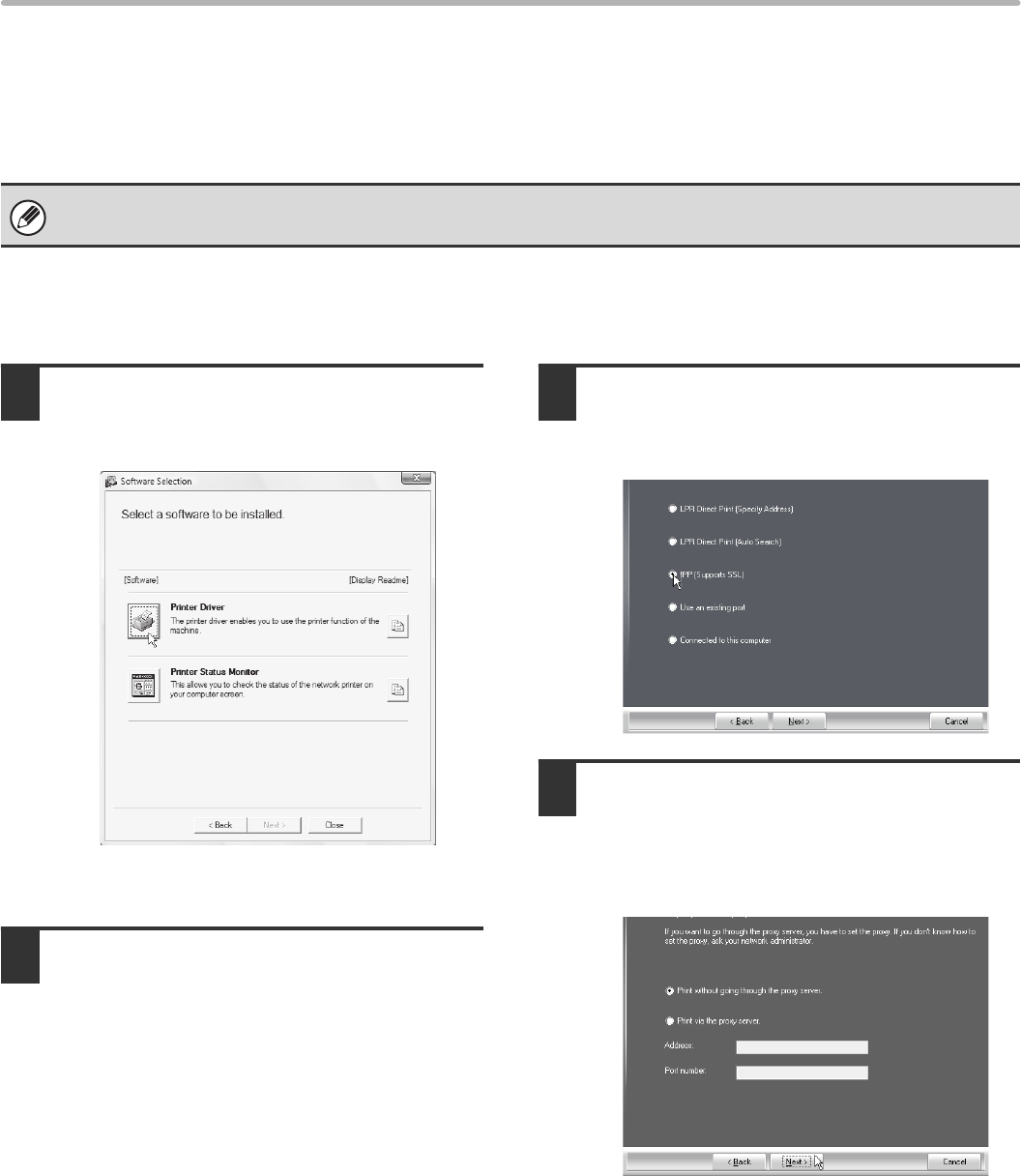
Printing using the IPP function and the SSL function
The IPP function can be used to print to the machine over a network using HTTP protocol.
When the machine is in a remote location, this function can be used in place of the fax function to print a higher quality
image than a fax. The IPP function can also be used in combination with the SSL (encrypted communication) function to
encrypt the print data. This enables secure printing with no concern that the data will be leaked to others.
When the software selection screen appears in step 6 of "OPENING THE SOFTWARE SELECTION SCREEN (FOR
ALL SOFTWARE)" (page 7), perform the steps below.
1
Click the [Printer Driver] button.
To install the PC-Fax driver, click the [PC-Fax Driver]
button on the "Disc 2" CD-ROM.
* The above screen appears when using the
"Disc 1" CD-ROM.
2
Click the [Custom installation] button.
3
When you are asked how the printer is
connected, select [IPP] and click the
[Next] button.
4
If a proxy server is used, specify the
proxy server and click the [Next]
button.
To specify a proxy server, select [Print via the proxy
server] and then enter the [Address] and [Port number].
To use the SSL function, configure the "SSL Settings" in the system settings (administrator) of the machine. To configure the
settings, see "SYSTEM SETTINGS" in the Operation Guide.
PDF-Datei · ·
Fragen zu Sharp MX-4101N
Zu diesem Handbuch gibt es noch keine Fragen. Stellen Sie die erste.
Verwandte Produkte und Handbücher für Multifunktionsgeräte Sharp MX-4101N
- Multifunktionsgeräte Sharp MX-M362N Bedienungsanleitung
 (12 Seiten)
- Multifunktionsgeräte Sharp AR-5520D Bedienungsanleitung
 (91 Seiten)
- Multifunktionsgeräte Sharp DC525 - FO B/W Laser Bedienungsanleitung
(6 Seiten)
- Multifunktionsgeräte Sharp MFP Series Bedienungsanleitung
(16 Seiten)
- Multifunktionsgeräte Sharp LC-70UD1X Spezifikationen
(96 Seiten)
- Multifunktionsgeräte Sharp MX-LCX3 Bedienungsanleitung
(12 Seiten)
- Multifunktionsgeräte Sharp MX-M753N Bedienungsanleitung
(12 Seiten)
- Multifunktionsgeräte Sharp MX-4101N Bedienungsanleitung
(2 Seiten)
- Multifunktionsgeräte Sharp MX-7500N Bedienungsanleitung
(2 Seiten)
- Multifunktionsgeräte Sharp MX-B402 Bedienungsanleitung
(9 Seiten)
- Multifunktionsgeräte Sharp EL-6230 Bedienungsanleitung
(438 Seiten)
- Multifunktionsgeräte Sharp MX-M260 Bedienungsanleitung
(8 Seiten)
- Multifunktionsgeräte Sharp MX-B402 Bedienungsanleitung
(12 Seiten)
- Multifunktionsgeräte Sharp MX-M362N Bedienungsanleitung
 (56 Seiten)
- Multifunktionsgeräte Sharp MX-2010U Spezifikationen
(12 Seiten)
- Multifunktionsgeräte Sharp MX-M314U N Bedienungsanleitung
(2 Seiten)
- Multifunktionsgeräte Sharp User Authentication Bedienungsanleitung
(40 Seiten)
- Multifunktionsgeräte Sharp MX-M753N Bedienungsanleitung
(12 Seiten)
- Multifunktionsgeräte Sharp AM-400 Bedienungsanleitung
(6 Seiten)
- Multifunktionsgeräte Sharp AL-1217 Spezifikationen
(86 Seiten)