Sharp MX-4101N Einstellungsanleitung Seite 26: When the PPD driver is installed
 1
 2
 3
 4
 5
 6
 7
 8
 9
 10
 11
 12
 13
 14
 15
 16
 17
 18
 19
 20
 21
 22
 23
 24
 25
 26
 27
 28
 29
 30
 31
 32
 33
 34
 35
 36
 37
 38
 39
 40
 41
 42
 43
 44
 45
24
INSTALLING THE PRINTER DRIVER / PC-FAX DRIVER
�
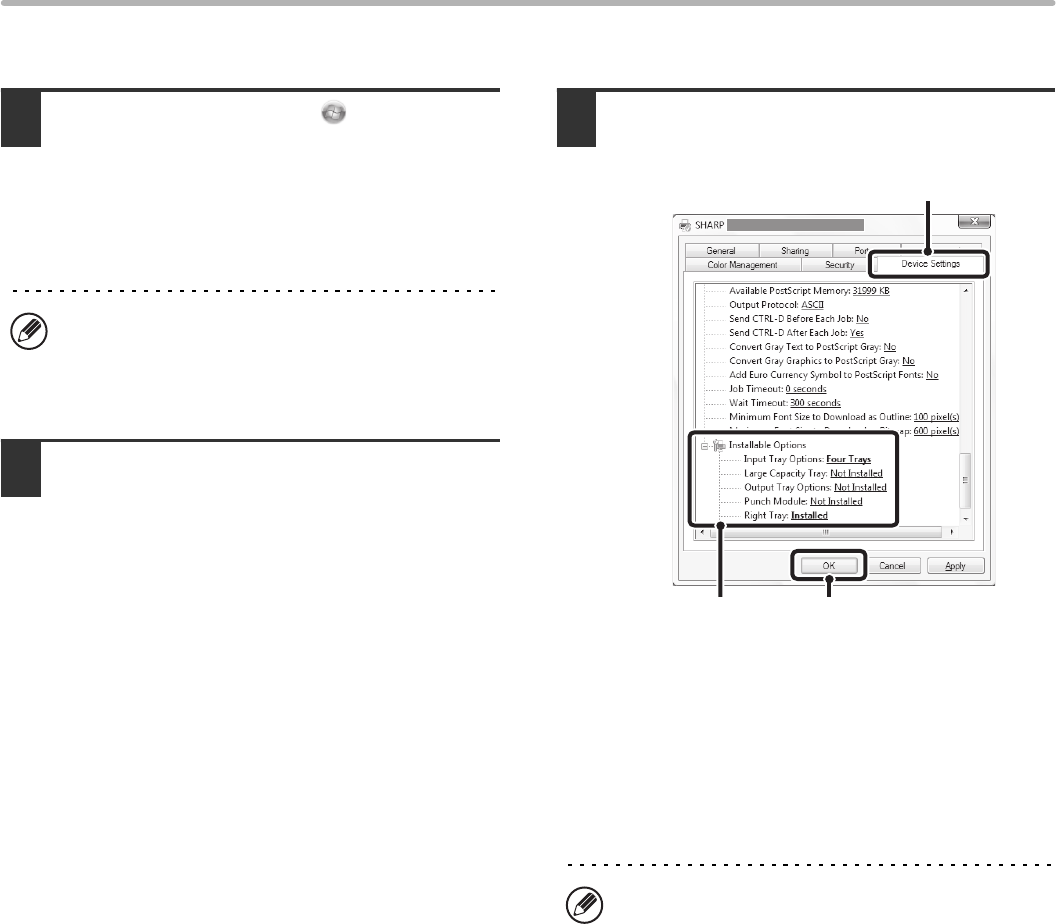
When the PPD driver is installed
1
Click the [Start] button (
), click
[Control Panel], and then click [Printer].
• In Windows XP/Server 2003, click the [start] button
and then click [Printers and Faxes].
• In Windows 2000, click the [Start] button, select
[Settings], and then click [Printers].
2
Open the printer properties window.
(1) Right-click the printer driver icon of the
machine.
(2) Select [Properties].
3
Configure the printer driver for the
options installed on the machine.
(1) Click the [Device Settings] tab.
(2) Configure each item based on the
machine configuration.
The items and the procedures for configuring the
items vary depending on the operating system
version.
(3) Click the [OK] button.
If [Printers and Faxes] does not appear in the [start]
menu in Windows XP, click the [start] button, click
[Control Panel], click [Printers and Other Hardware],
and then click [Printers and Faxes].
You can check the options that are installed on the
machine by printing out the "All Custom Setting List" in
the system settings. (However, note that "Input Tray
Options" must be set to the number of trays on the
machine.) Follow these steps to print out the "All
Custom Setting List": Press the [SYSTEM SETTINGS]
key, touch the [List Print (User)] key, and select "All
Custom Setting List".
(1)
(2)
(3)
PDF-Datei · ·
Fragen zu Sharp MX-4101N
Zu diesem Handbuch gibt es noch keine Fragen. Stellen Sie die erste.
Verwandte Produkte und Handbücher für Multifunktionsgeräte Sharp MX-4101N
- Multifunktionsgeräte Sharp MX-M362N Bedienungsanleitung
 (12 Seiten)
- Multifunktionsgeräte Sharp AR-5520D Bedienungsanleitung
 (91 Seiten)
- Multifunktionsgeräte Sharp DC525 - FO B/W Laser Bedienungsanleitung
(6 Seiten)
- Multifunktionsgeräte Sharp MFP Series Bedienungsanleitung
(16 Seiten)
- Multifunktionsgeräte Sharp LC-70UD1X Spezifikationen
(96 Seiten)
- Multifunktionsgeräte Sharp MX-LCX3 Bedienungsanleitung
(12 Seiten)
- Multifunktionsgeräte Sharp MX-M753N Bedienungsanleitung
(12 Seiten)
- Multifunktionsgeräte Sharp MX-4101N Bedienungsanleitung
(2 Seiten)
- Multifunktionsgeräte Sharp MX-7500N Bedienungsanleitung
(2 Seiten)
- Multifunktionsgeräte Sharp MX-B402 Bedienungsanleitung
(9 Seiten)
- Multifunktionsgeräte Sharp EL-6230 Bedienungsanleitung
(438 Seiten)
- Multifunktionsgeräte Sharp MX-M260 Bedienungsanleitung
(8 Seiten)
- Multifunktionsgeräte Sharp MX-B402 Bedienungsanleitung
(12 Seiten)
- Multifunktionsgeräte Sharp MX-M362N Bedienungsanleitung
 (56 Seiten)
- Multifunktionsgeräte Sharp MX-2010U Spezifikationen
(12 Seiten)
- Multifunktionsgeräte Sharp MX-M314U N Bedienungsanleitung
(2 Seiten)
- Multifunktionsgeräte Sharp User Authentication Bedienungsanleitung
(40 Seiten)
- Multifunktionsgeräte Sharp MX-M753N Bedienungsanleitung
(12 Seiten)
- Multifunktionsgeräte Sharp AM-400 Bedienungsanleitung
(6 Seiten)
- Multifunktionsgeräte Sharp AL-1217 Spezifikationen
(86 Seiten)