Sharp MX-4101N Einstellungsanleitung Seite 38: Display printer information
 1
 2
 3
 4
 5
 6
 7
 8
 9
 10
 11
 12
 13
 14
 15
 16
 17
 18
 19
 20
 21
 22
 23
 24
 25
 26
 27
 28
 29
 30
 31
 32
 33
 34
 35
 36
 37
 38
 39
 40
 41
 42
 43
 44
 45
36
MAC OS X
X Printing using the IPP function
The machine can print using the IPP function. When the machine is in a remote location, this function can be used in
place of the fax function to print a higher quality image than a fax. If you wish to use the IPP function, follow these steps
to select the PPD file when configuring the printer driver (step 14 on page 34).
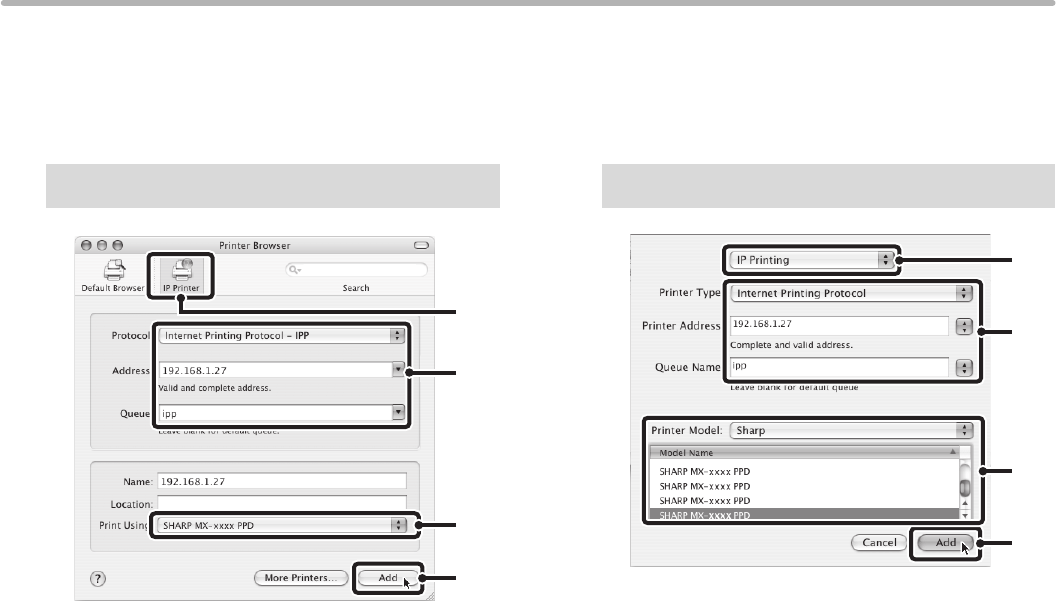
(1) Click the [IP Printer] icon.
If you are using Mac OS X v10.5 to 10.5.8 or v10.6
to 10.6.2, click the [IP] icon.
(2) Select [Internet Printing Protocol] in
"Protocol". Enter the address of the
machine (IP address or domain name)
and the queue name.
Enter "ipp" in "Queue".
(3) Select [Sharp] in "Print Using" and
click the PPD file of your model.
If you are using Mac OS X v 10.5 to 10.5.8 or v10.6
to 10.6.2, select [Select a driver to use] (or [Select
Printer Software]) from "Print Using" and click the
PPD file for your model.
(4) Click the [Add] button.
The "Installable Options" screen will appear. Make
sure that the settings are correct and click the
[Continue] button.
☞
Checking the IP address of the machine (page 6)
(1) Select [IP Printing].
(2) Select [Internet Printing Protocol] in
"Printer Type". Enter the address of the
machine (IP address or domain name)
and the "Queue Name".
• If you are using Mac OS X v10.2.8, enter the
address of the machine (IP address or domain
name) in "Printer's Address".
• Enter "ipp" in "Queue Name".
(3) Select [Sharp] in "Printer Model" and
click the PPD file of your model.
(4) Click the [Add] button.
☞
Checking the IP address of the machine (page 6)
v10.4.11, v10.5 - 10.5.8, v10.6 - 10.6.2
(1)
(2)
(4)
(3)
v10.2.8, v10.3.9
(1)
(2)
(4)
(3)
PDF-Datei · ·
Fragen zu Sharp MX-4101N
Zu diesem Handbuch gibt es noch keine Fragen. Stellen Sie die erste.
Verwandte Produkte und Handbücher für Multifunktionsgeräte Sharp MX-4101N
- Multifunktionsgeräte Sharp MX-M362N Bedienungsanleitung
 (12 Seiten)
- Multifunktionsgeräte Sharp AR-5520D Bedienungsanleitung
 (91 Seiten)
- Multifunktionsgeräte Sharp DC525 - FO B/W Laser Bedienungsanleitung
(6 Seiten)
- Multifunktionsgeräte Sharp MFP Series Bedienungsanleitung
(16 Seiten)
- Multifunktionsgeräte Sharp LC-70UD1X Spezifikationen
(96 Seiten)
- Multifunktionsgeräte Sharp MX-LCX3 Bedienungsanleitung
(12 Seiten)
- Multifunktionsgeräte Sharp MX-M753N Bedienungsanleitung
(12 Seiten)
- Multifunktionsgeräte Sharp MX-4101N Bedienungsanleitung
(2 Seiten)
- Multifunktionsgeräte Sharp MX-7500N Bedienungsanleitung
(2 Seiten)
- Multifunktionsgeräte Sharp MX-B402 Bedienungsanleitung
(9 Seiten)
- Multifunktionsgeräte Sharp EL-6230 Bedienungsanleitung
(438 Seiten)
- Multifunktionsgeräte Sharp MX-M260 Bedienungsanleitung
(8 Seiten)
- Multifunktionsgeräte Sharp MX-B402 Bedienungsanleitung
(12 Seiten)
- Multifunktionsgeräte Sharp MX-M362N Bedienungsanleitung
 (56 Seiten)
- Multifunktionsgeräte Sharp MX-2010U Spezifikationen
(12 Seiten)
- Multifunktionsgeräte Sharp MX-M314U N Bedienungsanleitung
(2 Seiten)
- Multifunktionsgeräte Sharp User Authentication Bedienungsanleitung
(40 Seiten)
- Multifunktionsgeräte Sharp MX-M753N Bedienungsanleitung
(12 Seiten)
- Multifunktionsgeräte Sharp AM-400 Bedienungsanleitung
(6 Seiten)
- Multifunktionsgeräte Sharp AL-1217 Spezifikationen
(86 Seiten)