Sharp MX-4101N Einstellungsanleitung Seite 24: CONFIGURING THE PRINTER DRIVER FOR THE OPTIONS INSTALLED ON THE…
 1
 2
 3
 4
 5
 6
 7
 8
 9
 10
 11
 12
 13
 14
 15
 16
 17
 18
 19
 20
 21
 22
 23
 24
 25
 26
 27
 28
 29
 30
 31
 32
 33
 34
 35
 36
 37
 38
 39
 40
 41
 42
 43
 44
 45
22
INSTALLING THE PRINTER DRIVER / PC-FAX DRIVER
CONFIGURING THE PRINTER DRIVER FOR THE
OPTIONS INSTALLED ON THE MACHINE
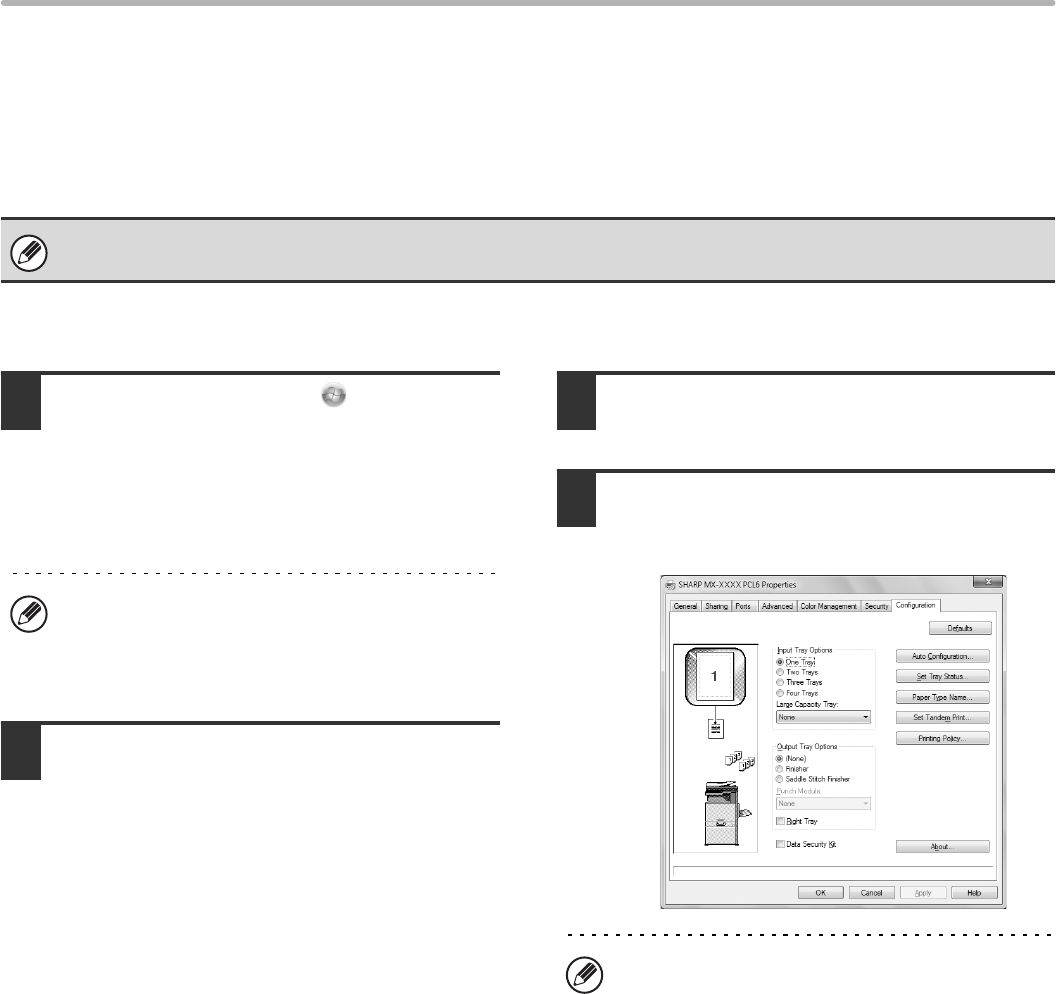
After installing the printer driver, you must configure the printer driver settings appropriately for the options that have
been installed and the size and type of paper loaded in the machine. Follow the steps below to configure the printer
driver.
�
When the PCL printer driver or PS printer driver is installed
1
Click the [Start] button (
), click
[Control Panel], and then click [Printer].
• In Windows XP/Server 2003, click the [start] button
and then click [Printers and Faxes].
• In Windows 2000, click the [Start] button, select
[Settings], and then click [Printers].
2
Open the printer properties window.
(1) Right-click the printer driver icon of the
machine.
(2) Select [Properties].
3
Click the [Configuration] tab.
4
Click the [Auto Configuration] button.
The settings are automatically configured based on the
detected machine status.
If the PPD driver is installed, see "When the PPD driver is installed" (page 24).
If [Printers and Faxes] does not appear in the [start]
menu in Windows XP, click the [start] button, click
[Control Panel], click [Printers and Other Hardware],
and then click [Printers and Faxes].
If the machine is being used on an IPv6 network, you
must configure the options manually as explained in "If
automatic configuration fails" (page 23).
PDF-Datei · ·
Fragen zu Sharp MX-4101N
Zu diesem Handbuch gibt es noch keine Fragen. Stellen Sie die erste.
Verwandte Produkte und Handbücher für Multifunktionsgeräte Sharp MX-4101N
- Multifunktionsgeräte Sharp MX-M362N Bedienungsanleitung
 (12 Seiten)
- Multifunktionsgeräte Sharp AR-5520D Bedienungsanleitung
 (91 Seiten)
- Multifunktionsgeräte Sharp DC525 - FO B/W Laser Bedienungsanleitung
(6 Seiten)
- Multifunktionsgeräte Sharp MFP Series Bedienungsanleitung
(16 Seiten)
- Multifunktionsgeräte Sharp LC-70UD1X Spezifikationen
(96 Seiten)
- Multifunktionsgeräte Sharp MX-LCX3 Bedienungsanleitung
(12 Seiten)
- Multifunktionsgeräte Sharp MX-M753N Bedienungsanleitung
(12 Seiten)
- Multifunktionsgeräte Sharp MX-4101N Bedienungsanleitung
(2 Seiten)
- Multifunktionsgeräte Sharp MX-7500N Bedienungsanleitung
(2 Seiten)
- Multifunktionsgeräte Sharp MX-B402 Bedienungsanleitung
(9 Seiten)
- Multifunktionsgeräte Sharp EL-6230 Bedienungsanleitung
(438 Seiten)
- Multifunktionsgeräte Sharp MX-M260 Bedienungsanleitung
(8 Seiten)
- Multifunktionsgeräte Sharp MX-B402 Bedienungsanleitung
(12 Seiten)
- Multifunktionsgeräte Sharp MX-M362N Bedienungsanleitung
 (56 Seiten)
- Multifunktionsgeräte Sharp MX-2010U Spezifikationen
(12 Seiten)
- Multifunktionsgeräte Sharp MX-M314U N Bedienungsanleitung
(2 Seiten)
- Multifunktionsgeräte Sharp User Authentication Bedienungsanleitung
(40 Seiten)
- Multifunktionsgeräte Sharp MX-M753N Bedienungsanleitung
(12 Seiten)
- Multifunktionsgeräte Sharp AM-400 Bedienungsanleitung
(6 Seiten)
- Multifunktionsgeräte Sharp AL-1217 Spezifikationen
(86 Seiten)