Sharp MX-2301N Spezifikationen Seite 48: Using printer driver help
 1
 2
 3
 4
 5
 6
 7
 8
 9
 10
 11
 12
 13
 14
 15
 16
 17
 18
 19
 20
 21
 22
 23
 24
 25
 26
 27
 28
 29
 30
 31
 32
 33
 34
 35
 36
 37
 38
 39
 40
 41
 42
 43
 44
 45
 46
 47
 48
 49
 50
 51
 52
 53
 54
 55
 56
 57
 58
 59
 60
 61
 62
 63
 64
 65
 66
 67
 68
 69
 70
 71
 72
 73
 74
 75
 76
 77
 78
 79
 80
 81
 82
 83
 84
 85
 86
 87
 88
 89
 90
 91
 92
 93
 94
 95
 96
 97
 98
 99
 100
 101
 102
 103
 104
 105
 106
 107
 108
 109
 110
 111
 112
 113
 114
 115
 116
46
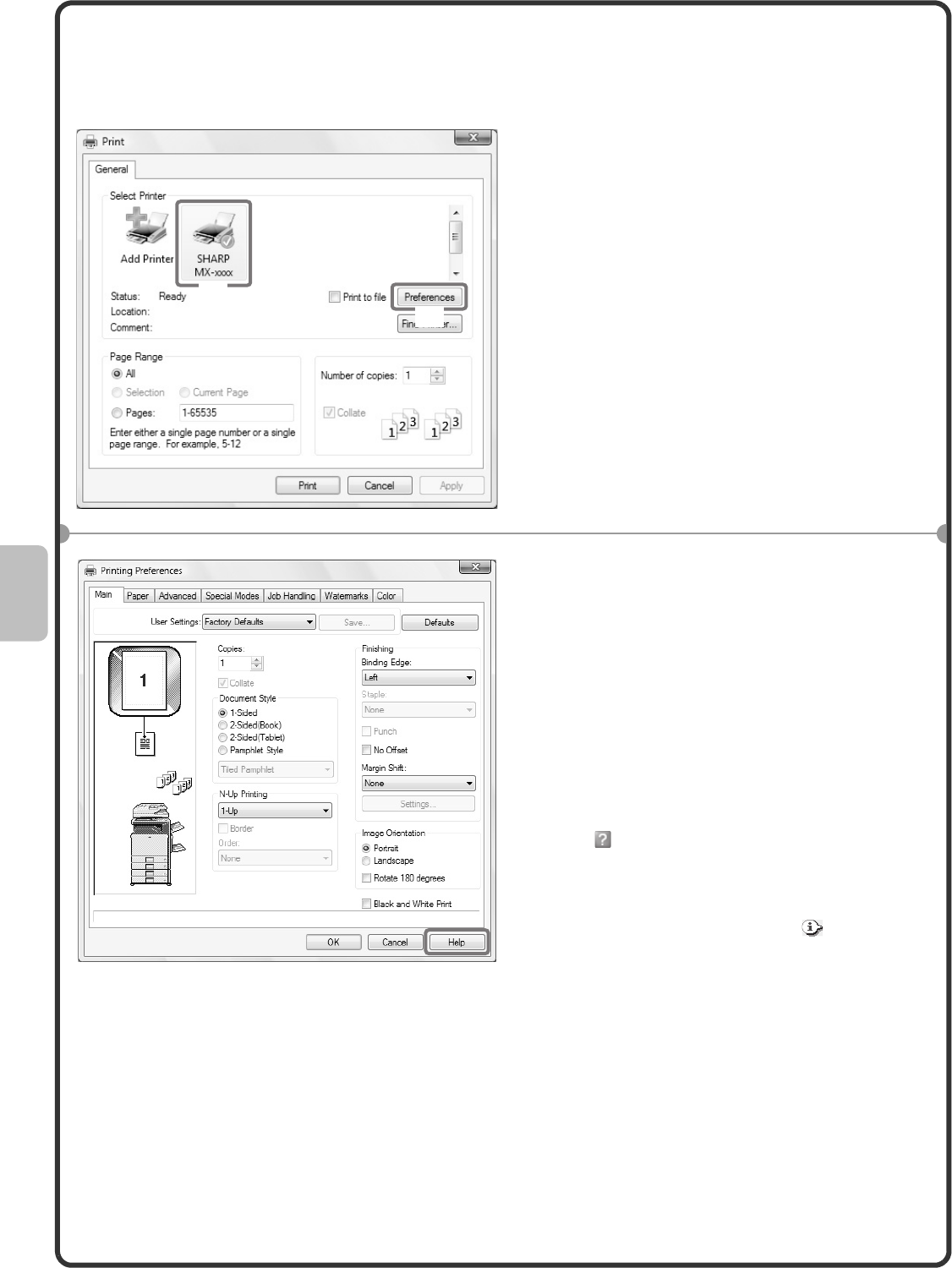
Using printer driver help
When selecting settings in the printer driver properties window, you can display Help to view explanations of the
settings. (Only in Windows)
1
Open the printer driver properties
window.
(1)
Select the printer driver of the
machine.
(2)
Click the [Preferences] button.
In Windows 2000, the [Preferences]
button does not appear. Click the tabs in
the "Print" dialog box to adjust the
settings on the tabs.
2
Click the [Help] button.
The Help window will open to let you view
explanations of the settings on the tab.
To view Help for settings in a dialog box, click
the green text at the top of the Help window.
To view Help for a specific setting
Click the setting that you wish to learn about
and press the [F1] key. Help for that setting
will appear.
* To view Help for a particular setting in
Windows 2000/XP/Server 2003, click the
button in the upper right-hand corner of
the printer driver window and then click the
setting.
When the information icon (
) appears
The icon can be clicked to show prohibited
combinations of functions and other
information.
(1)
(2)
PDF-Datei · ·
Fragen zu Sharp MX-2301N
Zu diesem Handbuch gibt es noch keine Fragen. Stellen Sie die erste.
Verwandte Produkte und Handbücher für Multifunktionsgeräte Sharp MX-2301N
- Multifunktionsgeräte Sharp MX-4101N Spezifikationen
 (76 Seiten)
- Multifunktionsgeräte Sharp JW-20FLT Bedienungsanleitung
(197 Seiten)
- Multifunktionsgeräte Sharp MX-C381 Spezifikationen
(148 Seiten)
- Multifunktionsgeräte Sharp MX-M260 Bedienungsanleitung
 (160 Seiten)
- Multifunktionsgeräte Sharp MX-4101N Spezifikationen
(12 Seiten)
- Multifunktionsgeräte Sharp MX-M564N Bedienungsanleitung
(8 Seiten)
- Multifunktionsgeräte Sharp MX-M564N Bedienungsanleitung
(8 Seiten)
- Multifunktionsgeräte Sharp CPD-3830 Bedienungsanleitung
(1 Seiten)
- Multifunktionsgeräte Sharp MX-2010U Bedienungsanleitung
(12 Seiten)
- Multifunktionsgeräte Sharp MX-B381 Bedienungsanleitung
(12 Seiten)
- Multifunktionsgeräte Sharp MX-7500N Bedienungsanleitung
(30 Seiten)
- Multifunktionsgeräte Sharp AL-2021 Spezifikationen
(91 Seiten)
- Multifunktionsgeräte Sharp MX-B402 Bedienungsanleitung
(50 Seiten)
- Multifunktionsgeräte Sharp FO-155 Spezifikationen

 (165 Seiten)
- Multifunktionsgeräte Sharp MX-4140N Installationshandbuch
(19 Seiten)
- Multifunktionsgeräte Sharp JW-50FL Bedienungsanleitung
(201 Seiten)
- Multifunktionsgeräte Sharp MX-4140N Bedienungsanleitung
(12 Seiten)
- Multifunktionsgeräte Sharp CPD-3830 Bedienungsanleitung
(12 Seiten)
- Multifunktionsgeräte Sharp CD600 - B/W - Fax Bedienungsanleitung
(23 Seiten)
- Multifunktionsgeräte Sharp AR-810 Bedienerhandbuch
(178 Seiten)