Sharp MX-2301N Spezifikationen Seite 92: DOCUMENT FILING
 1
 2
 3
 4
 5
 6
 7
 8
 9
 10
 11
 12
 13
 14
 15
 16
 17
 18
 19
 20
 21
 22
 23
 24
 25
 26
 27
 28
 29
 30
 31
 32
 33
 34
 35
 36
 37
 38
 39
 40
 41
 42
 43
 44
 45
 46
 47
 48
 49
 50
 51
 52
 53
 54
 55
 56
 57
 58
 59
 60
 61
 62
 63
 64
 65
 66
 67
 68
 69
 70
 71
 72
 73
 74
 75
 76
 77
 78
 79
 80
 81
 82
 83
 84
 85
 86
 87
 88
 89
 90
 91
 92
 93
 94
 95
 96
 97
 98
 99
 100
 101
 102
 103
 104
 105
 106
 107
 108
 109
 110
 111
 112
 113
 114
 115
 116
90
DOCUMENT FILING
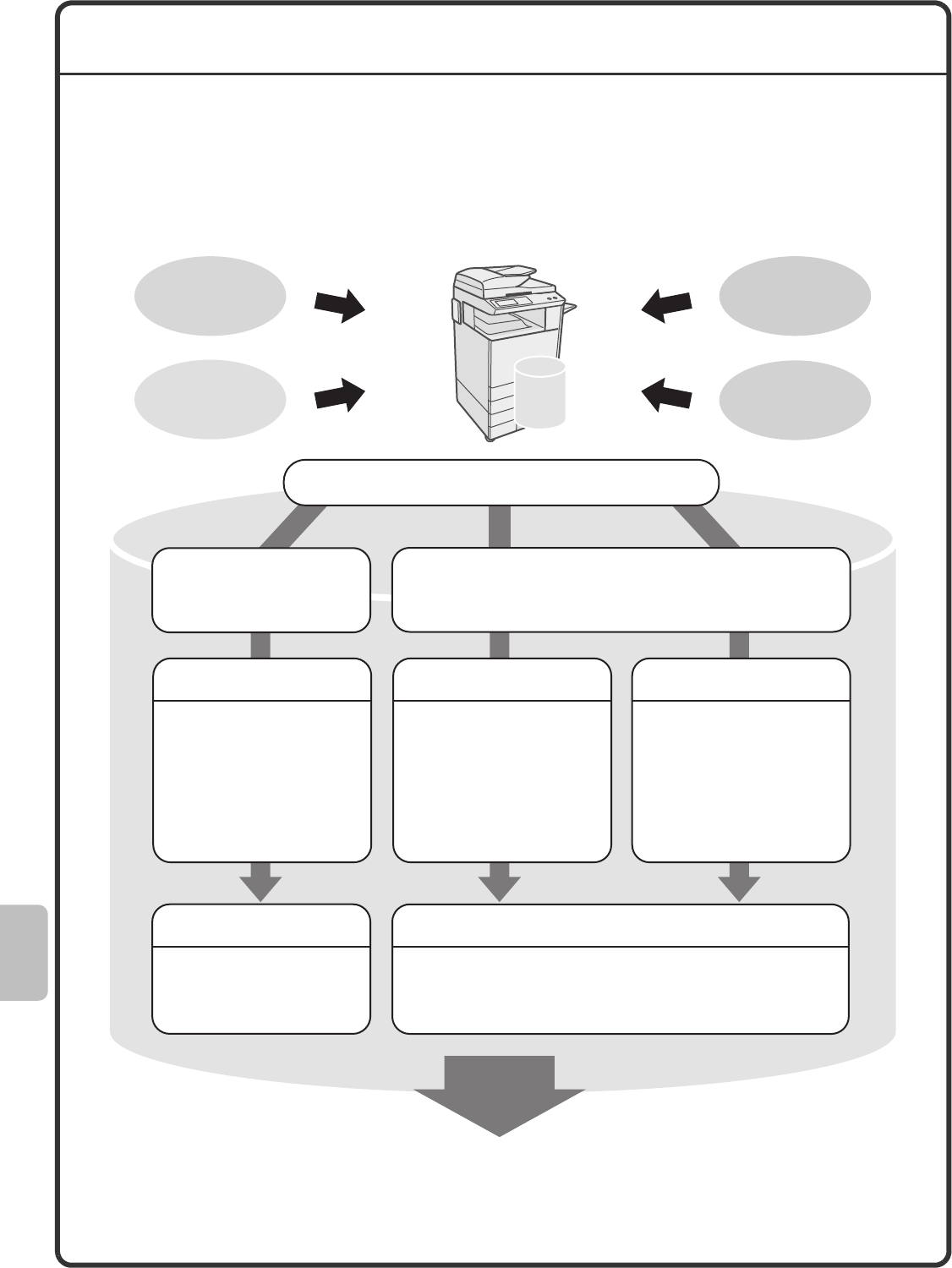
The document filing function allows you to save the document image of a copy or image send job, or the data of a
print job, as a file on the machine's hard drive.
The stored file can be retrieved and printed or transmitted as needed.
Uses of the document filing function
Files that you want to store for later use
Store quickly
and easily
Store and manage
If a folder is not specified when a file is saved with File or Scan to HDD,
the file is stored in the main folder. In addition to the main folder, files
can be saved in custom folders. Custom folders are created in the
system settings.
Main Folder / Custom Folder
Quick File Folder
Files saved with Quick File are
stored in this folder.
Using Quick File, you can easily
copy or send a document and
store the document data on the
hard drive at the same time.
When File is used, a user name
and file name can be appended
to the stored file. You can also
select which folder the file is
stored in, for easy file
management.
Use Scan to HDD to store a
document on the hard drive
without performing printing or
transmission. Like File, a user
name, file name, and folder can
be specified.
Stored files can be printed or transmitted whenever needed.
A file that has been stored using the printer driver cannot be transmitted.
Scan to HDD
File
Quick File
Copy
Fax
Scan
PDF-Datei · ·
Fragen zu Sharp MX-2301N
Zu diesem Handbuch gibt es noch keine Fragen. Stellen Sie die erste.
Verwandte Produkte und Handbücher für Multifunktionsgeräte Sharp MX-2301N
- Multifunktionsgeräte Sharp MX-4101N Spezifikationen
 (76 Seiten)
- Multifunktionsgeräte Sharp JW-20FLT Bedienungsanleitung
(197 Seiten)
- Multifunktionsgeräte Sharp MX-C381 Spezifikationen
(148 Seiten)
- Multifunktionsgeräte Sharp MX-M260 Bedienungsanleitung
 (160 Seiten)
- Multifunktionsgeräte Sharp MX-4101N Spezifikationen
(12 Seiten)
- Multifunktionsgeräte Sharp MX-M564N Bedienungsanleitung
(8 Seiten)
- Multifunktionsgeräte Sharp MX-M564N Bedienungsanleitung
(8 Seiten)
- Multifunktionsgeräte Sharp CPD-3830 Bedienungsanleitung
(1 Seiten)
- Multifunktionsgeräte Sharp MX-2010U Bedienungsanleitung
(12 Seiten)
- Multifunktionsgeräte Sharp MX-B381 Bedienungsanleitung
(12 Seiten)
- Multifunktionsgeräte Sharp MX-7500N Bedienungsanleitung
(30 Seiten)
- Multifunktionsgeräte Sharp AL-2021 Spezifikationen
(91 Seiten)
- Multifunktionsgeräte Sharp MX-B402 Bedienungsanleitung
(50 Seiten)
- Multifunktionsgeräte Sharp FO-155 Spezifikationen

 (165 Seiten)
- Multifunktionsgeräte Sharp MX-4140N Installationshandbuch
(19 Seiten)
- Multifunktionsgeräte Sharp JW-50FL Bedienungsanleitung
(201 Seiten)
- Multifunktionsgeräte Sharp MX-4140N Bedienungsanleitung
(12 Seiten)
- Multifunktionsgeräte Sharp CPD-3830 Bedienungsanleitung
(12 Seiten)
- Multifunktionsgeräte Sharp CD600 - B/W - Fax Bedienungsanleitung
(23 Seiten)
- Multifunktionsgeräte Sharp AR-810 Bedienerhandbuch
(178 Seiten)