Sharp MX-2301N Spezifikationen Seite 69: SENDING THE SAME FAX TO MULTIPLE DESTINATIONS (Broadcast Transmission)
 1
 2
 3
 4
 5
 6
 7
 8
 9
 10
 11
 12
 13
 14
 15
 16
 17
 18
 19
 20
 21
 22
 23
 24
 25
 26
 27
 28
 29
 30
 31
 32
 33
 34
 35
 36
 37
 38
 39
 40
 41
 42
 43
 44
 45
 46
 47
 48
 49
 50
 51
 52
 53
 54
 55
 56
 57
 58
 59
 60
 61
 62
 63
 64
 65
 66
 67
 68
 69
 70
 71
 72
 73
 74
 75
 76
 77
 78
 79
 80
 81
 82
 83
 84
 85
 86
 87
 88
 89
 90
 91
 92
 93
 94
 95
 96
 97
 98
 99
 100
 101
 102
 103
 104
 105
 106
 107
 108
 109
 110
 111
 112
 113
 114
 115
 116
67
SENDING THE SAME FAX TO MULTIPLE
DESTINATIONS (Broadcast Transmission)
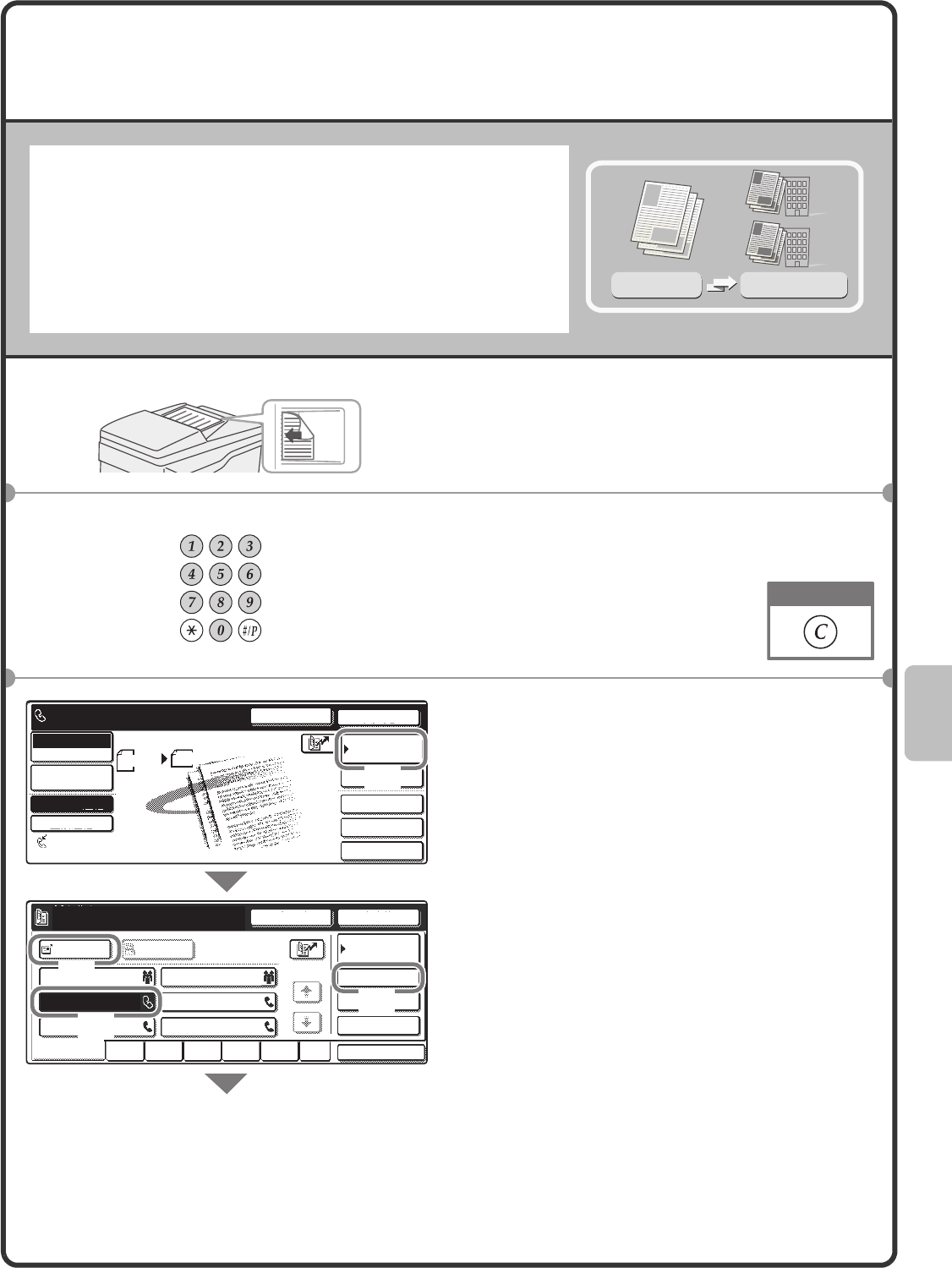
The same document/image can be sent to multiple fax mode, scan
mode, and Internet fax mode destinations in a single operation. If you
frequently send documents/images to the same group of destinations,
it is recommended that you store those destinations as a group in a
one-touch key.
The following procedure explains how to enter a fax number with the
numeric keys and then select a destination that is stored in a
one-touch key.
1
Place the originals.
When using the document glass, place the
original with the side to be scanned face down.
2
Enter the fax number of the first
destination.
3
Select settings in the touch panel.
(1)
Touch the [Address Book] key.
(2)
Touch the one-touch key in which
the desired destination is stored.
(3)
Touch the [To] key.
(4)
Touch the [Address Review] key.
Original
Broadcast
Transmission
The side to be scanned must be face up!
Correct a mistake
Sub Address
Global
Address Review
Next Address
Pause
Condition
Settings
Memory TX
1/1
Quick File
File
Special Modes
Sub Address
Pause
Next Address
Scan
Send
Auto
Address Book
Fax
Mode Switch
Job Detail
Settings
Direct TX
Memory TX
Auto Reception
Fax Memory:100%
0120000001
CCC CCC
0120000000
Sort Address
UVWXYZ etc.
OPQRST
JKLMN
EFGHI
ABCD
Freq.
AAA AAA
EEE EEE
CCC CCC
BBB BBB
DDD DDD
FFF FFF
To
Cc
A4
(1)
(4)
(2)
(3)
PDF-Datei · ·
Fragen zu Sharp MX-2301N
Zu diesem Handbuch gibt es noch keine Fragen. Stellen Sie die erste.
Verwandte Produkte und Handbücher für Multifunktionsgeräte Sharp MX-2301N
- Multifunktionsgeräte Sharp MX-4101N Spezifikationen
 (76 Seiten)
- Multifunktionsgeräte Sharp JW-20FLT Bedienungsanleitung
(197 Seiten)
- Multifunktionsgeräte Sharp MX-C381 Spezifikationen
(148 Seiten)
- Multifunktionsgeräte Sharp MX-M260 Bedienungsanleitung
 (160 Seiten)
- Multifunktionsgeräte Sharp MX-4101N Spezifikationen
(12 Seiten)
- Multifunktionsgeräte Sharp MX-M564N Bedienungsanleitung
(8 Seiten)
- Multifunktionsgeräte Sharp MX-M564N Bedienungsanleitung
(8 Seiten)
- Multifunktionsgeräte Sharp CPD-3830 Bedienungsanleitung
(1 Seiten)
- Multifunktionsgeräte Sharp MX-2010U Bedienungsanleitung
(12 Seiten)
- Multifunktionsgeräte Sharp MX-B381 Bedienungsanleitung
(12 Seiten)
- Multifunktionsgeräte Sharp MX-7500N Bedienungsanleitung
(30 Seiten)
- Multifunktionsgeräte Sharp AL-2021 Spezifikationen
(91 Seiten)
- Multifunktionsgeräte Sharp MX-B402 Bedienungsanleitung
(50 Seiten)
- Multifunktionsgeräte Sharp FO-155 Spezifikationen

 (165 Seiten)
- Multifunktionsgeräte Sharp MX-4140N Installationshandbuch
(19 Seiten)
- Multifunktionsgeräte Sharp JW-50FL Bedienungsanleitung
(201 Seiten)
- Multifunktionsgeräte Sharp MX-4140N Bedienungsanleitung
(12 Seiten)
- Multifunktionsgeräte Sharp CPD-3830 Bedienungsanleitung
(12 Seiten)
- Multifunktionsgeräte Sharp CD600 - B/W - Fax Bedienungsanleitung
(23 Seiten)
- Multifunktionsgeräte Sharp AR-810 Bedienerhandbuch
(178 Seiten)