Sharp MX-2301N Spezifikationen Seite 63: STORING A FAX NUMBER
 1
 2
 3
 4
 5
 6
 7
 8
 9
 10
 11
 12
 13
 14
 15
 16
 17
 18
 19
 20
 21
 22
 23
 24
 25
 26
 27
 28
 29
 30
 31
 32
 33
 34
 35
 36
 37
 38
 39
 40
 41
 42
 43
 44
 45
 46
 47
 48
 49
 50
 51
 52
 53
 54
 55
 56
 57
 58
 59
 60
 61
 62
 63
 64
 65
 66
 67
 68
 69
 70
 71
 72
 73
 74
 75
 76
 77
 78
 79
 80
 81
 82
 83
 84
 85
 86
 87
 88
 89
 90
 91
 92
 93
 94
 95
 96
 97
 98
 99
 100
 101
 102
 103
 104
 105
 106
 107
 108
 109
 110
 111
 112
 113
 114
 115
 116
61
STORING A FAX NUMBER
Storing an individual key
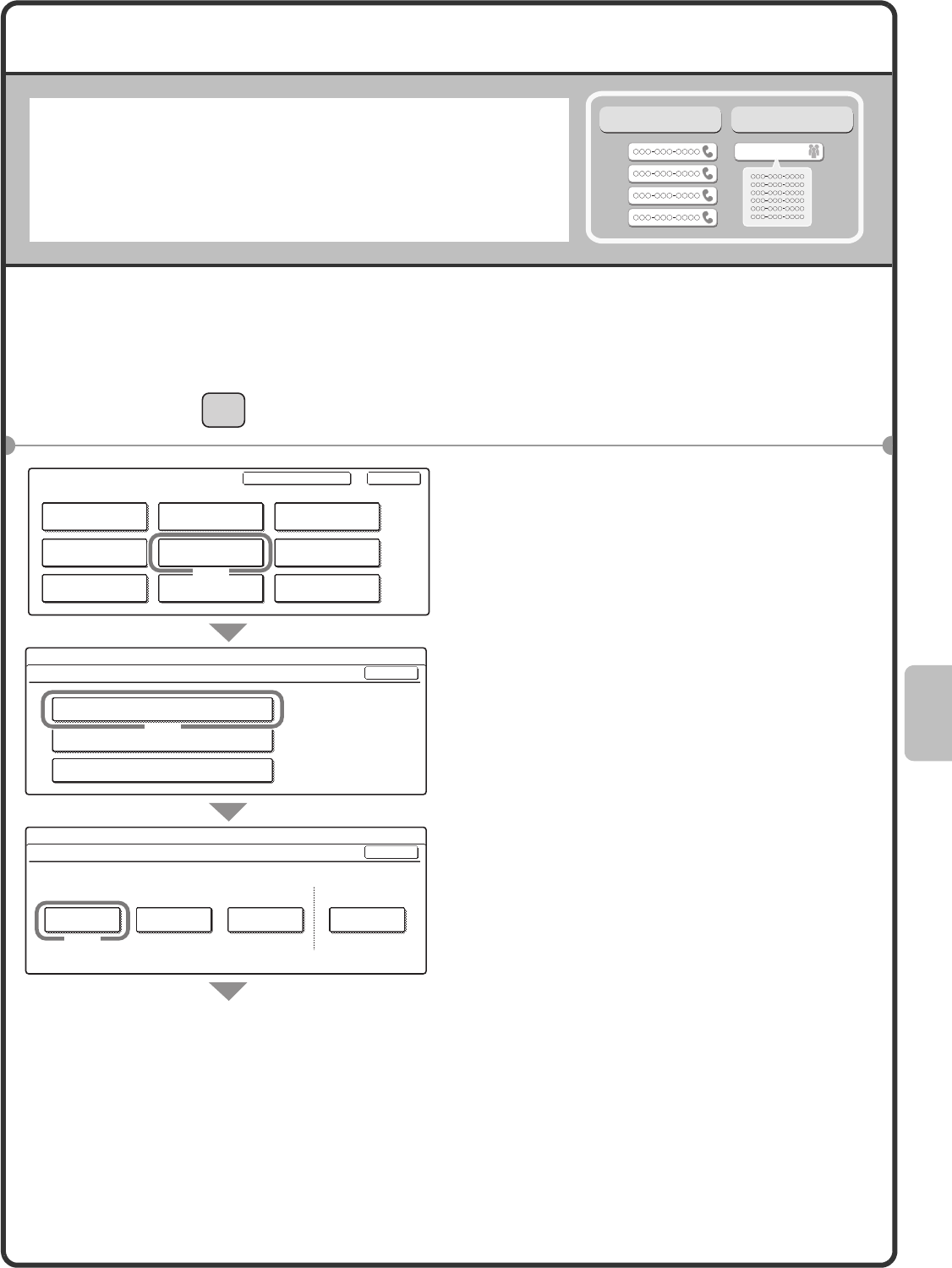
You can store fax numbers in one-touch keys.
Stored fax numbers can be retrieved quickly and easily.
If you frequently send faxes to the same group of fax machines, the
numbers of those fax machines can be stored as a group (multiple fax
numbers can be stored in one key).
1
Press the [SYSTEM SETTINGS] key.
2
Store the fax number in the touch
panel.
(1)
Touch the [Address Control] key.
(2)
Touch the [Direct Address /
Program] key.
(3)
Touch the [Individual] key.
A Corp.
One-touch keys
Group key
SYSTEM
SETTINGS
System Settings
Address Control
Direct Address / Program
F-Code Memory Box
Custom Index
OK
System Settings
Direct Address / Program
Individual
Group
Store
Program
Amend/Delete
OK
System Settings
Total Count
Paper Tray
Settings
Printer Condition
Settings
Default Settings
Address Control
Document Filing
Control
Fax Data
Receive/Forward
List Print
(User)
USB-Device Check
Exit
Admin Password
(1)
(2)
(3)
PDF-Datei · ·
Fragen zu Sharp MX-2301N
Zu diesem Handbuch gibt es noch keine Fragen. Stellen Sie die erste.
Verwandte Produkte und Handbücher für Multifunktionsgeräte Sharp MX-2301N
- Multifunktionsgeräte Sharp MX-4101N Spezifikationen
 (76 Seiten)
- Multifunktionsgeräte Sharp JW-20FLT Bedienungsanleitung
(197 Seiten)
- Multifunktionsgeräte Sharp MX-C381 Spezifikationen
(148 Seiten)
- Multifunktionsgeräte Sharp MX-M260 Bedienungsanleitung
 (160 Seiten)
- Multifunktionsgeräte Sharp MX-4101N Spezifikationen
(12 Seiten)
- Multifunktionsgeräte Sharp MX-M564N Bedienungsanleitung
(8 Seiten)
- Multifunktionsgeräte Sharp MX-M564N Bedienungsanleitung
(8 Seiten)
- Multifunktionsgeräte Sharp CPD-3830 Bedienungsanleitung
(1 Seiten)
- Multifunktionsgeräte Sharp MX-2010U Bedienungsanleitung
(12 Seiten)
- Multifunktionsgeräte Sharp MX-B381 Bedienungsanleitung
(12 Seiten)
- Multifunktionsgeräte Sharp MX-7500N Bedienungsanleitung
(30 Seiten)
- Multifunktionsgeräte Sharp AL-2021 Spezifikationen
(91 Seiten)
- Multifunktionsgeräte Sharp MX-B402 Bedienungsanleitung
(50 Seiten)
- Multifunktionsgeräte Sharp FO-155 Spezifikationen

 (165 Seiten)
- Multifunktionsgeräte Sharp MX-4140N Installationshandbuch
(19 Seiten)
- Multifunktionsgeräte Sharp JW-50FL Bedienungsanleitung
(201 Seiten)
- Multifunktionsgeräte Sharp MX-4140N Bedienungsanleitung
(12 Seiten)
- Multifunktionsgeräte Sharp CPD-3830 Bedienungsanleitung
(12 Seiten)
- Multifunktionsgeräte Sharp CD600 - B/W - Fax Bedienungsanleitung
(23 Seiten)
- Multifunktionsgeräte Sharp AR-810 Bedienerhandbuch
(178 Seiten)