Sharp MX-2301N Spezifikationen Seite 5: Opening the Web pages
 1
 2
 3
 4
 5
 6
 7
 8
 9
 10
 11
 12
 13
 14
 15
 16
 17
 18
 19
 20
 21
 22
 23
 24
 25
 26
 27
 28
 29
 30
 31
 32
 33
 34
 35
 36
 37
 38
 39
 40
 41
 42
 43
 44
 45
 46
 47
 48
 49
 50
 51
 52
 53
 54
 55
 56
 57
 58
 59
 60
 61
 62
 63
 64
 65
 66
 67
 68
 69
 70
 71
 72
 73
 74
 75
 76
 77
 78
 79
 80
 81
 82
 83
 84
 85
 86
 87
 88
 89
 90
 91
 92
 93
 94
 95
 96
 97
 98
 99
 100
 101
 102
 103
 104
 105
 106
 107
 108
 109
 110
 111
 112
 113
 114
 115
 116
3
ACCESSING THE WEB SERVER IN THE
MACHINE
When the machine is connected to a network, the machine's built-in Web server can be accessed from a Web
browser on your computer.
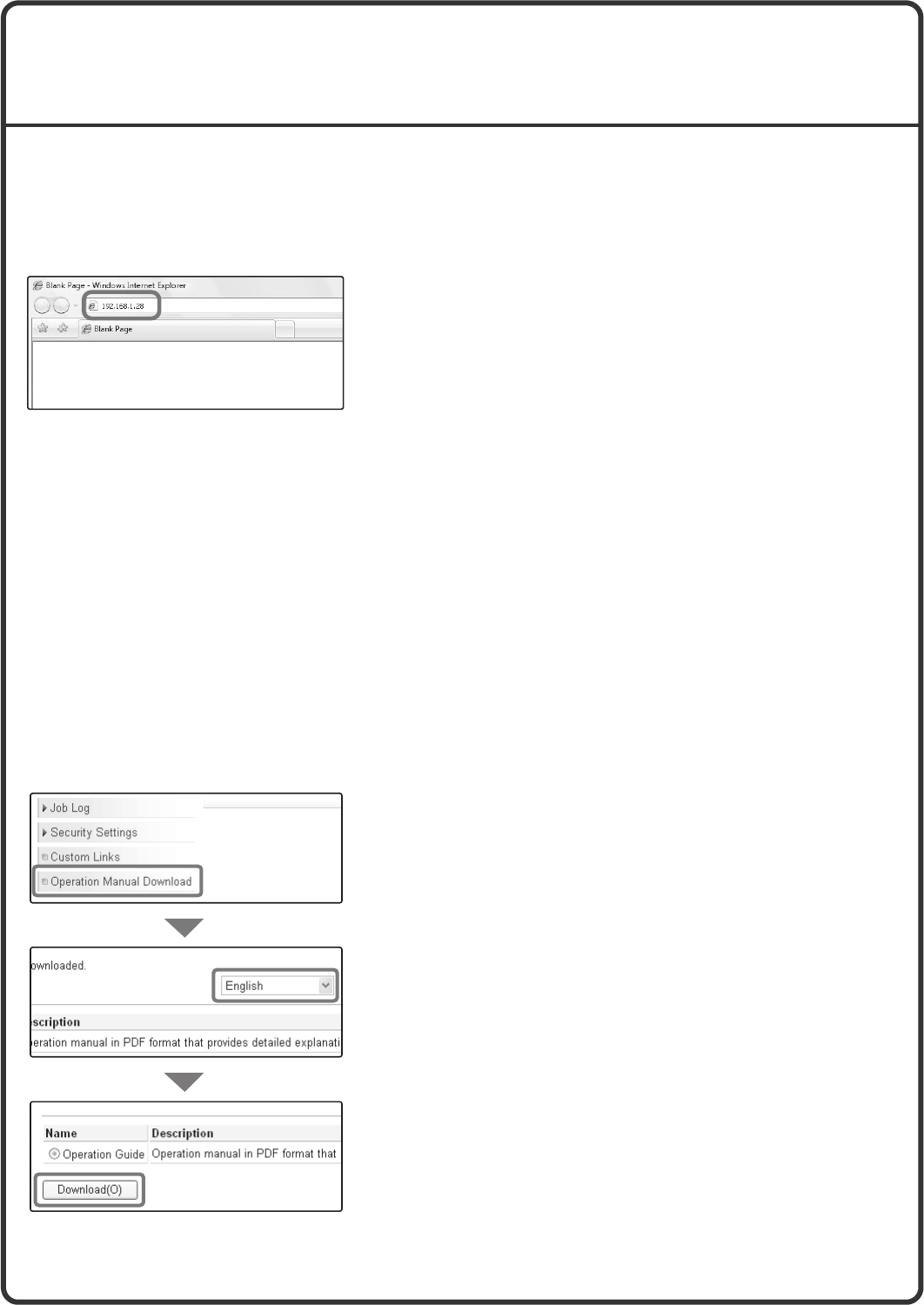
Opening the Web pages
Downloading the Operation Guide
The Operation Guide, which is a more detailed manual, can be downloaded from the machine's Web pages.
Access the Web server in the machine to open
the Web pages.
Start a Web browser on a computer that is
connected to the same network as the machine
and enter the IP address of the machine.
Recommended Web browsers
Internet Explorer: 6.0 or higher (Windows
®
)
Netscape Navigator: 9 (Windows
®
)
Firefox: 2.0 or higher (Windows
®
)
Safari: 1.5 or higher (Macintosh)
The Web page will appear.
The machine settings may require that user
authentication be performed in order to open the Web
page. Please ask the administrator of the machine for
the password that is required for user authentication.
Downloading the Operation Guide.
(1)
Click [Operation Manual Download] in the
menu of the Web page.
(2)
Select the desired language.
(3)
Click the [Download] button.
The Operation Guide is downloaded.
(1)
(2)
(3)
PDF-Datei · ·
Fragen zu Sharp MX-2301N
Zu diesem Handbuch gibt es noch keine Fragen. Stellen Sie die erste.
Verwandte Produkte und Handbücher für Multifunktionsgeräte Sharp MX-2301N
- Multifunktionsgeräte Sharp MX-4101N Spezifikationen
 (76 Seiten)
- Multifunktionsgeräte Sharp JW-20FLT Bedienungsanleitung
(197 Seiten)
- Multifunktionsgeräte Sharp MX-C381 Spezifikationen
(148 Seiten)
- Multifunktionsgeräte Sharp MX-M260 Bedienungsanleitung
 (160 Seiten)
- Multifunktionsgeräte Sharp MX-4101N Spezifikationen
(12 Seiten)
- Multifunktionsgeräte Sharp MX-M564N Bedienungsanleitung
(8 Seiten)
- Multifunktionsgeräte Sharp MX-M564N Bedienungsanleitung
(8 Seiten)
- Multifunktionsgeräte Sharp CPD-3830 Bedienungsanleitung
(1 Seiten)
- Multifunktionsgeräte Sharp MX-2010U Bedienungsanleitung
(12 Seiten)
- Multifunktionsgeräte Sharp MX-B381 Bedienungsanleitung
(12 Seiten)
- Multifunktionsgeräte Sharp MX-7500N Bedienungsanleitung
(30 Seiten)
- Multifunktionsgeräte Sharp AL-2021 Spezifikationen
(91 Seiten)
- Multifunktionsgeräte Sharp MX-B402 Bedienungsanleitung
(50 Seiten)
- Multifunktionsgeräte Sharp FO-155 Spezifikationen

 (165 Seiten)
- Multifunktionsgeräte Sharp MX-4140N Installationshandbuch
(19 Seiten)
- Multifunktionsgeräte Sharp JW-50FL Bedienungsanleitung
(201 Seiten)
- Multifunktionsgeräte Sharp MX-4140N Bedienungsanleitung
(12 Seiten)
- Multifunktionsgeräte Sharp CPD-3830 Bedienungsanleitung
(12 Seiten)
- Multifunktionsgeräte Sharp CD600 - B/W - Fax Bedienungsanleitung
(23 Seiten)
- Multifunktionsgeräte Sharp AR-810 Bedienerhandbuch
(178 Seiten)