Sharp AL-2021 Spezifikationen Seite 36: ID CARD COPY
 1
 2
 3
 4
 5
 6
 7
 8
 9
 10
 11
 12
 13
 14
 15
 16
 17
 18
 19
 20
 21
 22
 23
 24
 25
 26
 27
 28
 29
 30
 31
 32
 33
 34
 35
 36
 37
 38
 39
 40
 41
 42
 43
 44
 45
 46
 47
 48
 49
 50
 51
 52
 53
 54
 55
 56
 57
 58
 59
 60
 61
 62
 63
 64
 65
 66
 67
 68
 69
 70
 71
 72
 73
 74
 75
 76
 77
 78
 79
 80
 81
 82
 83
 84
 85
 86
 87
 88
 89
 90
 91
4
36
ID CARD COPY
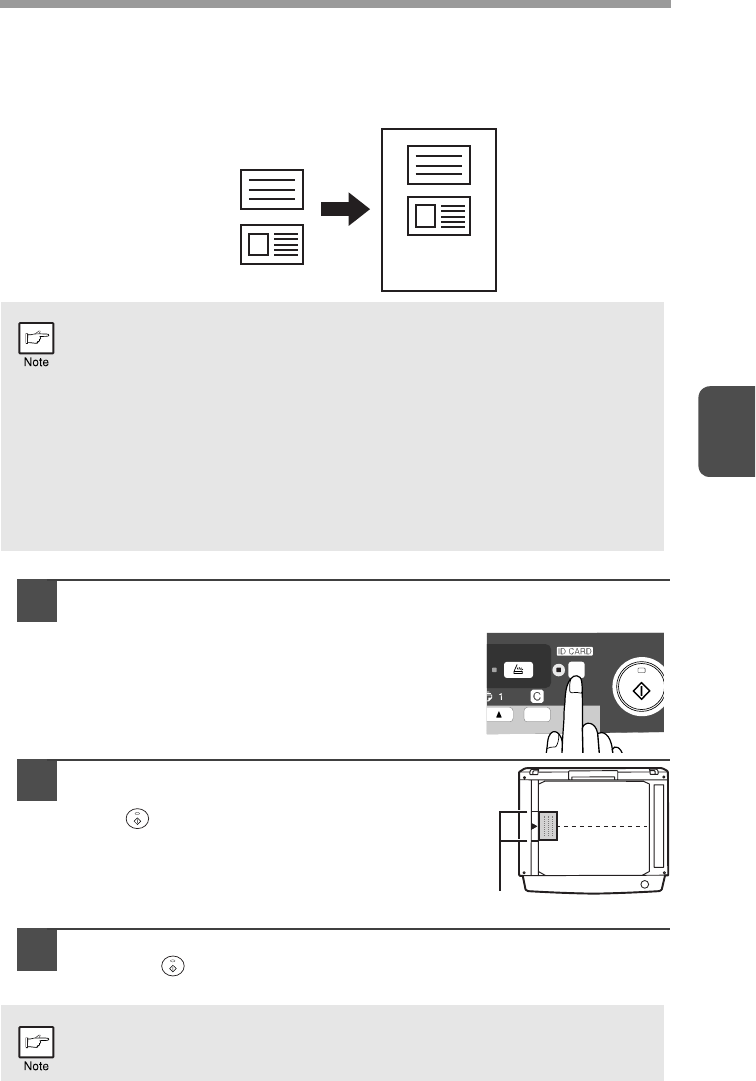
You can copy the front and reverse sides of ID card onto a page through this
function. The ID card print image is shown as follows.
1
Press the ID CARD key.
• The ID CARD indicator will light up. The
exposure is set to "text", the exposure level is set
to "3", and the number is set to "1" automatically.
• The multi-bypass tray is automatically selected
when ID card copy feature is selected. The tray
can be changed manually with the tray select key.
2
Place the ID card on the document glass,
align with the ID card mark, and press the
start (
) key.
When scan is finished, ID CARD indicator will blink
and one side of the ID card is scanned into
memory. (In this case, print will start if pressing
READ-END key.)
3
Turn and replace the ID card on the document glass, and press
the start (
) key.
When scan finished, Copy will begin.
•
ID card copy feature cannot be used in combination with two-sided
copy and sort functions.
•
The following paper sizes can be used: A5R, A4, B5, 16K. (A5R can
only be used in bypass tray.)
•
The image may cut off even if using standard paper size.
•
In ID card copy mode, scan area and scan number (1 page) cannot be
changed. Scan area is:
X: 54 + 5 mm (margin),
Y: 86 + 10 mm (top margin 5 mm and bottom margin 5 mm).
•
Only making a single copy is available (Number of copies cannot be
set.).
To cancel ID card copy, press the clear key and make sure the ID CARD
indicator is off.
Front
Back
Originals
Copies
ID CARD mark
PDF-Datei · ·
Fragen zu Sharp AL-2021
Zu diesem Handbuch gibt es noch keine Fragen. Stellen Sie die erste.
Verwandte Produkte und Handbücher für Multifunktionsgeräte Sharp AL-2021
- Multifunktionsgeräte Sharp MX-B402 Bedienungsanleitung
 (50 Seiten)
- Multifunktionsgeräte Sharp FO-155 Spezifikationen

 (165 Seiten)
- Multifunktionsgeräte Sharp MX-4140N Installationshandbuch
(19 Seiten)
- Multifunktionsgeräte Sharp JW-50FL Bedienungsanleitung
(201 Seiten)
- Multifunktionsgeräte Sharp MX-4140N Bedienungsanleitung
(12 Seiten)
- Multifunktionsgeräte Sharp CPD-3830 Bedienungsanleitung
(12 Seiten)
- Multifunktionsgeräte Sharp CD600 - B/W - Fax Bedienungsanleitung
(23 Seiten)
- Multifunktionsgeräte Sharp AR-810 Bedienerhandbuch
(178 Seiten)
- Multifunktionsgeräte Sharp AL-1566 Spezifikationen
(116 Seiten)
- Multifunktionsgeräte Sharp AM-400 Spezifikationen
(162 Seiten)
- Multifunktionsgeräte Sharp AL-2051 Spezifikationen
(173 Seiten)
- Multifunktionsgeräte Sharp MX-5111N Bedienungsanleitung
(12 Seiten)
- Multifunktionsgeräte Sharp AL-2021 Bedienungsanleitung
(91 Seiten)
- Multifunktionsgeräte Sharp MX-C250 Installationshandbuch
(20 Seiten)
- Multifunktionsgeräte Sharp AM-300 Spezifikationen
(167 Seiten)
- Multifunktionsgeräte Sharp AL-2060 Spezifikationen
(112 Seiten)
- Multifunktionsgeräte Sharp AL-1555 Series Bedienungsanleitung
 (37 Seiten)
- Multifunktionsgeräte Sharp AL-2050 Spezifikationen
(116 Seiten)
- Multifunktionsgeräte Sharp AL-1552 Bedienungsanleitung
(81 Seiten)
- Multifunktionsgeräte Sharp AR-168N Bedienungsanleitung
 (108 Seiten)