Sharp AL-2021 Spezifikationen Seite 53: SCANNING USING THE KEYS ON THE MACHINE
 1
 2
 3
 4
 5
 6
 7
 8
 9
 10
 11
 12
 13
 14
 15
 16
 17
 18
 19
 20
 21
 22
 23
 24
 25
 26
 27
 28
 29
 30
 31
 32
 33
 34
 35
 36
 37
 38
 39
 40
 41
 42
 43
 44
 45
 46
 47
 48
 49
 50
 51
 52
 53
 54
 55
 56
 57
 58
 59
 60
 61
 62
 63
 64
 65
 66
 67
 68
 69
 70
 71
 72
 73
 74
 75
 76
 77
 78
 79
 80
 81
 82
 83
 84
 85
 86
 87
 88
 89
 90
 91
6
53
SCANNING USING THE KEYS ON THE MACHINE
When scanning is performed by this method, the application that has been set in
Button Manager will automatically start and the scanned image will be pasted into
the application. For the steps to allocate applications using the Button Manager or
other settings, see "Button Manager settings" (p.55).
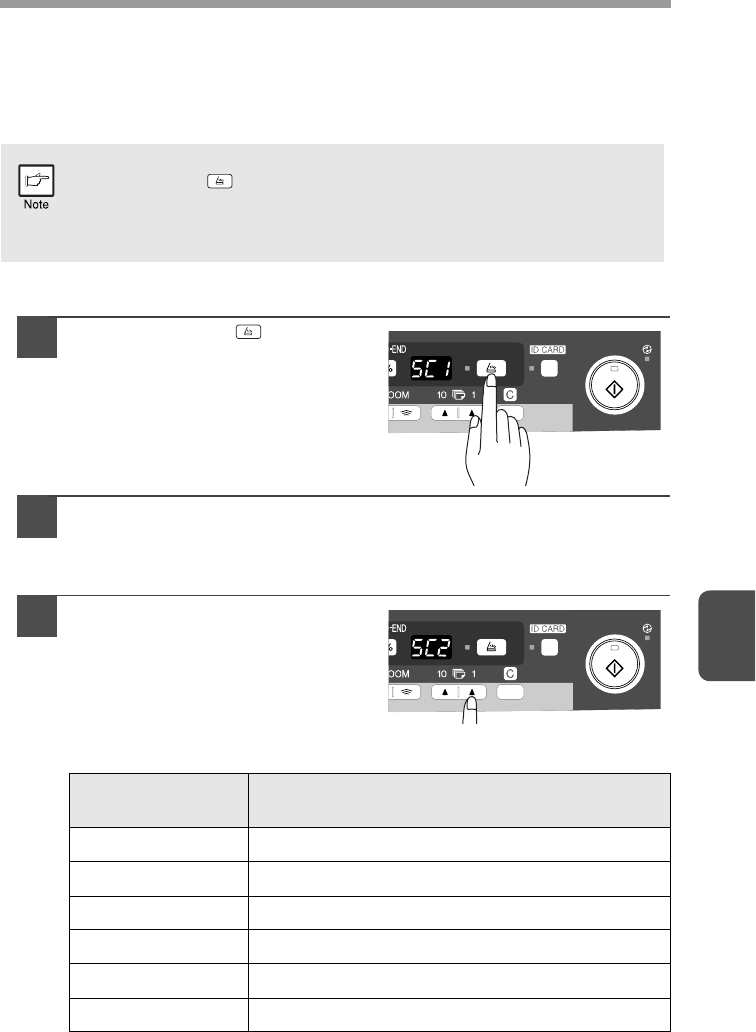
Scanning from the operation panel of the machine
1
Press the SCAN (
) key.
The unit enters scan mode.
2
Place the original you wish to scan on the document glass/SPF.
For the procedure for placing the original, see "ORIGINAL PLACEMENT"
(p.26).
3
Press the right copy quantity
key to display the number of
the application that you wish to
use for scanning.
The application numbers are initially
as follows.
To check the settings, see "Button Manager settings" (p.55) and then open
the settings window of the Button Manager.
•
Scanning is not possible during a copy job.
•
If the SCAN (
) key is pressed during a print job, the scan job will
be stored.
•
When scanning an original that has been placed in the SPF, only one
original can be placed unless you are using Sharpdesk.
Application
number
Application launched
SC1
Sharpdesk
SC2
Email
SC3
FAX
SC4
OCR
SC5
Microsoft Word
SC6
Filing
PDF-Datei · ·
Fragen zu Sharp AL-2021
Zu diesem Handbuch gibt es noch keine Fragen. Stellen Sie die erste.
Verwandte Produkte und Handbücher für Multifunktionsgeräte Sharp AL-2021
- Multifunktionsgeräte Sharp MX-B402 Bedienungsanleitung
 (50 Seiten)
- Multifunktionsgeräte Sharp FO-155 Spezifikationen

 (165 Seiten)
- Multifunktionsgeräte Sharp MX-4140N Installationshandbuch
(19 Seiten)
- Multifunktionsgeräte Sharp JW-50FL Bedienungsanleitung
(201 Seiten)
- Multifunktionsgeräte Sharp MX-4140N Bedienungsanleitung
(12 Seiten)
- Multifunktionsgeräte Sharp CPD-3830 Bedienungsanleitung
(12 Seiten)
- Multifunktionsgeräte Sharp CD600 - B/W - Fax Bedienungsanleitung
(23 Seiten)
- Multifunktionsgeräte Sharp AR-810 Bedienerhandbuch
(178 Seiten)
- Multifunktionsgeräte Sharp AL-1566 Spezifikationen
(116 Seiten)
- Multifunktionsgeräte Sharp AM-400 Spezifikationen
(162 Seiten)
- Multifunktionsgeräte Sharp AL-2051 Spezifikationen
(173 Seiten)
- Multifunktionsgeräte Sharp MX-5111N Bedienungsanleitung
(12 Seiten)
- Multifunktionsgeräte Sharp AL-2021 Bedienungsanleitung
(91 Seiten)
- Multifunktionsgeräte Sharp MX-C250 Installationshandbuch
(20 Seiten)
- Multifunktionsgeräte Sharp AM-300 Spezifikationen
(167 Seiten)
- Multifunktionsgeräte Sharp AL-2060 Spezifikationen
(112 Seiten)
- Multifunktionsgeräte Sharp AL-1555 Series Bedienungsanleitung
 (37 Seiten)
- Multifunktionsgeräte Sharp AL-2050 Spezifikationen
(116 Seiten)
- Multifunktionsgeräte Sharp AL-1552 Bedienungsanleitung
(81 Seiten)
- Multifunktionsgeräte Sharp AR-168N Bedienungsanleitung
 (108 Seiten)