Sharp AL-2021 Spezifikationen Seite 52: SCANNER FUNCTIONS
 1
 2
 3
 4
 5
 6
 7
 8
 9
 10
 11
 12
 13
 14
 15
 16
 17
 18
 19
 20
 21
 22
 23
 24
 25
 26
 27
 28
 29
 30
 31
 32
 33
 34
 35
 36
 37
 38
 39
 40
 41
 42
 43
 44
 45
 46
 47
 48
 49
 50
 51
 52
 53
 54
 55
 56
 57
 58
 59
 60
 61
 62
 63
 64
 65
 66
 67
 68
 69
 70
 71
 72
 73
 74
 75
 76
 77
 78
 79
 80
 81
 82
 83
 84
 85
 86
 87
 88
 89
 90
 91
6
6
52
This chapter explains how to use the scanner functions.
SCANNING OVERVIEW
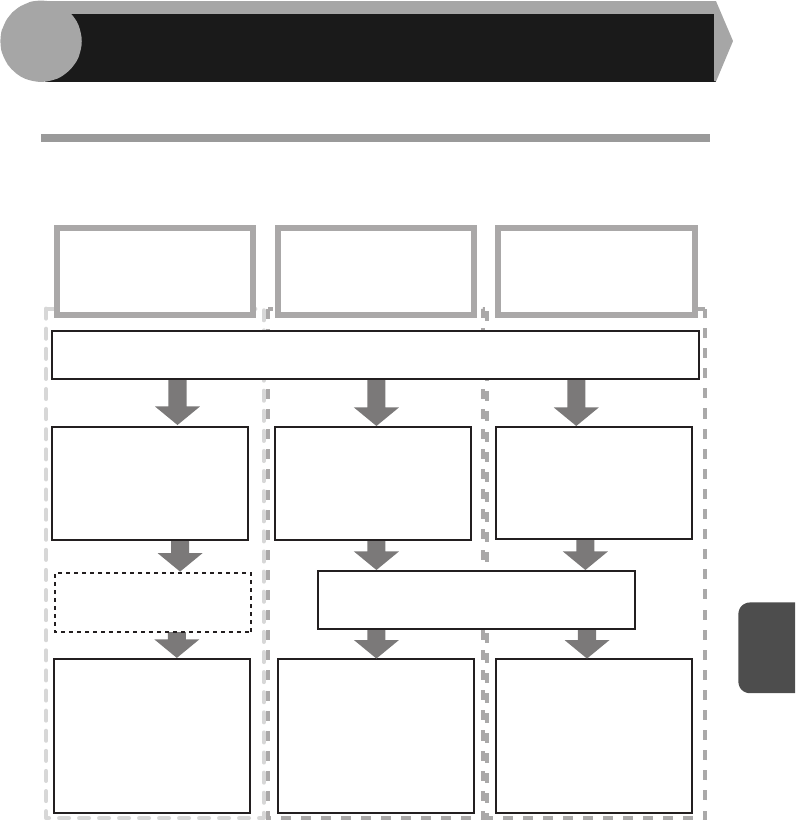
The flow chart shown below provides an overview of scanning.
*1 To scan using the machine's operation panel, you must first install Button
Manager and establish the appropriate settings in the Control Panel. For details,
see "SETTING UP BUTTON MANAGER" (p.23).
*2 TWAIN is an international interface standard for scanners and other image
acquisition devices. By installing a TWAIN driver on your computer, you can scan
and work with images using a variety of TWAIN-compliant applications.
*3 WIA (Windows Imaging Acquisition) is a Windows function that allows a scanner,
digital camera or other imaging device to communicate with an image processing
application. The WIA driver for this machine can only be used in Windows XP/
Vista/7.
Scanning from a
TWAIN*
2
-compliant or
WIA*
3
-compliant
application
Scanning from the
"Scanner and Camera
Wizard" (Windows XP)
Place the original in the scanning position
For more information, refer to "SCANNING USING THE KEYS ON THE MACHINE" (p.53).
Start up a Twain-
compliant or WIA-
compliant application,
and select the
machine's scanner
driver.
Start up the "Scanner
and Camera Wizard"
from "Control Panel" in
your computer.
Change the machine to
scanner mode and
select the scan menu.
(SC1: to SC6:)
Set the scan preferences
(only if the preferences
are set to appear)
Set the scan preferences
Scanning
"Scanning from a TWAIN-
compliant application"
(p.57)
"Scanning from a WIA-
compliant application
(Windows XP/Vista/7)"
(p.61)
Scanning
"SCANNING USING THE
KEYS ON THE
MACHINE" (p.53)
Scanning
"Scanning from the
"Scanner and Camera
Wizard" (Windows XP)"
(p.62)
Scanning from the
machine*
1
SCANNER FUNCTIONS
PDF-Datei · ·
Fragen zu Sharp AL-2021
Zu diesem Handbuch gibt es noch keine Fragen. Stellen Sie die erste.
Verwandte Produkte und Handbücher für Multifunktionsgeräte Sharp AL-2021
- Multifunktionsgeräte Sharp MX-B402 Bedienungsanleitung
 (50 Seiten)
- Multifunktionsgeräte Sharp FO-155 Spezifikationen

 (165 Seiten)
- Multifunktionsgeräte Sharp MX-4140N Installationshandbuch
(19 Seiten)
- Multifunktionsgeräte Sharp JW-50FL Bedienungsanleitung
(201 Seiten)
- Multifunktionsgeräte Sharp MX-4140N Bedienungsanleitung
(12 Seiten)
- Multifunktionsgeräte Sharp CPD-3830 Bedienungsanleitung
(12 Seiten)
- Multifunktionsgeräte Sharp CD600 - B/W - Fax Bedienungsanleitung
(23 Seiten)
- Multifunktionsgeräte Sharp AR-810 Bedienerhandbuch
(178 Seiten)
- Multifunktionsgeräte Sharp AL-1566 Spezifikationen
(116 Seiten)
- Multifunktionsgeräte Sharp AM-400 Spezifikationen
(162 Seiten)
- Multifunktionsgeräte Sharp AL-2051 Spezifikationen
(173 Seiten)
- Multifunktionsgeräte Sharp MX-5111N Bedienungsanleitung
(12 Seiten)
- Multifunktionsgeräte Sharp AL-2021 Bedienungsanleitung
(91 Seiten)
- Multifunktionsgeräte Sharp MX-C250 Installationshandbuch
(20 Seiten)
- Multifunktionsgeräte Sharp AM-300 Spezifikationen
(167 Seiten)
- Multifunktionsgeräte Sharp AL-2060 Spezifikationen
(112 Seiten)
- Multifunktionsgeräte Sharp AL-1555 Series Bedienungsanleitung
 (37 Seiten)
- Multifunktionsgeräte Sharp AL-2050 Spezifikationen
(116 Seiten)
- Multifunktionsgeräte Sharp AL-1552 Bedienungsanleitung
(81 Seiten)
- Multifunktionsgeräte Sharp AR-168N Bedienungsanleitung
 (108 Seiten)