Sharp AL-2021 Spezifikationen Seite 56: Outline of Button Manager
 1
 2
 3
 4
 5
 6
 7
 8
 9
 10
 11
 12
 13
 14
 15
 16
 17
 18
 19
 20
 21
 22
 23
 24
 25
 26
 27
 28
 29
 30
 31
 32
 33
 34
 35
 36
 37
 38
 39
 40
 41
 42
 43
 44
 45
 46
 47
 48
 49
 50
 51
 52
 53
 54
 55
 56
 57
 58
 59
 60
 61
 62
 63
 64
 65
 66
 67
 68
 69
 70
 71
 72
 73
 74
 75
 76
 77
 78
 79
 80
 81
 82
 83
 84
 85
 86
 87
 88
 89
 90
 91
6
56
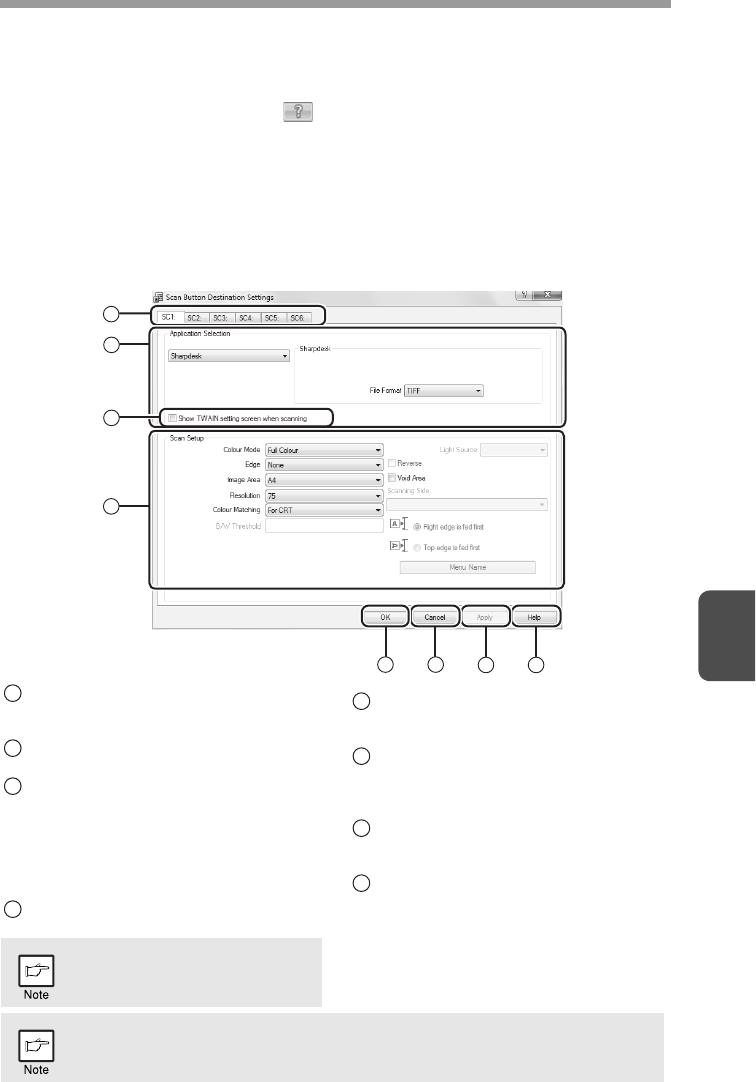
Outline of Button Manager
Button Manager is a software utility that allows you to use the scanner function at the
machine. Button Manager allows you to configure six sets of scanning settings as a
scan menu on the machine.
To view Help for a setting, click the
button in the upper right-hand corner of the
window and then click the setting.
To begin scanning using the machine's operation panel, settings must be established
in the Control Panel after Button Manager is installed. For information on installing
Button Manager and establishing the Control Panel settings, see "SETTING UP
BUTTON MANAGER" (p.23). For information on scanning using the machine's
operation panel, see "SCANNING USING THE KEYS ON THE MACHINE" (p.53).
You can use Button Manager to select and change the functions of the six scan
menus. Refer to "Button Manager settings" (p.55).
Tab
Click to set scan menu options. Each tab
contains scan settings for the scan menu.
"Application Selection" area
Select the start-up application here.
"Show TWAIN setting screen when
scanning" Checkbox
You can select whether or not the
TWAIN screen is shown. When the
checkbox is selected, the TWAIN screen
appears when scanning is executed to
let you adjust the scanning conditions.
"Scan Setup" area
Set the scan conditions.
"OK" button
Click to save your settings and exit the
dialog box.
"Cancel" button
Click this button to exit the dialog box
without making any changes to the
settings.
"Apply" button
Click to save your settings without
closing the dialog box.
"Help" button
Click this button to display the help file
for Button Manager.
2
3
4
5
6
7
8
1
Some applications may limit
your choice of settings.
1
2
3
4
5
6
7
8
"Menu Name" is not used on this machine.
PDF-Datei · ·
Fragen zu Sharp AL-2021
Zu diesem Handbuch gibt es noch keine Fragen. Stellen Sie die erste.
Verwandte Produkte und Handbücher für Multifunktionsgeräte Sharp AL-2021
- Multifunktionsgeräte Sharp MX-B402 Bedienungsanleitung
 (50 Seiten)
- Multifunktionsgeräte Sharp FO-155 Spezifikationen

 (165 Seiten)
- Multifunktionsgeräte Sharp MX-4140N Installationshandbuch
(19 Seiten)
- Multifunktionsgeräte Sharp JW-50FL Bedienungsanleitung
(201 Seiten)
- Multifunktionsgeräte Sharp MX-4140N Bedienungsanleitung
(12 Seiten)
- Multifunktionsgeräte Sharp CPD-3830 Bedienungsanleitung
(12 Seiten)
- Multifunktionsgeräte Sharp CD600 - B/W - Fax Bedienungsanleitung
(23 Seiten)
- Multifunktionsgeräte Sharp AR-810 Bedienerhandbuch
(178 Seiten)
- Multifunktionsgeräte Sharp AL-1566 Spezifikationen
(116 Seiten)
- Multifunktionsgeräte Sharp AM-400 Spezifikationen
(162 Seiten)
- Multifunktionsgeräte Sharp AL-2051 Spezifikationen
(173 Seiten)
- Multifunktionsgeräte Sharp MX-5111N Bedienungsanleitung
(12 Seiten)
- Multifunktionsgeräte Sharp AL-2021 Bedienungsanleitung
(91 Seiten)
- Multifunktionsgeräte Sharp MX-C250 Installationshandbuch
(20 Seiten)
- Multifunktionsgeräte Sharp AM-300 Spezifikationen
(167 Seiten)
- Multifunktionsgeräte Sharp AL-2060 Spezifikationen
(112 Seiten)
- Multifunktionsgeräte Sharp AL-1555 Series Bedienungsanleitung
 (37 Seiten)
- Multifunktionsgeräte Sharp AL-2050 Spezifikationen
(116 Seiten)
- Multifunktionsgeräte Sharp AL-1552 Bedienungsanleitung
(81 Seiten)
- Multifunktionsgeräte Sharp AR-168N Bedienungsanleitung
 (108 Seiten)