Sharp AL-2021 Spezifikationen Seite 61: (Windows XP/Vista/7)
 1
 2
 3
 4
 5
 6
 7
 8
 9
 10
 11
 12
 13
 14
 15
 16
 17
 18
 19
 20
 21
 22
 23
 24
 25
 26
 27
 28
 29
 30
 31
 32
 33
 34
 35
 36
 37
 38
 39
 40
 41
 42
 43
 44
 45
 46
 47
 48
 49
 50
 51
 52
 53
 54
 55
 56
 57
 58
 59
 60
 61
 62
 63
 64
 65
 66
 67
 68
 69
 70
 71
 72
 73
 74
 75
 76
 77
 78
 79
 80
 81
 82
 83
 84
 85
 86
 87
 88
 89
 90
 91
6
61
Scanning from a WIA-compliant application
(Windows XP/Vista/7)
If you are using Windows XP/Vista/7, you can use the WIA driver to scan from WIA-
compliant applications.
1
Place the original that you wish to scan on the document glass/
SPF.
For the procedure for placing the original, see "ORIGINAL PLACEMENT"
(p.26).
2
After starting WIA-compliant application, click the "File" menu
and select a menu to scan.
3
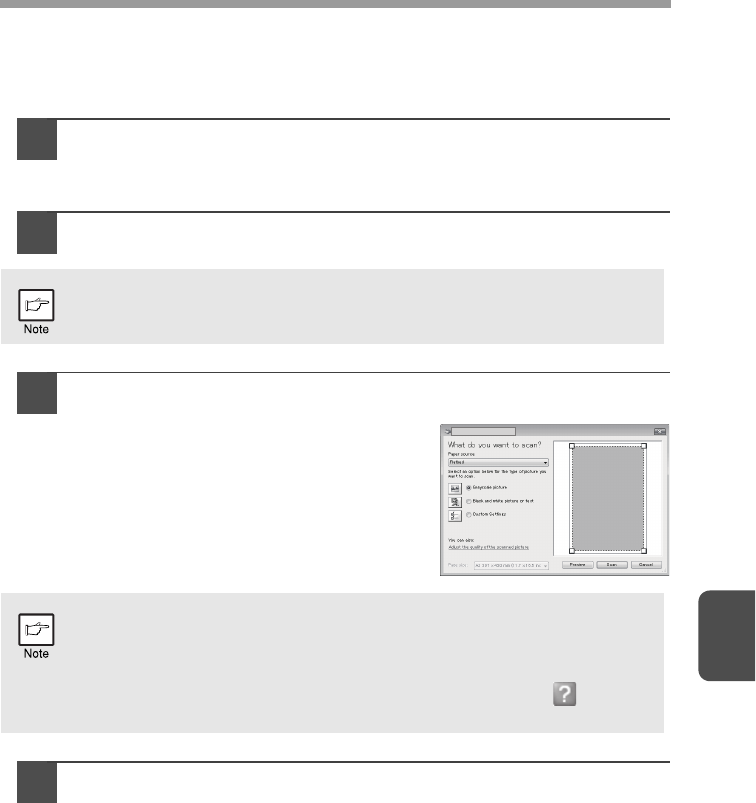
Select the paper source and picture type, and click the
"Preview" button.
The preview image will appear.
If you placed the original on the document
glass, select "Flatbed" for the "Paper
source".
If you placed the original in the SPF, select
"Document Feeder" for the "Paper source"
and specify the original size in "Page size".
4
Click the "Scan" button.
Scanning begins and the image is acquired into Paint.
Use "Save" in your application to specify a file name and folder for the
scanned image, and save the image.
To cancel a scanning job after clicking the "Scan" button, click the "Cancel"
button.
The method for accessing the menu to select the scanner depends upon
the application. For more information, refer to the manual or the help file
of your application.
•
If you select "Document Feeder" for the "Paper source" and click the
"Preview" button, the top original in the SPF is previewed. The
previewed original is sent to the original exit area, so you will need to
return it to the SPF before starting the scanning job.
•
In Windows XP, you can view Help for a setting. Click the
button in
the upper right-hand corner of the window and then click the setting.
PDF-Datei · ·
Fragen zu Sharp AL-2021
Zu diesem Handbuch gibt es noch keine Fragen. Stellen Sie die erste.
Verwandte Produkte und Handbücher für Multifunktionsgeräte Sharp AL-2021
- Multifunktionsgeräte Sharp MX-B402 Bedienungsanleitung
 (50 Seiten)
- Multifunktionsgeräte Sharp FO-155 Spezifikationen

 (165 Seiten)
- Multifunktionsgeräte Sharp MX-4140N Installationshandbuch
(19 Seiten)
- Multifunktionsgeräte Sharp JW-50FL Bedienungsanleitung
(201 Seiten)
- Multifunktionsgeräte Sharp MX-4140N Bedienungsanleitung
(12 Seiten)
- Multifunktionsgeräte Sharp CPD-3830 Bedienungsanleitung
(12 Seiten)
- Multifunktionsgeräte Sharp CD600 - B/W - Fax Bedienungsanleitung
(23 Seiten)
- Multifunktionsgeräte Sharp AR-810 Bedienerhandbuch
(178 Seiten)
- Multifunktionsgeräte Sharp AL-1566 Spezifikationen
(116 Seiten)
- Multifunktionsgeräte Sharp AM-400 Spezifikationen
(162 Seiten)
- Multifunktionsgeräte Sharp AL-2051 Spezifikationen
(173 Seiten)
- Multifunktionsgeräte Sharp MX-5111N Bedienungsanleitung
(12 Seiten)
- Multifunktionsgeräte Sharp AL-2021 Bedienungsanleitung
(91 Seiten)
- Multifunktionsgeräte Sharp MX-C250 Installationshandbuch
(20 Seiten)
- Multifunktionsgeräte Sharp AM-300 Spezifikationen
(167 Seiten)
- Multifunktionsgeräte Sharp AL-2060 Spezifikationen
(112 Seiten)
- Multifunktionsgeräte Sharp AL-1555 Series Bedienungsanleitung
 (37 Seiten)
- Multifunktionsgeräte Sharp AL-2050 Spezifikationen
(116 Seiten)
- Multifunktionsgeräte Sharp AL-1552 Bedienungsanleitung
(81 Seiten)
- Multifunktionsgeräte Sharp AR-168N Bedienungsanleitung
 (108 Seiten)