Sharp AL-2021 Spezifikationen Seite 88: WHILE USING THE SPF (AL-2041)
 1
 2
 3
 4
 5
 6
 7
 8
 9
 10
 11
 12
 13
 14
 15
 16
 17
 18
 19
 20
 21
 22
 23
 24
 25
 26
 27
 28
 29
 30
 31
 32
 33
 34
 35
 36
 37
 38
 39
 40
 41
 42
 43
 44
 45
 46
 47
 48
 49
 50
 51
 52
 53
 54
 55
 56
 57
 58
 59
 60
 61
 62
 63
 64
 65
 66
 67
 68
 69
 70
 71
 72
 73
 74
 75
 76
 77
 78
 79
 80
 81
 82
 83
 84
 85
 86
 87
 88
 89
 90
 91
9
88
IF A PAPER MISFEED OCCURS IN THE MAIN UNIT
WHILE USING THE SPF (AL-2041)
If a paper misfeed occurs in the main unit paper path when making copies with
original(s) through the SPF, the SPF will automatically stop scanning. Manually
remove the misfed paper(s) in the main unit. You can check the number of originals
that must be returned to the document feeder tray in the display on the operation
panel. Follow the steps below to display the number of originals to be returned.
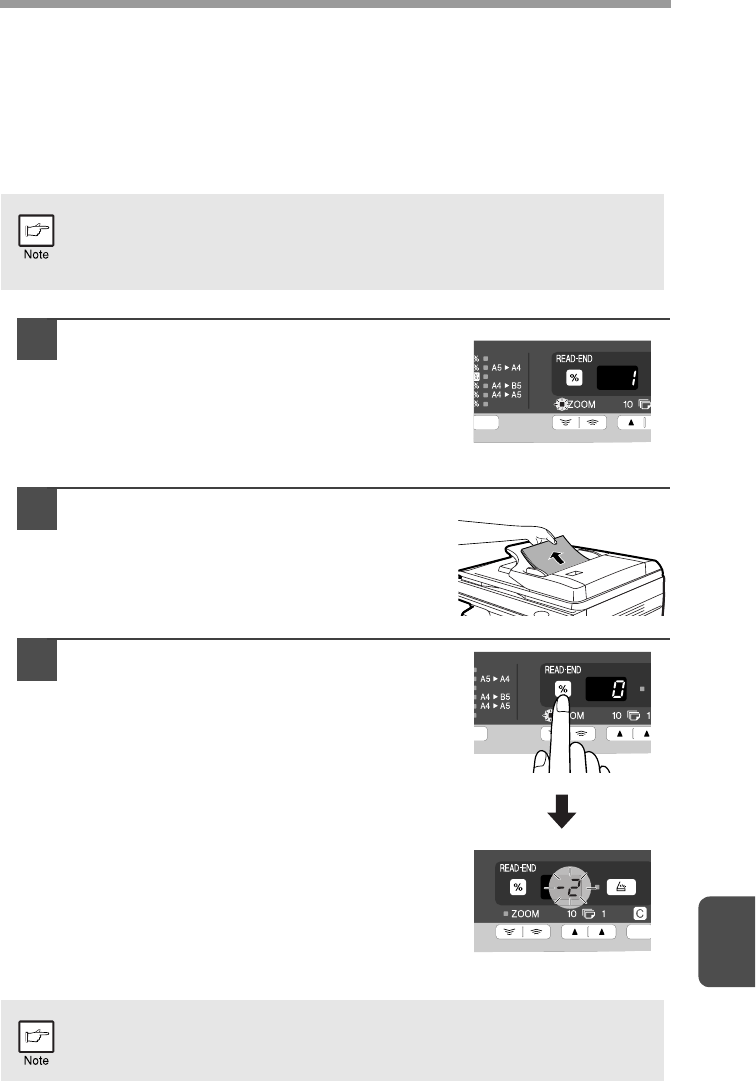
1
When a paper misfeed occurs in the
main unit, the SPF stops and the ZOOM
indicator blinks.
The remaining number of sets will blink in the
display.
Be sure to remove misfed paper(s) at the main
unit paper path first. Then follow the step 2
onwards.
2
Remove any originals that have not yet
been scanned from the document
feeder tray.
For the original(s) stuck in the SPF, do not
remove manually. This may cause a machine
malfunction. See the step 3.
3
Press the copy ratio display (%) key.
The originals that were being scanned in the
SPF will be discharged and the number of
original sheets to be returned will blink in the
display.
Place the displayed number of original sheets
back in the document feeder tray together with
the original sheets removed in step 2.
The following procedure omits removal of the misfeed. Be sure to
remove the misfeed before displaying the number of originals to be
returned. For the misfeed removal procedure, see "MISFEED
REMOVAL" (p.83).
If "SPF automatic original discharge time" is enabled in the user
programs, the originals in the SPF will be automatically discharged after
the set time elapses. ("USER PROGRAMS" (p.66))
Display of number of original
sheets to be returned
PDF-Datei · ·
Fragen zu Sharp AL-2021
Zu diesem Handbuch gibt es noch keine Fragen. Stellen Sie die erste.
Verwandte Produkte und Handbücher für Multifunktionsgeräte Sharp AL-2021
- Multifunktionsgeräte Sharp MX-B402 Bedienungsanleitung
 (50 Seiten)
- Multifunktionsgeräte Sharp FO-155 Spezifikationen

 (165 Seiten)
- Multifunktionsgeräte Sharp MX-4140N Installationshandbuch
(19 Seiten)
- Multifunktionsgeräte Sharp JW-50FL Bedienungsanleitung
(201 Seiten)
- Multifunktionsgeräte Sharp MX-4140N Bedienungsanleitung
(12 Seiten)
- Multifunktionsgeräte Sharp CPD-3830 Bedienungsanleitung
(12 Seiten)
- Multifunktionsgeräte Sharp CD600 - B/W - Fax Bedienungsanleitung
(23 Seiten)
- Multifunktionsgeräte Sharp AR-810 Bedienerhandbuch
(178 Seiten)
- Multifunktionsgeräte Sharp AL-1566 Spezifikationen
(116 Seiten)
- Multifunktionsgeräte Sharp AM-400 Spezifikationen
(162 Seiten)
- Multifunktionsgeräte Sharp AL-2051 Spezifikationen
(173 Seiten)
- Multifunktionsgeräte Sharp MX-5111N Bedienungsanleitung
(12 Seiten)
- Multifunktionsgeräte Sharp AL-2021 Bedienungsanleitung
(91 Seiten)
- Multifunktionsgeräte Sharp MX-C250 Installationshandbuch
(20 Seiten)
- Multifunktionsgeräte Sharp AM-300 Spezifikationen
(167 Seiten)
- Multifunktionsgeräte Sharp AL-2060 Spezifikationen
(112 Seiten)
- Multifunktionsgeräte Sharp AL-1555 Series Bedienungsanleitung
 (37 Seiten)
- Multifunktionsgeräte Sharp AL-2050 Spezifikationen
(116 Seiten)
- Multifunktionsgeräte Sharp AL-1552 Bedienungsanleitung
(81 Seiten)
- Multifunktionsgeräte Sharp AR-168N Bedienungsanleitung
 (108 Seiten)