Sharp AL-2021 Spezifikationen Seite 5: OPERATION PANEL
 1
 2
 3
 4
 5
 6
 7
 8
 9
 10
 11
 12
 13
 14
 15
 16
 17
 18
 19
 20
 21
 22
 23
 24
 25
 26
 27
 28
 29
 30
 31
 32
 33
 34
 35
 36
 37
 38
 39
 40
 41
 42
 43
 44
 45
 46
 47
 48
 49
 50
 51
 52
 53
 54
 55
 56
 57
 58
 59
 60
 61
 62
 63
 64
 65
 66
 67
 68
 69
 70
 71
 72
 73
 74
 75
 76
 77
 78
 79
 80
 81
 82
 83
 84
 85
 86
 87
 88
 89
 90
 91
1
5
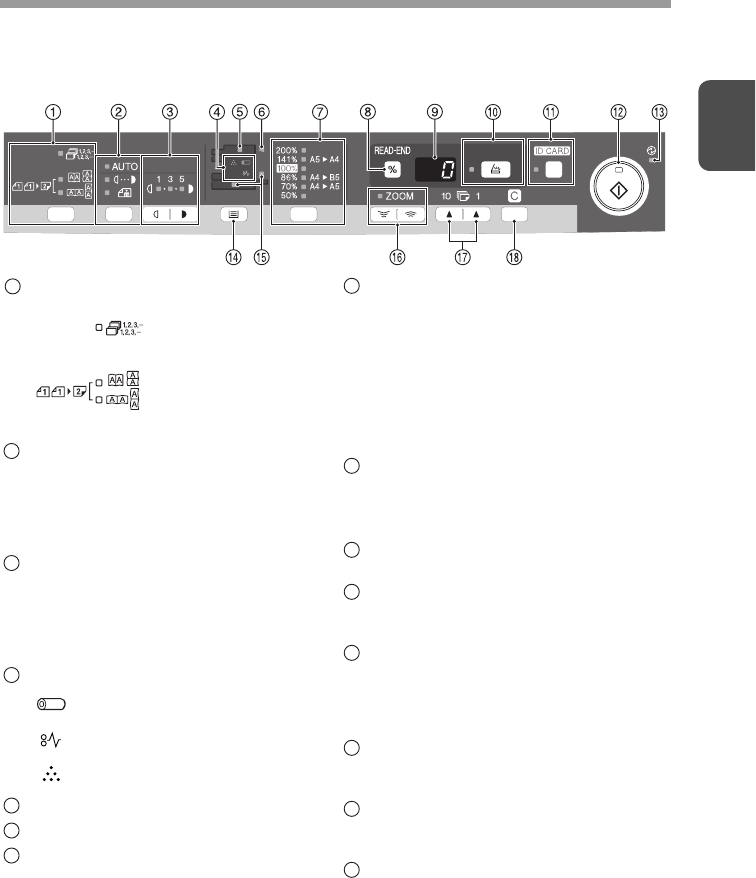
OPERATION PANEL
Two-sided copy key*
1
/Sort key and
indicators
Use to select sort
mode.
Two-sided copies from
one-sided originals.
Turn on Long Edge or
Turn on Short Edge
can be selected.
Exposure mode selector key and
indicators
Use to sequentially select the exposure
modes: AUTO, MANUAL or PHOTO.
Selected mode is shown by a lit
indicator. (p.28)
Light and dark keys and indicators
Use to adjust the MANUAL or PHOTO
exposure level. Selected exposure level
is shown by a lit indicator. (p.28) Use to
start and terminate user program
setting. (p.66)
Alarm indicators
Drum replacement required
indicator (p.70)
Misfeed indicator (p.83)
TD cartridge replacement
required indicator (p.69)
SPF indicator*
2
(p.27)
SPF misfeed indicator*
2
(p.87)
Copy ratio selector key*
3
and
indicators
Use to sequentially select preset
reduction/enlargement copy ratios.
Selected copy ratio is shown by a lit
indicator. (p.30)
1
2
3
4
5
6
7
Copy ratio display (%) key/
READ-END key
• Use to verify a zoom setting without
changing the zoom ratio. (p.30)
• Use to check the number of originals
that must be returned to the document
feeder tray if a misfeed occurs in the
machine when the SPF is used. (p.88)
• Use to terminate reading originals in
sort mode.
(
p.33
)
Display
Displays the specified copy quantity,
zoom copy ratio, user program code
and error code.
SCAN key and indicator
(p.6, p.53)
ID CARD key and indicator
Use to copy ID card. For description,
see "ID CARD COPY" (p.36).
Start key and indicator
• Copying is possible when the
indicator is on.
• Press to start copying
• Use to set a user program. (p.66)
Power save indicator
Lights up when the unit is in a power
save mode. (p.64, p.66)
Tray select key
Use to select a paper feed station
(paper tray or multi-bypass tray). (p.30)
Paper feed location indicators
Light up to show the selected paper
feed station.
*1 AL-2041 only
*2 AL-2041 only
*3 The indicators of the operation panel
may differ depending on the country
and region.
8
9
10
11
12
13
14
15
PDF-Datei · ·
Fragen zu Sharp AL-2021
Zu diesem Handbuch gibt es noch keine Fragen. Stellen Sie die erste.
Verwandte Produkte und Handbücher für Multifunktionsgeräte Sharp AL-2021
- Multifunktionsgeräte Sharp MX-B402 Bedienungsanleitung
 (50 Seiten)
- Multifunktionsgeräte Sharp FO-155 Spezifikationen

 (165 Seiten)
- Multifunktionsgeräte Sharp MX-4140N Installationshandbuch
(19 Seiten)
- Multifunktionsgeräte Sharp JW-50FL Bedienungsanleitung
(201 Seiten)
- Multifunktionsgeräte Sharp MX-4140N Bedienungsanleitung
(12 Seiten)
- Multifunktionsgeräte Sharp CPD-3830 Bedienungsanleitung
(12 Seiten)
- Multifunktionsgeräte Sharp CD600 - B/W - Fax Bedienungsanleitung
(23 Seiten)
- Multifunktionsgeräte Sharp AR-810 Bedienerhandbuch
(178 Seiten)
- Multifunktionsgeräte Sharp AL-1566 Spezifikationen
(116 Seiten)
- Multifunktionsgeräte Sharp AM-400 Spezifikationen
(162 Seiten)
- Multifunktionsgeräte Sharp AL-2051 Spezifikationen
(173 Seiten)
- Multifunktionsgeräte Sharp MX-5111N Bedienungsanleitung
(12 Seiten)
- Multifunktionsgeräte Sharp AL-2021 Bedienungsanleitung
(91 Seiten)
- Multifunktionsgeräte Sharp MX-C250 Installationshandbuch
(20 Seiten)
- Multifunktionsgeräte Sharp AM-300 Spezifikationen
(167 Seiten)
- Multifunktionsgeräte Sharp AL-2060 Spezifikationen
(112 Seiten)
- Multifunktionsgeräte Sharp AL-1555 Series Bedienungsanleitung
 (37 Seiten)
- Multifunktionsgeräte Sharp AL-2050 Spezifikationen
(116 Seiten)
- Multifunktionsgeräte Sharp AL-1552 Bedienungsanleitung
(81 Seiten)
- Multifunktionsgeräte Sharp AR-168N Bedienungsanleitung
 (108 Seiten)