Sharp MX-M260 Spezifikationen Seite 10: MAIN FEATURES
 1
 2
 3
 4
 5
 6
 7
 8
 9
 10
 11
 12
 13
 14
 15
 16
 17
 18
 19
 20
 21
 22
 23
 24
 25
 26
 27
 28
 29
 30
 31
 32
 33
 34
 35
 36
 37
 38
 39
 40
 41
 42
 43
 44
 45
 46
 47
 48
 49
 50
 51
 52
 53
 54
 55
 56
 57
 58
 59
 60
 61
 62
 63
 64
 65
 66
 67
 68
 69
 70
 71
 72
 73
 74
 75
 76
 77
 78
 79
 80
 81
 82
 83
 84
 85
 86
 87
 88
 89
 90
 91
 92
 93
 94
 95
 96
 97
 98
 99
 100
 101
 102
 103
 104
 105
 106
 107
 108
 109
 110
 111
 112
 113
 114
 115
 116
 117
 118
 119
 120
 121
 122
 123
 124
 125
 126
 127
 128
 129
 130
 131
 132
 133
 134
 135
 136
 137
 138
 139
 140
 141
 142
 143
 144
 145
 146
 147
 148
 149
 150
 151
 152
 153
 154
 155
 156
 157
 158
 159
 160
8
MAIN FEATURES
High-speed laser copying
• First-copy time* is only 4.8 seconds (MX-M260) or 4.5 seconds (MX-M310).
• Copying speed is 26 copies/min. (MX-M260) or 31 copies/min. (MX-M310). This is ideal for business use and
provides a big boost to workplace productivity.
* First-Copy time may vary depending on the power-supply voltage, ambient temperature, and other operating conditions.
High-quality digital image
• In addition to automatic exposure adjustment, three original type modes are available: "TEXT mode" for text-only
originals, "TEXT/PHOTO mode" for mixed text and photo originals, and "PHOTO mode" for photos. The exposure
can be manually adjusted to 5 levels in each mode.
Enhanced copying features
• Zoom copies can be made from 25% to 400% in increments of 1%.
• Continuous copying of up to 999 copies is possible.
• Automatic two-sided copying can be performed.
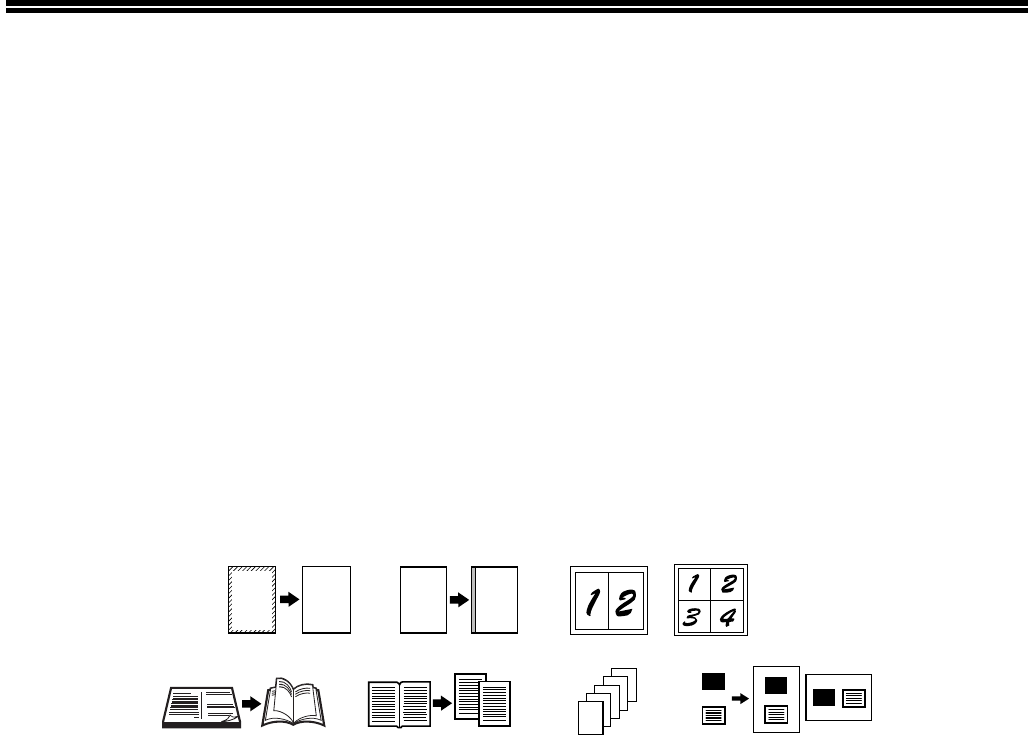
• Useful special features such as erase, margin shift, 2 in 1 and 4 in 1, pamphlet copy, dual page copy and cover
copy are available.
• Administrator settings allow the setting or modification of functions to meet your specific needs. The administrator
settings can also be used to enable audit mode, which allows the machine administrator to control use of the
machine.
Black and white LCD touch panel makes it easy to operate the machine
• Employing a backlit black and white LCD display, the touch panel provides step-by-step guidance for each function
of the machine. The touch panel even provides instructions for removing paper misfeeds and other problems that
occur.
Environment and people friendly design
• Preheat and auto power shut-off modes are provided to reduce power consumption when the machine is not in
use.
• A universal design has been implemented in the product whereby the height of the operation panel and shape of
the keys are designed to be usable by as many people as possible.
Erase copy
Margin shift copy
2in1 copy
4in1 copy
A
A
A
A
Dual page copy
Pamphlet copy
3
4
SHARP
1
2
Cover copy
Card shot
PDF-Datei · ·
Fragen zu Sharp MX-M260
Zu diesem Handbuch gibt es noch keine Fragen. Stellen Sie die erste.
Verwandte Produkte und Handbücher für Multifunktionsgeräte Sharp MX-M260
- Multifunktionsgeräte Sharp MX-M362N Spezifikationen
 (56 Seiten)
- Multifunktionsgeräte Sharp MX-LCX3 Spezifikationen
(76 Seiten)
- Multifunktionsgeräte Sharp AR-FR11 Bedienungsanleitung
(6 Seiten)
- Multifunktionsgeräte Sharp MX-M363U Einstellungsanleitung
(112 Seiten)
- Multifunktionsgeräte Sharp DX-C401FX Bedienungsanleitung
(12 Seiten)
- Multifunktionsgeräte Sharp MX-5000N Bedienungsanleitung
(2 Seiten)
- Multifunktionsgeräte Sharp AL-2040CS Bedienungsanleitung
 (82 Seiten)
- Multifunktionsgeräte Sharp AR-C250 Spezifikationen
(161 Seiten)
- Multifunktionsgeräte Sharp MX-2301N Spezifikationen
(116 Seiten)
- Multifunktionsgeräte Sharp MX-4101N Spezifikationen
(76 Seiten)
- Multifunktionsgeräte Sharp JW-20FLT Bedienungsanleitung
(197 Seiten)
- Multifunktionsgeräte Sharp MX-C381 Spezifikationen
(148 Seiten)
- Multifunktionsgeräte Sharp MX-M260 Bedienungsanleitung
(160 Seiten)
- Multifunktionsgeräte Sharp MX-4101N Spezifikationen
(12 Seiten)
- Multifunktionsgeräte Sharp MX-M564N Bedienungsanleitung
(8 Seiten)
- Multifunktionsgeräte Sharp MX-M564N Bedienungsanleitung
(8 Seiten)
- Multifunktionsgeräte Sharp CPD-3830 Bedienungsanleitung
(1 Seiten)
- Multifunktionsgeräte Sharp MX-2010U Bedienungsanleitung
(12 Seiten)
- Multifunktionsgeräte Sharp MX-B381 Bedienungsanleitung
(12 Seiten)
- Multifunktionsgeräte Sharp MX-7500N Bedienungsanleitung
(30 Seiten)