Sharp MX-M260 Spezifikationen Seite 121: TROUBLESHOOTING
 1
 2
 3
 4
 5
 6
 7
 8
 9
 10
 11
 12
 13
 14
 15
 16
 17
 18
 19
 20
 21
 22
 23
 24
 25
 26
 27
 28
 29
 30
 31
 32
 33
 34
 35
 36
 37
 38
 39
 40
 41
 42
 43
 44
 45
 46
 47
 48
 49
 50
 51
 52
 53
 54
 55
 56
 57
 58
 59
 60
 61
 62
 63
 64
 65
 66
 67
 68
 69
 70
 71
 72
 73
 74
 75
 76
 77
 78
 79
 80
 81
 82
 83
 84
 85
 86
 87
 88
 89
 90
 91
 92
 93
 94
 95
 96
 97
 98
 99
 100
 101
 102
 103
 104
 105
 106
 107
 108
 109
 110
 111
 112
 113
 114
 115
 116
 117
 118
 119
 120
 121
 122
 123
 124
 125
 126
 127
 128
 129
 130
 131
 132
 133
 134
 135
 136
 137
 138
 139
 140
 141
 142
 143
 144
 145
 146
 147
 148
 149
 150
 151
 152
 153
 154
 155
 156
 157
 158
 159
 160
119
5
TROUBLESHOOTING
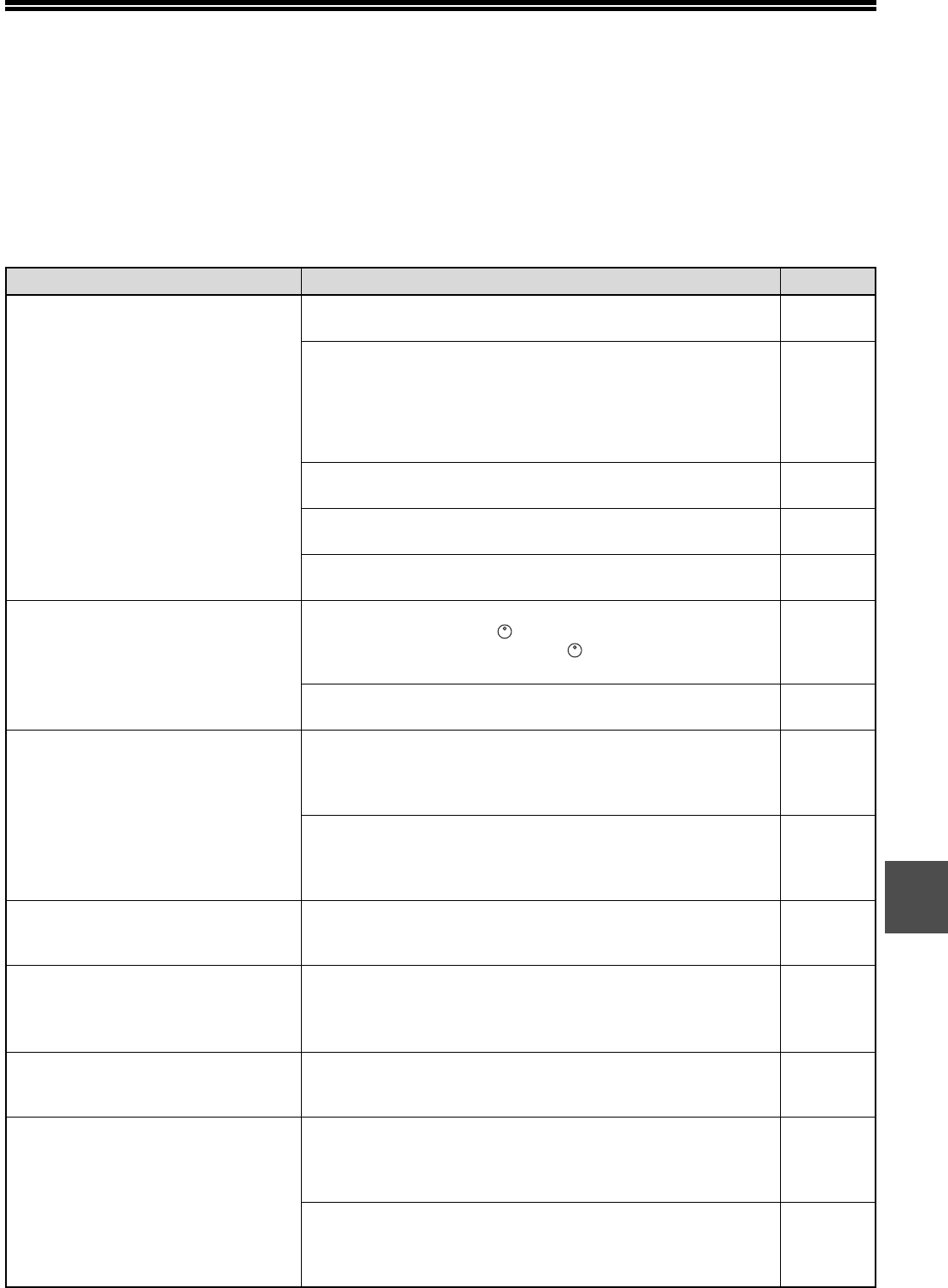
If you experience difficulty using the machine, check the following troubleshooting guide before calling for service.
Many problems can be easily resolved by the user. If you are unable to solve the problem using the troubleshooting
guide, turn off the power switch, unplug the machine, and contact your authorised service representative. The
following problems are related to the general operation of the machine and copying.
For problems related to the printer and fax, see the corresponding operation manuals.
Problems related to machine operation
Problem
Cause and solution
Page
The machine does not operate.
Power switch OFF.
→
Turn the power switch ON.
14
The machine is warming up.
→
The machine requires about 23 seconds (MX-M260) or 25
seconds (MX-M310) to warm up after the power switch is turned
on. While the machine is warming up, copy settings can be
selected but copying is not possible. Wait until "READY TO
COPY." appears.
14
Out of paper.
→
Load paper.
18
Out of toner.
→
Replace the toner cartridge.
134
Misfeed occurs.
→
Remove the misfed paper.
127
The power is on but copying is not
possible.
The machine is in auto power shut-off mode.
→
If only the [START] key (
) blinks, auto power shut-off mode has
activated. Press the [START] key (
) to return the machine to
normal operation.
15
Copy mode is not selected.
→
Press the [COPY] key to select copy mode.
11
Two-sided copying is not possible.
Automatic two-sided copying was attempted on paper
that is not suitable for automatic two-sided copying.
→
Two-sided copying is not possible on special paper. Use paper
that is suitable for automatic two-sided copying.
28
Two-sided copying is prohibited in the administrator
settings.
→
Change the setting in the administrator settings to permit
two-sided copying.
107
Wrong paper size is displayed for
paper in the bypass tray.
The bypass tray extension is not pulled out.
→
To detect the paper size correctly, the bypass tray extension
must be pulled out when the paper is loaded.
19
A copy job stops before it is
finished.
Too many pages have accumulated in the output tray,
causing the tray full sensor to activate. Further
copying is not possible until the pages are removed.
→
Remove the pages from the output tray.
-
The contrast of the touch panel is
too high or too low.
The display contrast has not been adjusted.
→
Adjust the contrast using "DISPLAY CONTRAST" in the system
settings.
92
Image cannot be rotated.
Neither auto paper selection nor auto image mode are
selected.
→
Rotation copy functions only if auto paper select mode or auto
image mode is selected.
26, 31
Rotation copy is prohibited in the administrator
settings.
→
Change the setting in the administrator settings to permit rotation
copying.
110
PDF-Datei · ·
Fragen zu Sharp MX-M260
Zu diesem Handbuch gibt es noch keine Fragen. Stellen Sie die erste.
Verwandte Produkte und Handbücher für Multifunktionsgeräte Sharp MX-M260
- Multifunktionsgeräte Sharp MX-M362N Spezifikationen
 (56 Seiten)
- Multifunktionsgeräte Sharp MX-LCX3 Spezifikationen
(76 Seiten)
- Multifunktionsgeräte Sharp AR-FR11 Bedienungsanleitung
(6 Seiten)
- Multifunktionsgeräte Sharp MX-M363U Einstellungsanleitung
(112 Seiten)
- Multifunktionsgeräte Sharp DX-C401FX Bedienungsanleitung
(12 Seiten)
- Multifunktionsgeräte Sharp MX-5000N Bedienungsanleitung
(2 Seiten)
- Multifunktionsgeräte Sharp AL-2040CS Bedienungsanleitung
 (82 Seiten)
- Multifunktionsgeräte Sharp AR-C250 Spezifikationen
(161 Seiten)
- Multifunktionsgeräte Sharp MX-2301N Spezifikationen
(116 Seiten)
- Multifunktionsgeräte Sharp MX-4101N Spezifikationen
(76 Seiten)
- Multifunktionsgeräte Sharp JW-20FLT Bedienungsanleitung
(197 Seiten)
- Multifunktionsgeräte Sharp MX-C381 Spezifikationen
(148 Seiten)
- Multifunktionsgeräte Sharp MX-M260 Bedienungsanleitung
(160 Seiten)
- Multifunktionsgeräte Sharp MX-4101N Spezifikationen
(12 Seiten)
- Multifunktionsgeräte Sharp MX-M564N Bedienungsanleitung
(8 Seiten)
- Multifunktionsgeräte Sharp MX-M564N Bedienungsanleitung
(8 Seiten)
- Multifunktionsgeräte Sharp CPD-3830 Bedienungsanleitung
(1 Seiten)
- Multifunktionsgeräte Sharp MX-2010U Bedienungsanleitung
(12 Seiten)
- Multifunktionsgeräte Sharp MX-B381 Bedienungsanleitung
(12 Seiten)
- Multifunktionsgeräte Sharp MX-7500N Bedienungsanleitung
(30 Seiten)