Sharp MX-M260 Spezifikationen Seite 57: FUNCTION
 1
 2
 3
 4
 5
 6
 7
 8
 9
 10
 11
 12
 13
 14
 15
 16
 17
 18
 19
 20
 21
 22
 23
 24
 25
 26
 27
 28
 29
 30
 31
 32
 33
 34
 35
 36
 37
 38
 39
 40
 41
 42
 43
 44
 45
 46
 47
 48
 49
 50
 51
 52
 53
 54
 55
 56
 57
 58
 59
 60
 61
 62
 63
 64
 65
 66
 67
 68
 69
 70
 71
 72
 73
 74
 75
 76
 77
 78
 79
 80
 81
 82
 83
 84
 85
 86
 87
 88
 89
 90
 91
 92
 93
 94
 95
 96
 97
 98
 99
 100
 101
 102
 103
 104
 105
 106
 107
 108
 109
 110
 111
 112
 113
 114
 115
 116
 117
 118
 119
 120
 121
 122
 123
 124
 125
 126
 127
 128
 129
 130
 131
 132
 133
 134
 135
 136
 137
 138
 139
 140
 141
 142
 143
 144
 145
 146
 147
 148
 149
 150
 151
 152
 153
 154
 155
 156
 157
 158
 159
 160
55
4
ABOUT THE NETWORK SCANNER
FUNCTION
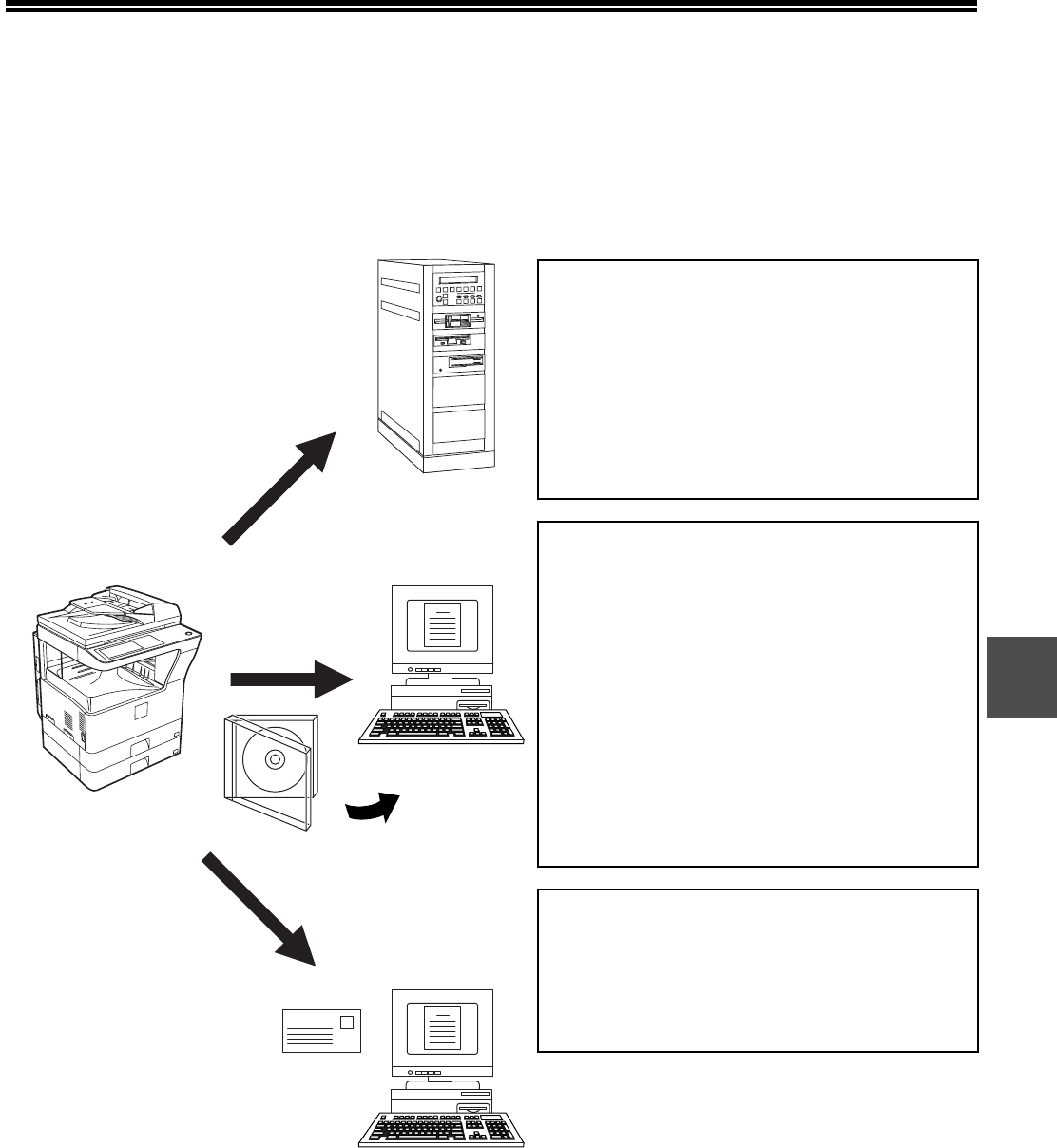
When the network scanner function is added to the machine, a document or photo can be scanned into an image file
and sent over a network or the Internet to a file server, e-mail destination, or your own computer. The scanned
image can be sent to the following types of destinations:
1. The scanned image can be sent to a memory
storage device on a network (a designated
directory on an FTP server). (This is called
"Scan to FTP"
in this manual.)
When sending scanned image to an FTP
server, an e-mail message can also be sent to a
preset e-mail address to inform the recipient of
the location of the scanned image data. (This is
called
"Scan to FTP (Hyperlink)"
in this
manual.)
2. A scanned image can be sent to a computer
connected to the same network as the
machine. (This is called
"Scan to Desktop"
in
this manual.)
* Before Scan to Desktop can be performed, the
"Network Scanner Tool" software in the
CD-ROM that accompanied the Network
Scanner Expansion Kit (MX-NSX1) must be
installed. For information on Scan to Desktop
system requirements, installing the Network
Scanner Tool, and storing the destination, see
the Users Guide for the Network Scanner Tool
on the CD-ROM that accompanies the network
scanner expansion kit.
3. The scanned image can be sent to an e-mail
recipient. (This is called
"Scan to E-mail"
in
this manual.)
* A limit is set in the Web page for the size of
image files that can be sent using Scan to
E-mail (p.58).
PDF-Datei · ·
Fragen zu Sharp MX-M260
Zu diesem Handbuch gibt es noch keine Fragen. Stellen Sie die erste.
Verwandte Produkte und Handbücher für Multifunktionsgeräte Sharp MX-M260
- Multifunktionsgeräte Sharp MX-M362N Spezifikationen
 (56 Seiten)
- Multifunktionsgeräte Sharp MX-LCX3 Spezifikationen
(76 Seiten)
- Multifunktionsgeräte Sharp AR-FR11 Bedienungsanleitung
(6 Seiten)
- Multifunktionsgeräte Sharp MX-M363U Einstellungsanleitung
(112 Seiten)
- Multifunktionsgeräte Sharp DX-C401FX Bedienungsanleitung
(12 Seiten)
- Multifunktionsgeräte Sharp MX-5000N Bedienungsanleitung
(2 Seiten)
- Multifunktionsgeräte Sharp AL-2040CS Bedienungsanleitung
 (82 Seiten)
- Multifunktionsgeräte Sharp AR-C250 Spezifikationen
(161 Seiten)
- Multifunktionsgeräte Sharp MX-2301N Spezifikationen
(116 Seiten)
- Multifunktionsgeräte Sharp MX-4101N Spezifikationen
(76 Seiten)
- Multifunktionsgeräte Sharp JW-20FLT Bedienungsanleitung
(197 Seiten)
- Multifunktionsgeräte Sharp MX-C381 Spezifikationen
(148 Seiten)
- Multifunktionsgeräte Sharp MX-M260 Bedienungsanleitung
(160 Seiten)
- Multifunktionsgeräte Sharp MX-4101N Spezifikationen
(12 Seiten)
- Multifunktionsgeräte Sharp MX-M564N Bedienungsanleitung
(8 Seiten)
- Multifunktionsgeräte Sharp MX-M564N Bedienungsanleitung
(8 Seiten)
- Multifunktionsgeräte Sharp CPD-3830 Bedienungsanleitung
(1 Seiten)
- Multifunktionsgeräte Sharp MX-2010U Bedienungsanleitung
(12 Seiten)
- Multifunktionsgeräte Sharp MX-B381 Bedienungsanleitung
(12 Seiten)
- Multifunktionsgeräte Sharp MX-7500N Bedienungsanleitung
(30 Seiten)