Sharp MX-M260 Spezifikationen Seite 20: LOADING PAPER
 1
 2
 3
 4
 5
 6
 7
 8
 9
 10
 11
 12
 13
 14
 15
 16
 17
 18
 19
 20
 21
 22
 23
 24
 25
 26
 27
 28
 29
 30
 31
 32
 33
 34
 35
 36
 37
 38
 39
 40
 41
 42
 43
 44
 45
 46
 47
 48
 49
 50
 51
 52
 53
 54
 55
 56
 57
 58
 59
 60
 61
 62
 63
 64
 65
 66
 67
 68
 69
 70
 71
 72
 73
 74
 75
 76
 77
 78
 79
 80
 81
 82
 83
 84
 85
 86
 87
 88
 89
 90
 91
 92
 93
 94
 95
 96
 97
 98
 99
 100
 101
 102
 103
 104
 105
 106
 107
 108
 109
 110
 111
 112
 113
 114
 115
 116
 117
 118
 119
 120
 121
 122
 123
 124
 125
 126
 127
 128
 129
 130
 131
 132
 133
 134
 135
 136
 137
 138
 139
 140
 141
 142
 143
 144
 145
 146
 147
 148
 149
 150
 151
 152
 153
 154
 155
 156
 157
 158
 159
 160
18
BEFORE USING THE MACHINE
LOADING PAPER
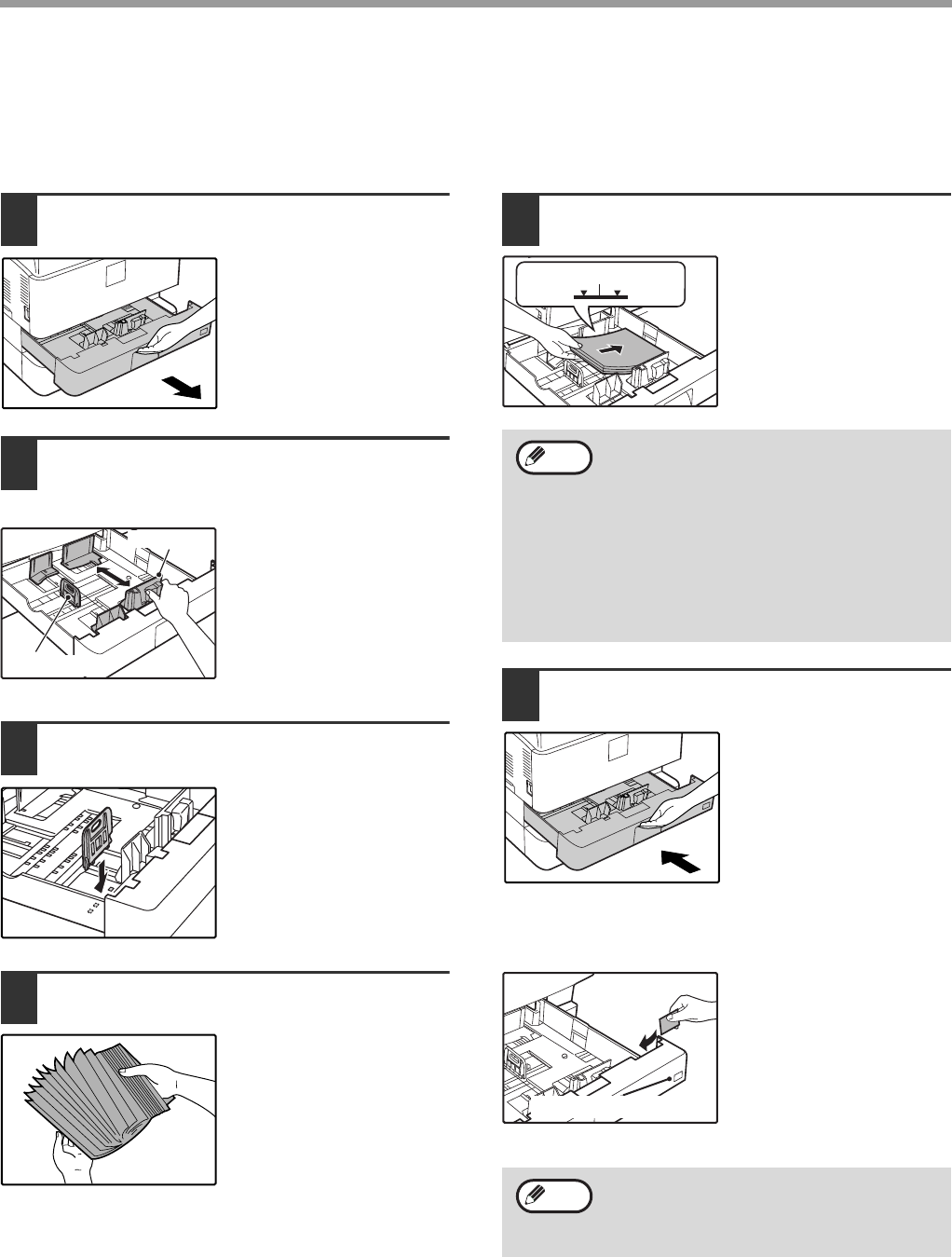
Make sure that the machine is not copying, printing, or printing a received fax, and then follow these steps to load paper.
Loading the paper in the paper tray
1
Pull out the paper tray until it stops.
If you are loading the
same size of paper as
was loaded previously,
go to step 4. If you are
loading a different size of
paper, continue with the
following step.
2
Squeeze the lock lever of the front
guide and slide the front guide to
match the width of the paper.
3
Move the left guide to the appropriate
slot as marked on the tray.
When using 11" x 17"
copy paper, store the left
guide in the slot at the left
front of the paper tray.
4
Fan the copy paper.
5
Load paper in the tray.
6
Push the paper tray firmly back into
the machine.
If you loaded a different size of paper that was loaded
previously, place the appropriate paper size card in the
front of the paper tray to indicate the new paper size.
Left guide
Front guide
•
Load the paper with the print side facing up.
• Insert the paper along the guides.
• The tray holds up to 500 sheets of 80
g
/m
2
(21 lbs.) bond paper.
• Do not load paper above the maximum
height line.
• When adding paper, first remove any
paper remaining in the tray, combine it
with the paper to be added, and then
reload as a single stack.
If you loaded a different size of paper that
was loaded previously, go to "CHANGING A
TRAY’S PAPER TYPE AND PAPER SIZE
SETTINGS" (p.20).
Maximum height line
Note
Paper size card
Note
PDF-Datei · ·
Fragen zu Sharp MX-M260
Zu diesem Handbuch gibt es noch keine Fragen. Stellen Sie die erste.
Verwandte Produkte und Handbücher für Multifunktionsgeräte Sharp MX-M260
- Multifunktionsgeräte Sharp MX-M362N Spezifikationen
 (56 Seiten)
- Multifunktionsgeräte Sharp MX-LCX3 Spezifikationen
(76 Seiten)
- Multifunktionsgeräte Sharp AR-FR11 Bedienungsanleitung
(6 Seiten)
- Multifunktionsgeräte Sharp MX-M363U Einstellungsanleitung
(112 Seiten)
- Multifunktionsgeräte Sharp DX-C401FX Bedienungsanleitung
(12 Seiten)
- Multifunktionsgeräte Sharp MX-5000N Bedienungsanleitung
(2 Seiten)
- Multifunktionsgeräte Sharp AL-2040CS Bedienungsanleitung
 (82 Seiten)
- Multifunktionsgeräte Sharp AR-C250 Spezifikationen
(161 Seiten)
- Multifunktionsgeräte Sharp MX-2301N Spezifikationen
(116 Seiten)
- Multifunktionsgeräte Sharp MX-4101N Spezifikationen
(76 Seiten)
- Multifunktionsgeräte Sharp JW-20FLT Bedienungsanleitung
(197 Seiten)
- Multifunktionsgeräte Sharp MX-C381 Spezifikationen
(148 Seiten)
- Multifunktionsgeräte Sharp MX-M260 Bedienungsanleitung
(160 Seiten)
- Multifunktionsgeräte Sharp MX-4101N Spezifikationen
(12 Seiten)
- Multifunktionsgeräte Sharp MX-M564N Bedienungsanleitung
(8 Seiten)
- Multifunktionsgeräte Sharp MX-M564N Bedienungsanleitung
(8 Seiten)
- Multifunktionsgeräte Sharp CPD-3830 Bedienungsanleitung
(1 Seiten)
- Multifunktionsgeräte Sharp MX-2010U Bedienungsanleitung
(12 Seiten)
- Multifunktionsgeräte Sharp MX-B381 Bedienungsanleitung
(12 Seiten)
- Multifunktionsgeräte Sharp MX-7500N Bedienungsanleitung
(30 Seiten)