Sharp MX-M260 Spezifikationen Seite 70: PROTECTING INFORMATION PROGRAMMED IN THE WEB PAGE ("Passwords")
 1
 2
 3
 4
 5
 6
 7
 8
 9
 10
 11
 12
 13
 14
 15
 16
 17
 18
 19
 20
 21
 22
 23
 24
 25
 26
 27
 28
 29
 30
 31
 32
 33
 34
 35
 36
 37
 38
 39
 40
 41
 42
 43
 44
 45
 46
 47
 48
 49
 50
 51
 52
 53
 54
 55
 56
 57
 58
 59
 60
 61
 62
 63
 64
 65
 66
 67
 68
 69
 70
 71
 72
 73
 74
 75
 76
 77
 78
 79
 80
 81
 82
 83
 84
 85
 86
 87
 88
 89
 90
 91
 92
 93
 94
 95
 96
 97
 98
 99
 100
 101
 102
 103
 104
 105
 106
 107
 108
 109
 110
 111
 112
 113
 114
 115
 116
 117
 118
 119
 120
 121
 122
 123
 124
 125
 126
 127
 128
 129
 130
 131
 132
 133
 134
 135
 136
 137
 138
 139
 140
 141
 142
 143
 144
 145
 146
 147
 148
 149
 150
 151
 152
 153
 154
 155
 156
 157
 158
 159
 160
68
NETWORK SCANNER FUNCTION
PROTECTING INFORMATION PROGRAMMED IN THE
WEB PAGE ("Passwords")
Passwords can be established to protect the settings and information stored in the Web page. Note that it is not
necessary to set passwords; the network scanner functionality can also be used without passwords.
A password can be set for the administrator and a password can be set for users. When the Web page is accessed
with the user password, the "Device Setup" and "Network Setup" settings cannot be configured.
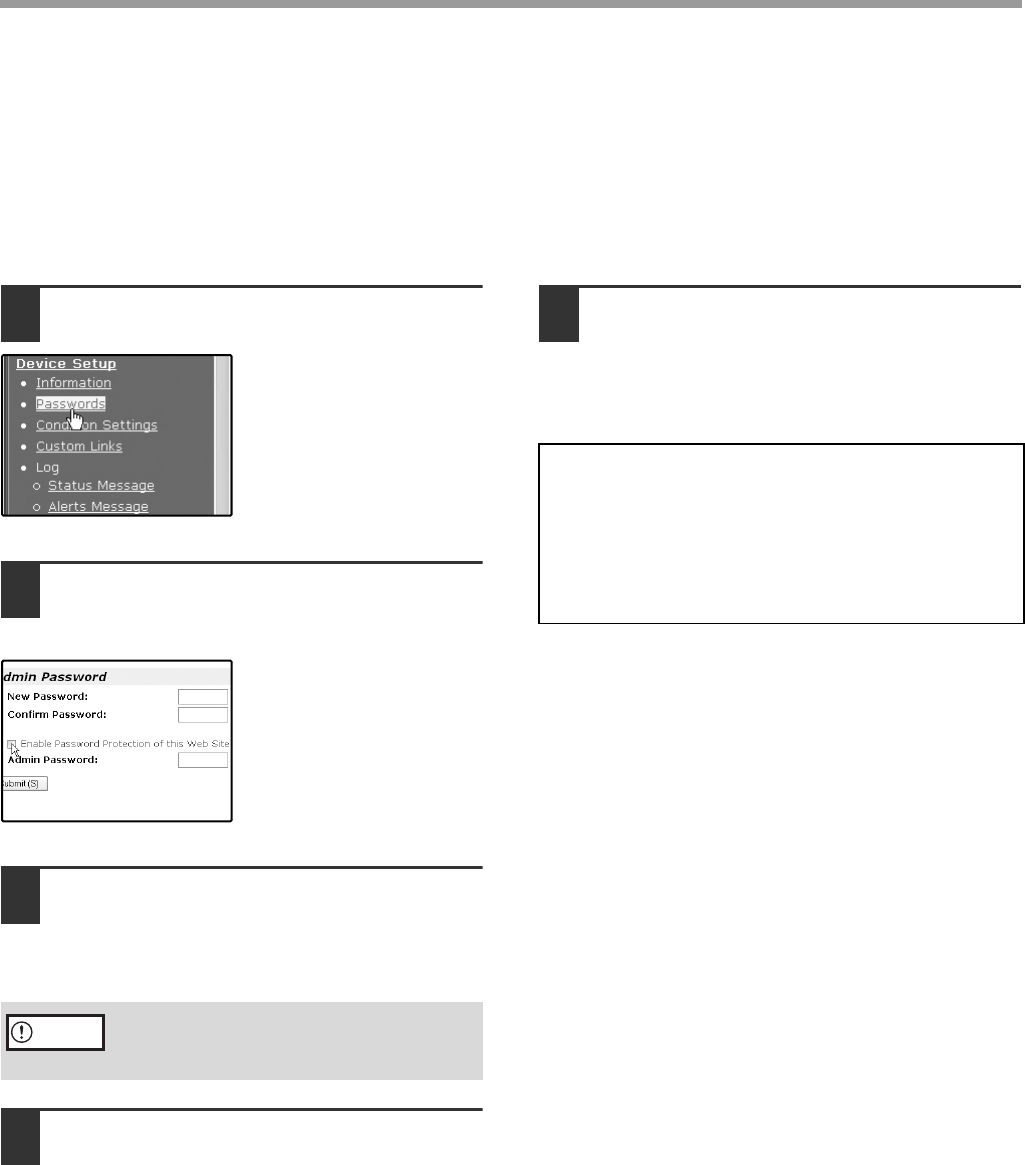
1
Click "Passwords" in the menu frame.
2
Select the "Enable Password
Protection of this Web Site"
checkbox.
3
Enter the current password in "Admin
Password".
When establishing a password for the first time,
enter "
Sharp
" in "Admin Password".
4
Enter passwords in "User Password"
and "Admin Password".
A maximum of 7 characters and/or numbers can
be entered for each password (passwords are
case sensitive).
Be sure to enter the same password in "New
Password" as you did in "Confirm Password".
5
When you have completed all of the
entries, click "Submit".
The entered password is stored.
After setting the password, turn the machine
power off and then back on.
Be sure to enter "S" in upper case and
"harp" in lower case (passwords are case
sensitive).
Caution
When a password is set, you will be prompted for the
password when you attempt to access a Web page
with protected settings. For the "User name", enter
"user" if you are accessing the page as a user, or
"admin" if you are accessing the page as an
administrator. For detailed information on setting
passwords, refer to "Help".
PDF-Datei · ·
Fragen zu Sharp MX-M260
Zu diesem Handbuch gibt es noch keine Fragen. Stellen Sie die erste.
Verwandte Produkte und Handbücher für Multifunktionsgeräte Sharp MX-M260
- Multifunktionsgeräte Sharp MX-M362N Spezifikationen
 (56 Seiten)
- Multifunktionsgeräte Sharp MX-LCX3 Spezifikationen
(76 Seiten)
- Multifunktionsgeräte Sharp AR-FR11 Bedienungsanleitung
(6 Seiten)
- Multifunktionsgeräte Sharp MX-M363U Einstellungsanleitung
(112 Seiten)
- Multifunktionsgeräte Sharp DX-C401FX Bedienungsanleitung
(12 Seiten)
- Multifunktionsgeräte Sharp MX-5000N Bedienungsanleitung
(2 Seiten)
- Multifunktionsgeräte Sharp AL-2040CS Bedienungsanleitung
 (82 Seiten)
- Multifunktionsgeräte Sharp AR-C250 Spezifikationen
(161 Seiten)
- Multifunktionsgeräte Sharp MX-2301N Spezifikationen
(116 Seiten)
- Multifunktionsgeräte Sharp MX-4101N Spezifikationen
(76 Seiten)
- Multifunktionsgeräte Sharp JW-20FLT Bedienungsanleitung
(197 Seiten)
- Multifunktionsgeräte Sharp MX-C381 Spezifikationen
(148 Seiten)
- Multifunktionsgeräte Sharp MX-M260 Bedienungsanleitung
(160 Seiten)
- Multifunktionsgeräte Sharp MX-4101N Spezifikationen
(12 Seiten)
- Multifunktionsgeräte Sharp MX-M564N Bedienungsanleitung
(8 Seiten)
- Multifunktionsgeräte Sharp MX-M564N Bedienungsanleitung
(8 Seiten)
- Multifunktionsgeräte Sharp CPD-3830 Bedienungsanleitung
(1 Seiten)
- Multifunktionsgeräte Sharp MX-2010U Bedienungsanleitung
(12 Seiten)
- Multifunktionsgeräte Sharp MX-B381 Bedienungsanleitung
(12 Seiten)
- Multifunktionsgeräte Sharp MX-7500N Bedienungsanleitung
(30 Seiten)