Sharp MX-M260 Spezifikationen Seite 130: MISFEED IN THE RSPF
 1
 2
 3
 4
 5
 6
 7
 8
 9
 10
 11
 12
 13
 14
 15
 16
 17
 18
 19
 20
 21
 22
 23
 24
 25
 26
 27
 28
 29
 30
 31
 32
 33
 34
 35
 36
 37
 38
 39
 40
 41
 42
 43
 44
 45
 46
 47
 48
 49
 50
 51
 52
 53
 54
 55
 56
 57
 58
 59
 60
 61
 62
 63
 64
 65
 66
 67
 68
 69
 70
 71
 72
 73
 74
 75
 76
 77
 78
 79
 80
 81
 82
 83
 84
 85
 86
 87
 88
 89
 90
 91
 92
 93
 94
 95
 96
 97
 98
 99
 100
 101
 102
 103
 104
 105
 106
 107
 108
 109
 110
 111
 112
 113
 114
 115
 116
 117
 118
 119
 120
 121
 122
 123
 124
 125
 126
 127
 128
 129
 130
 131
 132
 133
 134
 135
 136
 137
 138
 139
 140
 141
 142
 143
 144
 145
 146
 147
 148
 149
 150
 151
 152
 153
 154
 155
 156
 157
 158
 159
 160
128
TROUBLESHOOTING AND MAINTENANCE
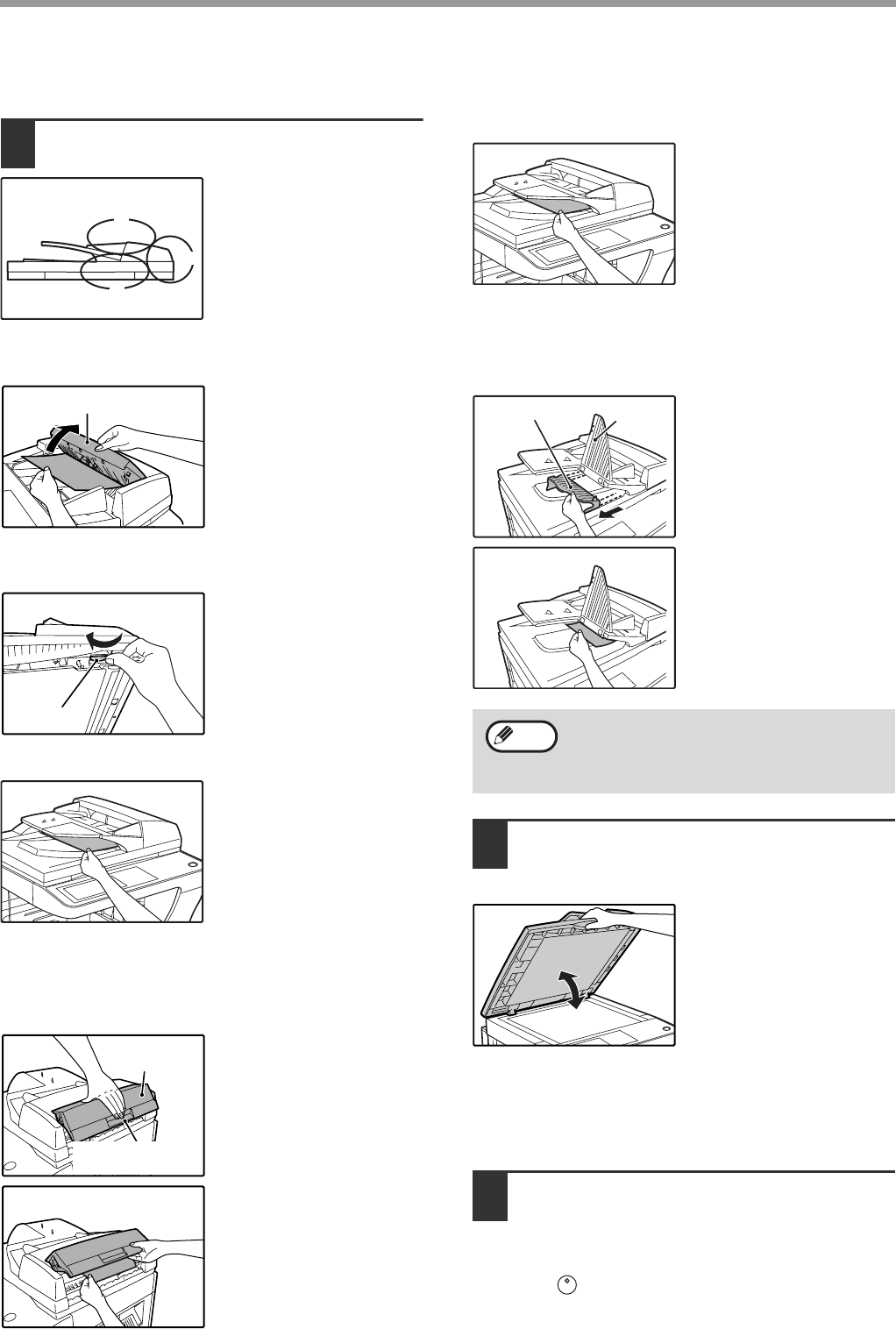
MISFEED IN THE RSPF
1
Remove the misfed original.
Check sections A, B, and
C in the illustration at left
and remove the misfed
original.
Section A
Open the document
feeder cover and
carefully remove the
misfed original from the
document feeder tray.
Close the document
feeder cover.
Section B
Open the RSPF and
rotate the release roller in
the direction of the arrow
to feed the original out.
Close the RSPF and then
carefully remove the
original.
If the misfed original
cannot be removed,
open the document
transport cover (below),
and rotate the release
roller again.
If a small original (A5 (5-1/2" x 8-1/2"), etc.) is misfed,
or if an original misfeed occurs in the reversing tray of
the RSPF, lift the document transport cover knob, open
the document transport cover, and remove the original.
Section C
Carefully remove the
misfed original from the
exit area.
If the misfed original cannot be easily removed from
the exit area, open the moveable part of the document
feeder tray and remove the reversing tray, and then
remove the original.
2
Open and close the RSPF to clear the
misfeed message from the touch
panel.
The message can also
be cleared by opening
and closing the
document feeder cover
or the document
transport cover.
After the misfeed is removed and the misfeed
message is cleared, a message will appear indicating
the number of originals that must be reinserted in the
RSPF.
3
Reinsert the originals that still must
be scanned (Including the original that
was being scanned when the misfeed
occurred.), and press the [START]
key(
).
Copying of the remaining originals will resume.
A
C
B
Document feeder cover
Roller
Document
transport cover
Document transport
cover knob
After removing a misfed original from the
exit area, be sure to attach the reversing tray
securely to the exit area (When the RSPF is
installed.).
Reversing tray
Moveable
part
Note
PDF-Datei · ·
Fragen zu Sharp MX-M260
Zu diesem Handbuch gibt es noch keine Fragen. Stellen Sie die erste.
Verwandte Produkte und Handbücher für Multifunktionsgeräte Sharp MX-M260
- Multifunktionsgeräte Sharp MX-M362N Spezifikationen
 (56 Seiten)
- Multifunktionsgeräte Sharp MX-LCX3 Spezifikationen
(76 Seiten)
- Multifunktionsgeräte Sharp AR-FR11 Bedienungsanleitung
(6 Seiten)
- Multifunktionsgeräte Sharp MX-M363U Einstellungsanleitung
(112 Seiten)
- Multifunktionsgeräte Sharp DX-C401FX Bedienungsanleitung
(12 Seiten)
- Multifunktionsgeräte Sharp MX-5000N Bedienungsanleitung
(2 Seiten)
- Multifunktionsgeräte Sharp AL-2040CS Bedienungsanleitung
 (82 Seiten)
- Multifunktionsgeräte Sharp AR-C250 Spezifikationen
(161 Seiten)
- Multifunktionsgeräte Sharp MX-2301N Spezifikationen
(116 Seiten)
- Multifunktionsgeräte Sharp MX-4101N Spezifikationen
(76 Seiten)
- Multifunktionsgeräte Sharp JW-20FLT Bedienungsanleitung
(197 Seiten)
- Multifunktionsgeräte Sharp MX-C381 Spezifikationen
(148 Seiten)
- Multifunktionsgeräte Sharp MX-M260 Bedienungsanleitung
(160 Seiten)
- Multifunktionsgeräte Sharp MX-4101N Spezifikationen
(12 Seiten)
- Multifunktionsgeräte Sharp MX-M564N Bedienungsanleitung
(8 Seiten)
- Multifunktionsgeräte Sharp MX-M564N Bedienungsanleitung
(8 Seiten)
- Multifunktionsgeräte Sharp CPD-3830 Bedienungsanleitung
(1 Seiten)
- Multifunktionsgeräte Sharp MX-2010U Bedienungsanleitung
(12 Seiten)
- Multifunktionsgeräte Sharp MX-B381 Bedienungsanleitung
(12 Seiten)
- Multifunktionsgeräte Sharp MX-7500N Bedienungsanleitung
(30 Seiten)