Sharp MX-M260 Spezifikationen Seite 17: POWER SAVE MODES
 1
 2
 3
 4
 5
 6
 7
 8
 9
 10
 11
 12
 13
 14
 15
 16
 17
 18
 19
 20
 21
 22
 23
 24
 25
 26
 27
 28
 29
 30
 31
 32
 33
 34
 35
 36
 37
 38
 39
 40
 41
 42
 43
 44
 45
 46
 47
 48
 49
 50
 51
 52
 53
 54
 55
 56
 57
 58
 59
 60
 61
 62
 63
 64
 65
 66
 67
 68
 69
 70
 71
 72
 73
 74
 75
 76
 77
 78
 79
 80
 81
 82
 83
 84
 85
 86
 87
 88
 89
 90
 91
 92
 93
 94
 95
 96
 97
 98
 99
 100
 101
 102
 103
 104
 105
 106
 107
 108
 109
 110
 111
 112
 113
 114
 115
 116
 117
 118
 119
 120
 121
 122
 123
 124
 125
 126
 127
 128
 129
 130
 131
 132
 133
 134
 135
 136
 137
 138
 139
 140
 141
 142
 143
 144
 145
 146
 147
 148
 149
 150
 151
 152
 153
 154
 155
 156
 157
 158
 159
 160
15
BEFORE USING THE MACHINE
1
INITIAL SETTINGS
The machine reverts to the initial settings when it is first turned on, when the [CLEAR ALL] key (
) is pressed, or the
preset "auto clear time" elapses after the last copy is made in any mode. When the machine reverts to the initial
settings, all settings and functions selected to that point are cancelled. The auto clear time can be changed in the
administrator settings. (See "6. SYSTEM SETTINGS (ADMINISTRATOR)".)
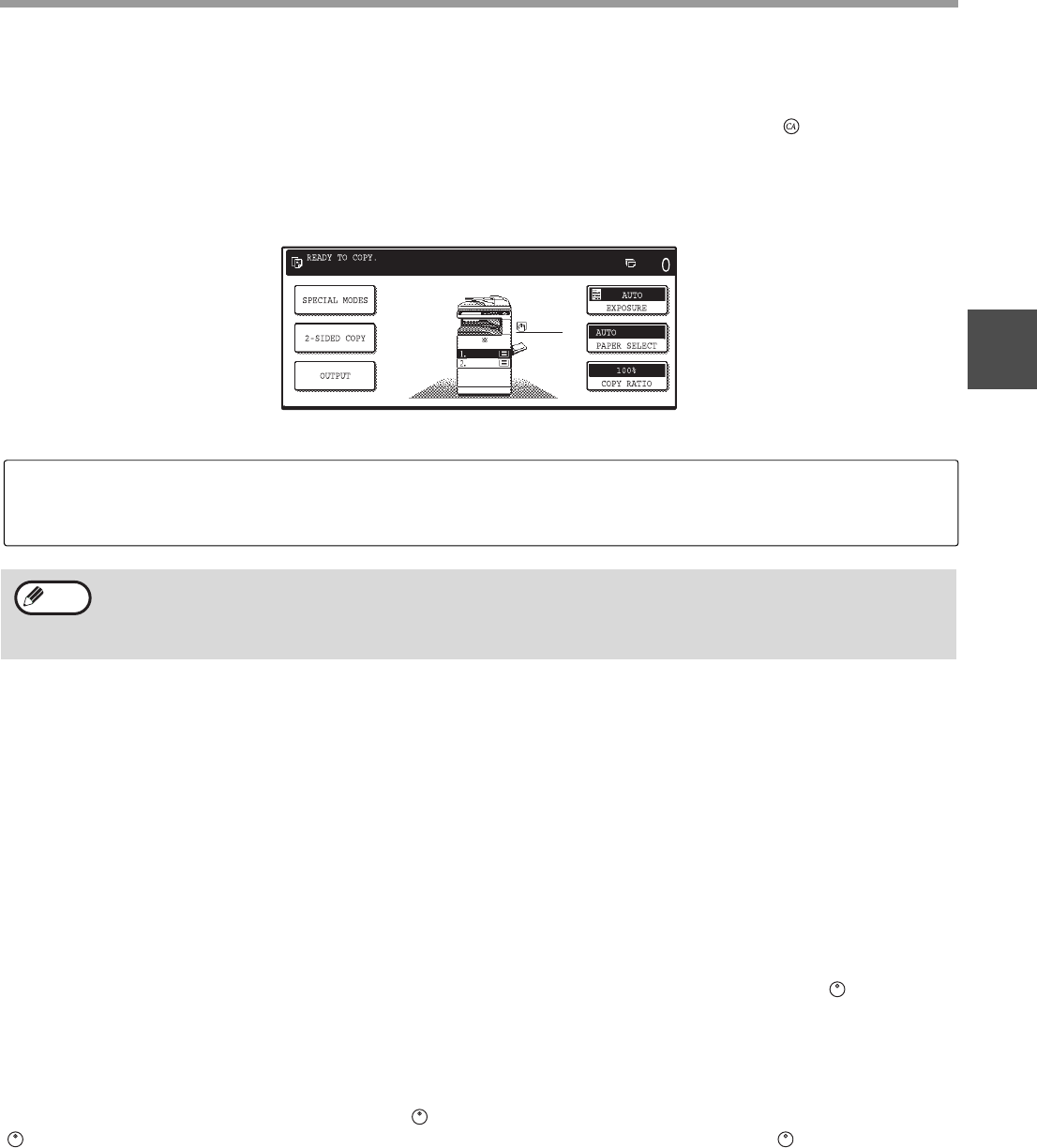
The initial settings that appear in the display are shown below.
Functions and settings are explained based on the above screen as applicable.
Copy ratio
: 100%,
Exposure
: Automatic,
Copy quantity
: 0,
Automatic two-sided
: One side to One side,
Auto paper selection
: On,
Paper tray
: Upper paper tray
POWER SAVE MODES
The machine has two power save modes to reduce overall power consumption and thereby reduce the cost of
operation. These modes help conserve natural resources and reduce environmental pollution. The two power save
modes are "Preheat mode" and "Auto power shut-off mode".
The time settings for each mode can be changed in the administrator settings. (See "6. SYSTEM SETTINGS
(ADMINISTRATOR)".)
Preheat mode
When the set time elapses, the temperature of the fusing unit is automatically lowered to reduce power consumption
while on standby. To return to normal operation, touch any key on the operation panel. To make a copy when the
machine is in this mode, simply select the desired copy selections and then press the [START] key (
).
Auto power shut-off mode
When the set time elapses, the power to the fusing unit automatically turns off to reduce power consumption. (This is
based on the guidelines of the International Energy Star Program.) When the machine enters this mode, the touch
panel screen turns off and only the [START] key (
) blinks. To return to normal operation, press the [START] key
(
). To copy after warm-up starts, make desired copy selections and press the [START] key (
). When the
machine receives a fax or a print job, Auto power shut-off mode automatically deactivates and the machine returns
to normal operation.
The initial settings can be changed in the administrator settings. (See "6. SYSTEM SETTINGS
(ADMINISTRATOR)".)
For the initial settings (initial screen) of printer, fax, and scanner modes, see the operation manuals of those
modes.
A4
A4
A4
A3
Note
PDF-Datei · ·
Fragen zu Sharp MX-M260
Zu diesem Handbuch gibt es noch keine Fragen. Stellen Sie die erste.
Verwandte Produkte und Handbücher für Multifunktionsgeräte Sharp MX-M260
- Multifunktionsgeräte Sharp MX-M362N Spezifikationen
 (56 Seiten)
- Multifunktionsgeräte Sharp MX-LCX3 Spezifikationen
(76 Seiten)
- Multifunktionsgeräte Sharp AR-FR11 Bedienungsanleitung
(6 Seiten)
- Multifunktionsgeräte Sharp MX-M363U Einstellungsanleitung
(112 Seiten)
- Multifunktionsgeräte Sharp DX-C401FX Bedienungsanleitung
(12 Seiten)
- Multifunktionsgeräte Sharp MX-5000N Bedienungsanleitung
(2 Seiten)
- Multifunktionsgeräte Sharp AL-2040CS Bedienungsanleitung
 (82 Seiten)
- Multifunktionsgeräte Sharp AR-C250 Spezifikationen
(161 Seiten)
- Multifunktionsgeräte Sharp MX-2301N Spezifikationen
(116 Seiten)
- Multifunktionsgeräte Sharp MX-4101N Spezifikationen
(76 Seiten)
- Multifunktionsgeräte Sharp JW-20FLT Bedienungsanleitung
(197 Seiten)
- Multifunktionsgeräte Sharp MX-C381 Spezifikationen
(148 Seiten)
- Multifunktionsgeräte Sharp MX-M260 Bedienungsanleitung
(160 Seiten)
- Multifunktionsgeräte Sharp MX-4101N Spezifikationen
(12 Seiten)
- Multifunktionsgeräte Sharp MX-M564N Bedienungsanleitung
(8 Seiten)
- Multifunktionsgeräte Sharp MX-M564N Bedienungsanleitung
(8 Seiten)
- Multifunktionsgeräte Sharp CPD-3830 Bedienungsanleitung
(1 Seiten)
- Multifunktionsgeräte Sharp MX-2010U Bedienungsanleitung
(12 Seiten)
- Multifunktionsgeräte Sharp MX-B381 Bedienungsanleitung
(12 Seiten)
- Multifunktionsgeräte Sharp MX-7500N Bedienungsanleitung
(30 Seiten)